
On this page
- WhatsApp click tracking for WooCommerce products
- Make every click name its product
- Three tools, three halves of the picture
- Set up the product button so clicks name the product
- Put the product name in the pre-filled message
- What the click log records on a product page
- Clicks, views and orders per product
- Product campaigns: UTMs and ad conversions
- Tag the product landing pages
- Count WhatsApp questions as conversions
- Free or PRO for a store
- FAQ
- Official sources
WhatsApp click tracking for WooCommerce products
WooCommerce counts orders per product, but not the WhatsApp questions people ask before buying. Log those clicks per product page and compare them with views and orders.
Make every click name its product
Put the product name in the pre-filled WhatsApp message: your team knows what the chat is about, and the click log shows it in the clicked link.
To see which WooCommerce products get WhatsApp questions, log every click on the WhatsApp button of your product pages together with the product it came from, then put those clicks next to product views and orders. WooCommerce records orders, not the chats that come before them, so the clicks have to be logged separately.
This guide sets up the product button so the log tells products apart, builds a clicks-views-orders table per product, and shows how product campaigns can count WhatsApp questions as conversions.
Three tools, three halves of the picture
| Source | What it gives you per product | What it doesn’t |
|---|---|---|
| WooCommerce Analytics → Products | Items sold, net sales, orders | Page views, WhatsApp clicks |
| GA4 (Pages and screens) | Views of each product page | Orders (unless ecommerce tracking is set up), clicks on widgets that open WhatsApp without a normal link (unless the widget sends its own event) |
| A WhatsApp click log | WhatsApp clicks per product page, with campaign and referrer | Who clicked, whether they wrote, whether they bought |
None of them links one click to one order. What you can compare reliably is totals per product over the same dates.
Set up the product button so clicks name the product
Put the product name in the pre-filled message
A WhatsApp link can carry a pre-filled message: https://wa.me/<number>?text=<URL-encoded text>. On a product page, put the product name in it. Your team sees which product the question is about, and the clicked link in your log says it too.
- Click to Chat: on single product pages you can set a product-specific message with variables such as
{product},{price}and{sku}. - Joinchat: start messages for product pages can use
{PRODUCT},{SKU}and{PRICE}, and it can add a WhatsApp button next to Add to cart. - Your own button: a few lines in your child theme’s
functions.phpadd an “Ask on WhatsApp” link right after the Add to cart button.
add_action( 'woocommerce_after_add_to_cart_button', function () {
    global $product;
    if ( ! is_a( $product, 'WC_Product' ) ) {
        return;
    }
    $text = sprintf( 'Hi, I have a question about %s', $product->get_name() );
    printf(
        '<a class="button" href="%s">Ask on WhatsApp</a>',
        esc_url( 'https://wa.me/15551234567?text=' . rawurlencode( $text ) )
    );
} );
Replace the number with yours, in full international format without +, leading zeros, spaces, brackets or dashes. The link appears wherever WooCommerce prints its Add to cart button, so not on products that are out of stock or can’t be bought. More on the plugin options is in Click to Chat Analytics: Track Which Pages Drive WhatsApp Conversations and Joinchat Analytics: How to Track WhatsApp Clicks by Page.
What the click log records on a product page
WhatsLink Click Tracker works on WooCommerce product pages with no extra setup, and it also catches chat widgets that open WhatsApp from JavaScript, such as Click to Chat and Joinchat. Each click on a product page is saved with:
- the product title and the post type
product; - the full page address, and the clicked link with its pre-filled message;
- the date, the referrer, and the UTM source, medium and campaign if the page address has them.
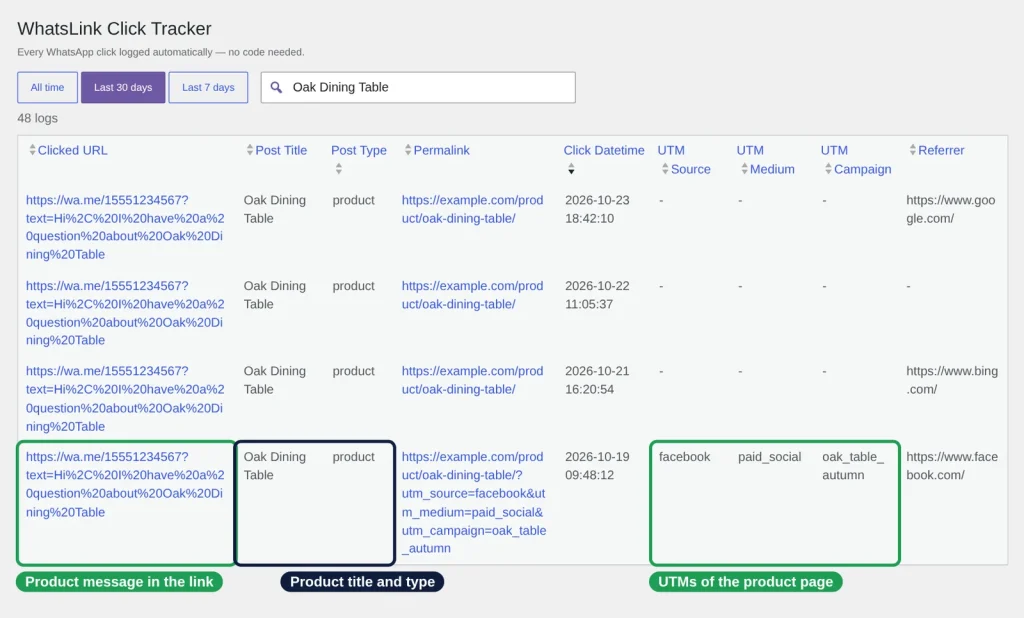
Variable products are logged under the product page, whatever variation was selected. Clicks on the shop page and on product category pages are logged with that page’s own title (the shop page’s title, or the category name) since WhatsLink 1.6.1. With an older version, the shop could appear as “Homepage” and a category page as “Unknown” or with an unrelated title: update the plugin, and for older rows go by the Permalink column, which always holds the real page address.
Clicks, views and orders per product
- Pick one period, such as the last 30 days, and use it everywhere.
- WhatsApp clicks: in WhatsLink Click Tracker, set Last 30 days and search for the product name; the total above the table is the count. With PRO, Top Pages shows your ten busiest pages for any date range, and the CSV export lists every click to count per product in a spreadsheet.
- Views: GA4 → Reports → Engagement → Pages and screens, Views for each product page.
- Orders: Analytics → Products in your WordPress admin (WooCommerce Analytics), the Orders column.
- Questions per 100 views: clicks ÷ views × 100. It makes busy and quiet products comparable.
An invented example of the result:
| Product | Views | WhatsApp clicks | Orders | Questions per 100 views |
|---|---|---|---|---|
| Oak dining table | 1,200 | 48 | 6 | 4.0 |
| Linen sofa cover | 3,000 | 15 | 60 | 0.5 |
| Custom bookshelf | 500 | 35 | 4 | 7.0 |
- Many questions, few orders (the bookshelf): people want to buy but something is missing. Read the chats: sizes, delivery, materials? Put the answers on the page.
- Few questions, many orders (the sofa cover): the page answers what buyers need. Leave it alone.
- Many questions on a high-price product (the table): WhatsApp may be part of how it sells. Make sure someone answers fast, and consider an “Order via WhatsApp” message for it.
To know which chats became orders, you need something in the message that your team can match, such as a reference code. That workflow is in Track WhatsApp Lead Source in Your CRM from WordPress.
Product campaigns: UTMs and ad conversions
Tag the product landing pages
Point each product campaign at a tagged product URL, so every WhatsApp click on that page carries the campaign:
https://example.com/product/oak-dining-table/?utm_source=facebook&utm_medium=paid_social&utm_campaign=oak_table_autumnWhatsLink reads the tags from the page where the click happens. If the visitor moves on to another product and asks there, that click has no campaign. Google Ads needs the tags in its Final URL suffix, because auto-tagging adds a click ID rather than UTMs. Both points are explained in WhatsApp UTM Tracking: Tag Links and Attribute Chats.
Count WhatsApp questions as conversions
If you run Google Ads or Meta ads for products, the ad platforms see purchases on your site but not the questions that go to WhatsApp. WhatsLink PRO‘s Ad Conversions sends every WhatsApp click as:
- a Google Ads conversion, to the conversion action you choose;
- the standard Meta Pixel
Contactevent; - a GA4
whatsapp_clickevent. GA4 collects the page location with every event, so you can break those events down by product page.
It uses the Google tag and Meta Pixel your store already loads and adds none of its own, so your cookie banner keeps applying. Decide whether a WhatsApp question should weigh as much as a purchase in your bidding before you switch it on; the setup and counting options are in How to Track WhatsApp Clicks as Conversions in Google Ads and Meta Ads.
Free or PRO for a store
- Free: every WhatsApp, Telegram and phone click with product title, page, clicked link, referrer and UTMs; search, the 7-day, 30-day and all-time filters, and Top Pages (top 5). Enough to build the table above by hand.
- PRO (from $19/year): Ad Conversions; reports for any date range with Top Pages and Top Clicked URLs (the ten busiest of each; every product message is its own link) and UTM filters; a daily trend chart for the whole site; CSV export to set next to your WooCommerce exports; daily and weekly summary emails.
WhatsLink is not a WooCommerce Analytics extension: its numbers live in its own screens and exports, and the comparison with orders is yours to make.
What WhatsLink does on a WooCommerce store
- WhatsApp clicks on product pages labelled with the product title
- Clicked link stored in full, product message included
- UTM source, medium and campaign and the referrer per click
- PRO: Google Ads conversion, Meta Contact event and GA4 event per click
- PRO: Top Pages and Top Clicked URLs for any date range
- PRO: CSV export to compare with your WooCommerce data
FAQ
Does WhatsLink work on WooCommerce product pages?
Yes. WhatsLink logs WhatsApp clicks on product pages with no extra setup and labels them with the product title and the post type product. It also catches chat widgets such as Click to Chat and Joinchat.
How do I see which products get the most WhatsApp questions?
Count WhatsApp clicks per product page over a period, then divide by the page's views in GA4 for the same dates. Clicks per 100 views makes busy and quiet products comparable; set them next to the Orders column of WooCommerce Analytics.
How do I put the product name in the WhatsApp message?
Use the pre-filled text of the wa.me link. Click to Chat offers the {product} variable on product pages, Joinchat offers {PRODUCT}, and a custom button can add the product name with a few lines of PHP. The name then also appears in the clicked link stored by your click log.
Can I link a WhatsApp click to a WooCommerce order?
Not automatically. The click log doesn't know who clicked, and WooCommerce doesn't know about the chat. Compare totals per product, or add a reference code to the message so your team can note it on the order.
Can Google Ads or Meta count WhatsApp questions on product pages as conversions?
Yes, if your site reports them. WhatsLink PRO's Ad Conversions sends every WhatsApp click as a Google Ads conversion, a Meta Pixel Contact event and a GA4 whatsapp_click event, using the tags already on your store.