
WhatsLink Click Tracker FREE
Monitor every WhatsApp and Telegram interaction on your WordPress site — with zero setup.
WhatsLink Click Tracker FREE lets you track clicks to wa.me, api.whatsapp.com, and t.me/ (Telegram) links across your posts, pages, and products.
Start collecting insights today and unlock even more with the Pro version.
GPL v2 · No account needed · Auto-updates via WordPress
Screenshots
See WhatsLink Click Tracker FREE in action
Screenshot 1

Screenshot 2
WhatsLink Click Tracker FREE is the easiest way to track WhatsApp, Telegram, and phone link clicks on your WordPress site — no setup required.
This lightweight plugin automatically detects clicks on wa.me, api.whatsapp.com, t.me/, and tel: links across your posts, pages, and WooCommerce products.
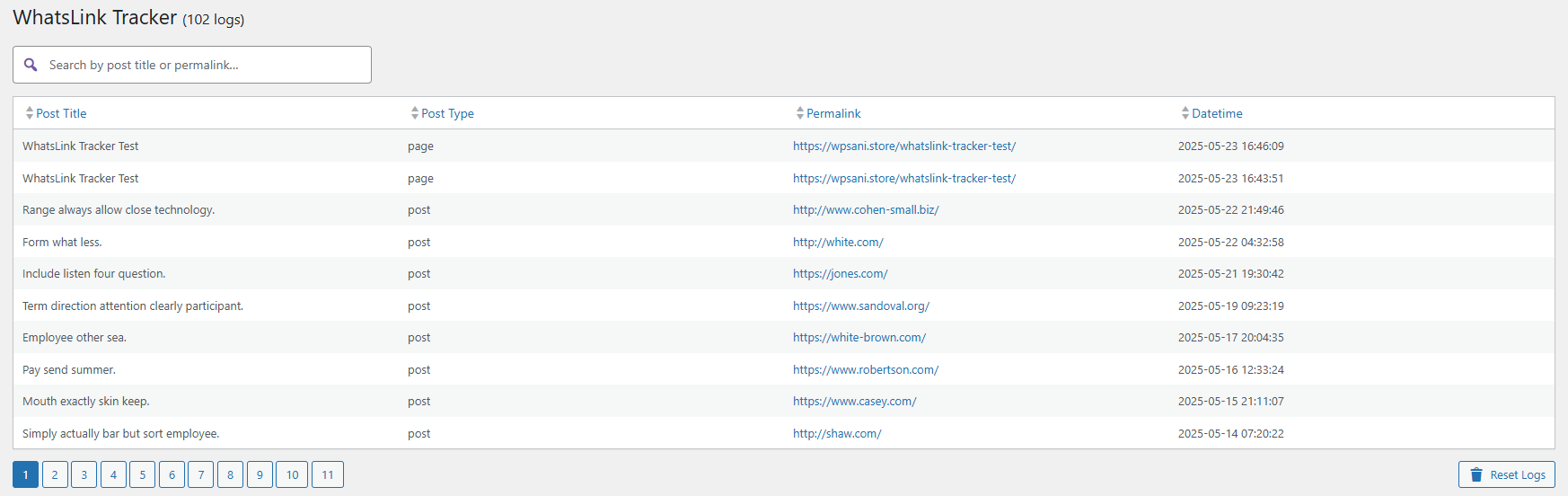
Each click is logged with key details: content name, post type, permalink, date/time, clicked URL, UTM source, UTM medium, UTM campaign, and referrer.
Want to know where your leads come from and which campaigns perform best?
Start with the FREE version and scale with Pro version whenever you are ready.
Yes. WhatsLink detects clicks on WhatsApp links regardless of how they were added to the page — through any theme, page builder, or widget.
WhatsApp: `https://wa.me/` and `https://api.whatsapp.com/send` are detected automatically.
Since version 1.5.5, WhatsLink also tracks Telegram links (`https://t.me/`) and phone links (`tel:`). No additional configuration needed.
Yes, since version 1.5.5. Any link with a `t.me/` URL or a `tel:` href is tracked alongside WhatsApp clicks. All three channels appear in the same click log and — if you use WhatsLink PRO — in the Channel Breakdown widget in the Reports dashboard.
No. WhatsLink uses a JavaScript event listener to detect clicks. Your links are never modified — they still open WhatsApp directly as usual. The click is just logged silently in the background.
An optional feature that shows the total number of clicks next to each WhatsApp button — visible only when you are logged in as an admin. Useful for monitoring click activity directly on the page without opening the dashboard.
The free version gives you the full click log with UTM and referrer data. Pro adds advanced filtering, visual charts, CSV export, and automated email reports. See the full comparison above.
Yes. WhatsApp clicks on product pages are tracked and labeled by product title and type.
The Free version stores no IP addresses, no location data, and no personal user information — only anonymized click events tied to page URLs.
No. Click logging is asynchronous (uses the browser's sendBeacon API) and has no impact on page load time.
There is no hard limit. Clicks are stored in your WordPress database. You can reset the log at any time from the dashboard.
CSV export is available in the Pro version.
---
- Fix: Badge counter now displays click counts on Telegram (t.me) links, not only WhatsApp.
- New: Click tracking now covers Telegram links (t.me) and phone links (tel:) in addition to WhatsApp links.
- Fix: Corrected Pro upgrade link URL in readme — wrong URL was causing a redirect that stripped UTM parameters.
- Docs: Fixed installation instructions — plugin has a dedicated admin menu item, not under Tools.
- Compatibility: Confirmed compatibility with WordPress 7.0.
- Fix: Tracking reliability improvements for sites using dynamic WhatsApp button plugins.
- Fix: Admin scripts now load only on the plugin pages, not across the entire dashboard.
- Fix: Improved compatibility on sites with non-standard server configurations.
- Fix: Click tracking now works correctly with Joinchat, Chaty, WP Social Chat, and any plugin that injects its WhatsApp button via JavaScript. Previously those buttons could go untracked.
- Fix: Lighter frontend script — jQuery dependency removed.
- Fix: Badge counter correctly documented as visible to admins only.
- New: After tracking 25 clicks, a notice in the dashboard invites you to leave a review on WordPress.org.
- New: Plugin page updated with a compatibility list for popular WhatsApp button plugins.
- New: Deactivation feedback form — a short optional survey when you deactivate helps us improve the plugin.
- New: Once you have tracked 10+ clicks, a notice links to WhatsLink PRO for charts and CSV export.
- New: First-install screen — if no clicks have been logged yet, the dashboard confirms tracking is active instead of showing an empty table.
- New: Stats bar — total clicks, last 30 days, and top page shown at the top of the dashboard.
- New: Date range filter — view clicks from the last 7 days, 30 days, or all time.
- New: Top Pages — the 5 pages that have received the most WhatsApp clicks.
- Fix: Click tracking was not recording clicks from regular (non-admin) visitors. Critical fix — update immediately if you are on 1.1.x.
- Fix: Plugin was silently failing on sites with a non-standard database table prefix.
- Fix: Column sorting was not working correctly in all cases.
- Fix: Prevented a startup error on some server configurations during plugin activation.
- New: UTM tracking (source, medium, campaign) and referrer now included in the free version.
- New: Badge counter — shows total click counts next to each WhatsApp button (visible to admins only).
- New: Clicked URL column added to the click log.
- Fix: Click logging is now more reliable on mobile browsers.
- Fix: Security improvements.
- Fix: Security and stability improvements.
- Initial release.
- ---
No reviews yet — be the first to share your experience.
Leave a Review
WhatsLink Click Tracker PRO — WordPress WhatsApp & Telegram Click Tracker
Everything in the free version, plus trend charts, CSV export, and weekly email reports.
Have a question or need help?
We respond to every message personally, usually within 24 hours.