
On this page
- How to Track WhatsApp QR Code Scans Through WordPress
- Can you see if someone scanned your WhatsApp QR code?
- Which printed material brought the WhatsApp click?
- Tag the pre-filled message with a print reference code
- How to check your WhatsApp QR code works before printing
- Getting the QR campaign’s click log in WordPress
- Official sources
How to Track WhatsApp QR Code Scans Through WordPress
To track WhatsApp QR code scans through WordPress, send the QR code to a page on your website, then measure clicks on its WhatsApp button separately. This lets you distinguish interest in a flyer or package from the decision to open WhatsApp—but neither action proves that someone sent a message.
Can you see if someone scanned your WhatsApp QR code?
You can record someone opening a tracked destination, not merely pointing a camera at the code. A phone may recognise a QR code without its owner opening the suggested link. Even recorded destination visits are not necessarily unique people: someone can return repeatedly or share the address.
The destination determines what your WordPress site can measure:
- A direct-to-WhatsApp QR code, containing a
wa.meaddress, bypasses WordPress. Adding campaign labels to that address does not make your website record the visit. A separate tracking service could measure the opening, but that is not tracking performed by your WordPress site. - For website-based measurement, use a landing page: an ordinary WordPress page containing a clear WhatsApp button. The path becomes printed QR code → website page → WhatsApp click. You can then compare page visits with button clicks.
An automatic redirect, which immediately forwards visitors to WhatsApp, needs a different setup: something must record the incoming request before forwarding it. Do not assume a normal button-click tracker records redirects. Google’s GA4 outbound-click measurement measures clicked links, not server-side forwarding. Compare the different ways to measure WhatsApp interest. Explore the other guides on website clicks, campaign sources and WhatsApp reporting. Read more WhatsApp tracking guides
Which printed material brought the WhatsApp click?
Give each placement a distinct campaign address, even when every address opens the same page. Otherwise, a flyer, poster and packaging insert will look alike in your reports.
For example, encode https://example.com/contact/?utm_source=flyer&utm_medium=qr&utm_campaign=summer_offer in the flyer’s QR code. Use utm_source=packaging for the packaging version. These UTM parameters are campaign labels in the address; they do not identify the person scanning it.
- Keep a consistent naming convention, such as lowercase words separated by underscores. Google treats parameter values as case-sensitive, so
Flyerandflyercan split your reporting. Its campaign URL guidance explains how these values appear in acquisition reports. - Keep the WhatsApp button on the tagged destination page so its click can be associated with that page’s campaign details. A referrer may be empty when someone arrives from a phone’s camera; the QR address’s explicit campaign labels are therefore more useful than relying on a referring website.
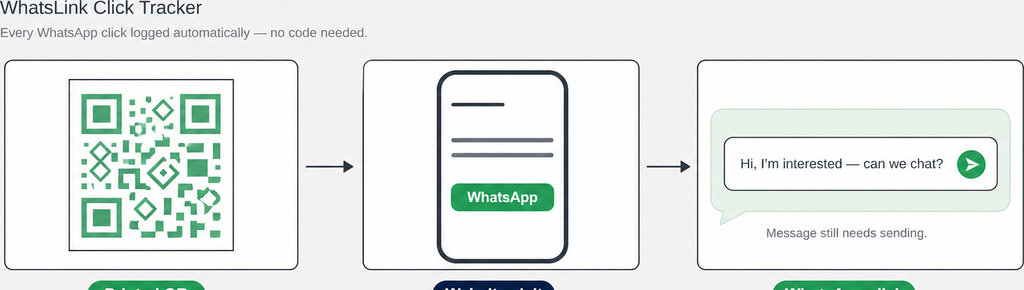
For this setup, WhatsLink Click Tracker can record the page, UTM parameters and available referrer of each supported WhatsApp click. It records the button interaction, not everyone who opened the QR destination.
Keep the printed campaign attached to the website click. Use the free click log to inspect the page, campaign parameters and available referrer. Track WhatsApp clicks free with WhatsLink. For the general website setup, follow How to Track WhatsApp Clicks on WordPress; the print-specific work is assigning and preserving those campaign addresses.
Tag the pre-filled message with a print reference code
Add a reference code to the WhatsApp message offered by each campaign page. A flyer’s button might open “Hello, I’m asking about your summer offer. Ref: FLYER-A.” A packaging page could use PACK-A instead.
https://wa.me/15551234567?text=Hello%2C%20Ref%3A%20FLYER-AThis link illustrates the format. Replace the example number with your own full international number, without a plus sign, spaces or punctuation. The pre-filled text must be URL-encoded, as explained in WhatsApp’s click-to-chat documentation.
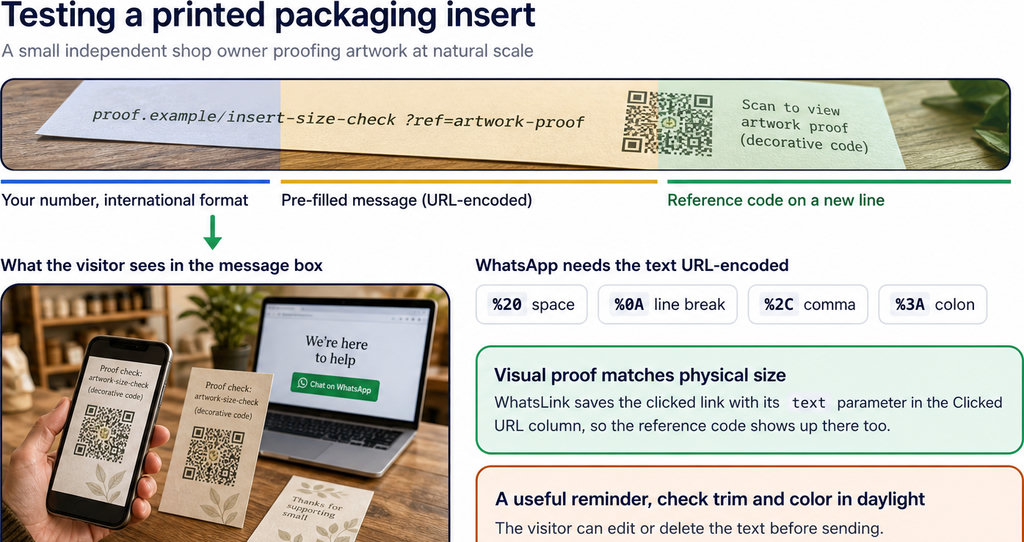
- Match the button to the campaign. Use separate landing pages or deliberately configure their buttons to match the campaign. UTM labels do not automatically become message text just because they appear in the page address.
- Treat references as attribution evidence. The visitor can edit or delete the reference before sending. A received reference-tagged message is therefore useful attribution evidence, but missing references do not prove that a campaign brought no enquiries.
How to check your WhatsApp QR code works before printing
- Test a physical proof at its intended size, rather than only scanning the artwork on your monitor. Check that the actual paper, contrast and placement allow a phone to recognise it. Try another phone as well, particularly if customers use both Android and iPhone.
- Inspect the complete campaign address. Open the destination. Confirm that the correct page loads and its UTM parameters survive any redirects. Tap the WhatsApp button, check the recipient and reference text, then send a test message to the business.
- Check the two measurement points separately: the landing-page visit in your website analytics and the WhatsApp button click in your click log. Seeing one does not establish that the other worked. Consent choices and browser privacy controls can also affect analytics visibility.
Keep a website address you control as the printed destination. You can update the page’s offer or WhatsApp button later without replacing the QR artwork, provided that address remains available.
Getting the QR campaign’s click log in WordPress
Read the log as a record of WhatsApp button clicks, not a scan counter. For supported interactions, WhatsLink records details including the date, destination, page, campaign fields and available referrer. It does not become a redirect-request logger merely because a QR code points at WordPress. Keep three separate totals: recorded landing visits, outbound WhatsApp clicks and received messages carrying a reference. Repeated visits, repeated clicks and edited messages mean these figures will not form a perfect person-by-person funnel.
The log provides campaign attribution, not the scanner’s name or WhatsApp phone number. For identity limits, see Who Clicked My WhatsApp Link? What You Can Track. If you report clicks to advertising platforms, label them as click conversions, not confirmed conversations or sales. A printed campaign can generate measurable interest without generating a message. Report click conversions without confusing them with enquiries. Explore WhatsLink PRO to send WhatsApp clicks to your ads and your team. Send WhatsApp clicks to your ads and your team with WhatsLink PRO
What WhatsLink records for each click
- The page and post type where the click happened
- The WhatsApp, Telegram or phone link clicked, with its pre-filled text
- UTM source, medium and campaign of that page
- The referrer and the date and time
- No IP address, location or device