
On this page
- Tracking link clicks without Google Analytics
- Pick the method by link type
- Three ways to count clicks without Google Analytics
- Link tracking plugins compared
- Step by step: count clicks on one button
- For links you share: a redirect link
- WhatsApp, Telegram and phone links
- Before you trust the counts
- FAQ
- Official sources
Tracking link clicks without Google Analytics
To track link clicks in WordPress without Google Analytics, use a plugin that stores clicks in your own database: redirect links for links you share, click goals for buttons on your pages.
Pick the method by link type
WhatsApp, Telegram and phone links open an app instead of a page, so they need a logger built for them. This guide compares the main plugins and shows how to set up and test each method.
Three ways to count clicks without Google Analytics
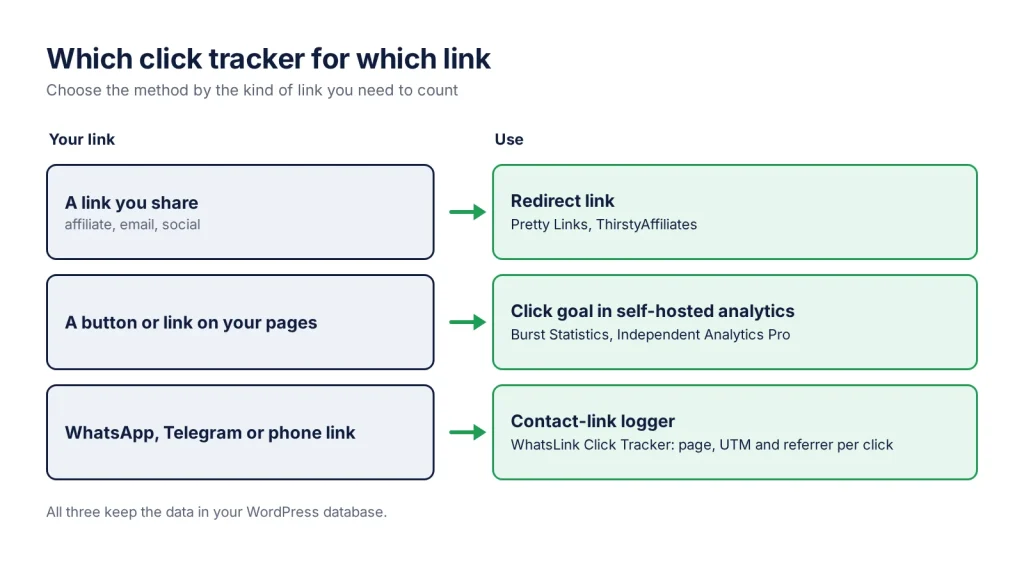
Every method below keeps the data in your own WordPress database. They differ in how they see the click, and that decides which links they can count.
- Redirect links. You create a short address on your own domain, such as
yoursite.com/go/offer, that redirects to the destination. Each visit to it is counted on your server, wherever the link was clicked: a post, an email, a social profile. Only links you replace with a short link are counted. - Click goals in a self-hosted analytics plugin. A script on your pages counts clicks on the elements you choose, such as a button with a given CSS class, and reports them next to your page views. Your links stay as they are.
- A dedicated logger for contact links. WhatsApp, Telegram and phone links open another app, and a specialised plugin records each of those clicks with its page and campaign.
Link tracking plugins compared
These plugins are well established on WordPress.org. Install counts and features are from their WordPress.org pages in October 2026.
| Plugin | Method | What it records | Click tracking in the free version | Active installs |
|---|---|---|---|---|
| Pretty Links | Redirect links | Each click, with referrer, browser, OS, host and IP (IP anonymisation available) | Yes | 200,000+ |
| ThirstyAffiliates | Redirect links for affiliate URLs | Click statistics per link | Yes; advanced reports are in Pro | 30,000+ |
| Burst Statistics | Click goals on a CSS selector | Goal completions, next to visitors and page views | Yes, with a limited number of active goals | 200,000+ |
| Independent Analytics | Click tracking on links and buttons, outbound links, downloads | Clicks in its own reports | No, click tracking is in Pro | 100,000+ |
What about MonsterInsights? It is a popular plugin (2,000,000+ installs) with outbound link reports, but it is a Google Analytics dashboard for WordPress: the clicks are sent to and stored in Google Analytics. If your goal is to avoid Google Analytics, it doesn’t fit.
If you already run Matomo, its standard tracking code tracks clicks on links to other domains by default, in its Outlinks report.
Step by step: count clicks on one button
This example uses a click goal, because it works for buttons and links inside your pages without changing their address. Burst Statistics’ free version is used here; other analytics plugins with click goals work the same way.
- Open the page in the editor and select the button. In the block settings sidebar, open Advanced and type a class in Additional CSS class(es), for example
track-quote. Update the page. - In Burst, add a goal of type Clicks. Enter
.track-quoteas the element to track, and choose the whole website or only that page. - Open the published page in a private window, so you browse as a normal visitor, and click the button once.
- Check the goal in Burst. If the click doesn’t appear, check the class name on the published page with your browser’s inspector.
For links you share: a redirect link
For affiliate links or links you also post outside your site, a redirect plugin is simpler. In Pretty Links or ThirstyAffiliates, create a link with the destination as its target and a short slug, then use the new address everywhere instead of the original. The plugin’s reports show the clicks per link. Clicks on the original address, wherever it is still used, are not counted.
WhatsApp, Telegram and phone links
Contact links are the case general tools handle worst. They open an app, and many chat buttons open WhatsApp from JavaScript rather than through a link, so there is no link to swap for a redirect link. A click goal can still count such a button if you know its CSS selector.
WhatsLink Click Tracker (free) is built only for these links. It logs every click on WhatsApp (wa.me, api.whatsapp.com, web.whatsapp.com, whatsapp://), Telegram (t.me) and phone (tel:) links, including chat widgets such as Click to Chat and Joinchat, with the page, the date, the referrer and the UTM values of the page. It doesn’t track ordinary links: pair it with one of the plugins above if you need both.
The details for each channel are in How to Track WhatsApp Button Clicks in WordPress (No Code), Track Telegram Link Clicks (t.me) on a WordPress Site and Track Phone Number Clicks in WordPress (tel: Links).
Before you trust the counts
- Test each link type once. A menu link, a button and a link in a post can behave differently. Click each one and check that a record or count appears.
- Know whose clicks count. Some tools skip logged-in users, others count them. Test in a private window and check each plugin’s settings.
- Counts or records? Some plugins show totals per link, others keep one row per click. Pick a tool that keeps rows if you need the page or campaign of each click.
- A click is not the outcome. It doesn’t prove a booking, a purchase or a conversation. Measure those where they happen, for example with a goal on the thank-you page.
If the click is meant to become a conversion in your ad accounts, the choice of tool depends on the goal: WordPress Conversion Tracking Plugin: Choose by Goal sorts the options.
What WhatsLink tracks (and only that)
- Clicks on wa.me, api.whatsapp.com, web.whatsapp.com and whatsapp:// links
- Clicks on Telegram t.me links and phone tel: links
- Chat widgets such as Click to Chat and Joinchat
- Page, date, referrer and UTM values for each click
- Stored in your WordPress database, no IP address
FAQ
Can I track link clicks in WordPress without Google Analytics?
Yes. Redirect-link plugins such as Pretty Links count clicks on short links on your domain, and self-hosted analytics plugins such as Burst Statistics count clicks on chosen buttons with click goals. The data stays in your WordPress database.
Which free plugin tracks clicks on every outbound link?
Among the plugins compared here, none does it for free without changing your links: Pretty Links and ThirstyAffiliates count links you turn into redirect links, Burst counts the elements you set as goals, and Independent Analytics tracks outbound links in its Pro version. Matomo's standard tracking code tracks outlinks by default.
Is MonsterInsights an alternative to Google Analytics?
No. MonsterInsights is a WordPress plugin that sets up and shows Google Analytics. Its outbound link reports are based on data stored in Google Analytics.
How do I track clicks on WhatsApp, Telegram or phone links?
Use a plugin made for contact links. WhatsLink Click Tracker (free) logs each click on WhatsApp, Telegram and tel: links, including chat widgets, with the page, date, referrer and UTM values. It doesn't track ordinary links.
Does a link click count as a conversion?
Only as a step. A click shows interest, not a booking, purchase or conversation. Measure the outcome where it happens, for example with a goal on the thank-you page.