
On this page
- Tracking phone number clicks in WordPress
- Clicks or calls?
- tel: click tracking vs call tracking
- When click tracking is enough, and when it isn’t
- Does Google Analytics track phone number clicks?
- Log phone taps in WordPress without Tag Manager
- Count phone taps as Google Ads and Meta conversions
- Read next
- FAQ
- Official sources
Tracking phone number clicks in WordPress
To track phone number clicks in WordPress, record each tap on your tel: links with the page and campaign it came from. A plugin or a Tag Manager trigger does it in minutes, and it costs nothing.
Clicks or calls?
If you need to know whether calls were answered and how long they lasted, you need call tracking with its own numbers. This guide explains both, so you can pick the one that answers your question.
tel: click tracking vs call tracking
People who search for “call tracking” usually want one of two different things. Click tracking counts taps on the phone number on your site. Call tracking counts the phone calls that actually reach you, and needs its own phone numbers.
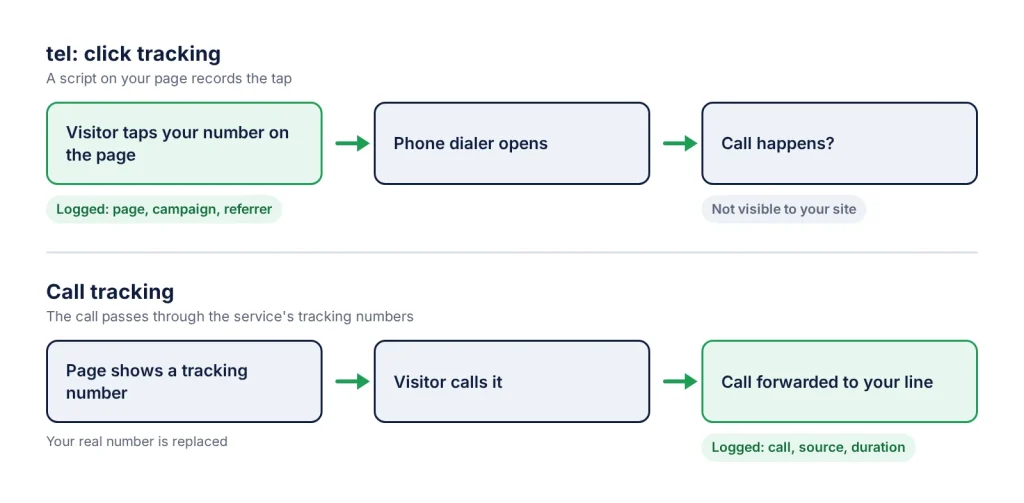
A tap on a tel: link happens on your page, so a script on that page can record it, with the page and the campaign. What happens next is out of its sight: whether the visitor pressed call, whether you answered, how long you talked.
Call tracking services such as CallRail and CallTrackingMetrics work the other way round. They show a tracking number on your site, often a different one per traffic source (dynamic number insertion), and forward calls to your real line. Because the call passes through their numbers, they can report calls, duration and source.
| tel: click tracking | Call tracking (tracking numbers) | |
|---|---|---|
| What it counts | A tap or click on a tel: link | A call that reaches a tracking number |
| Number typed by hand, or read on a desktop screen | Not counted | Counted, if the tracking number was shown |
| Call answered, call length | Unknown | Reported |
| Your phone number on the page | Unchanged | Replaced by tracking numbers |
| Cost | Free plugins or a Tag Manager setup | Usually a paid plan; CallRail, for example, charges a base fee plus any numbers and minutes beyond those included |
| Setup | Minutes | An account, tracking numbers, call forwarding |
When click tracking is enough, and when it isn’t
- Click tracking is enough when most callers are on mobile and you want to know which pages and campaigns make people tap your number.
- You need call tracking when many visitors call from a desktop by typing the number, when you report cost per answered call to a client, or when you need call length or recordings.
- For Google Ads only, Google offers website call conversions: dynamic Google forwarding numbers replace your number for visitors who came from an ad, and only calls longer than a minimum length you set count as conversions. The numbers cost nothing, but they are available only in some countries.
Does Google Analytics track phone number clicks?
Don’t count on it by default. GA4’s enhanced measurement sends outbound clicks for links that lead away from your domain to another website. A tel: link doesn’t point to a website, and Google’s documentation of outbound clicks doesn’t mention phone links. Check your own reports before relying on them, and if phone taps are missing, add an event for them.
With Google Tag Manager, that means a Click – Just Links trigger limited to links whose Click URL starts with tel:, and a GA4 event tag such as phone_click. Mark that event as a key event if calls are a goal. The Google Tag Manager guide for WhatsApp buttons uses the same steps with a different condition.
If you use another analytics tool, check whether it counts tel: links: Matomo and Plausible describe their outbound tracking as clicks to other domains or external sites.
Log phone taps in WordPress without Tag Manager
WhatsLink Click Tracker (free) records every tap on a link whose address starts with tel:, whatever the number’s formatting, in a log inside WordPress. Each row has the page title and URL, the clicked number, the date, the referrer and the UTM source, medium and campaign of the page. It stores no IP address or location.
- Go to Plugins → Add Plugin, search for WhatsLink Click Tracker, click Install Now, then Activate. No settings are needed.
- Make sure your number is a real link, such as
<a href="tel:+15551234567">+1 555 123 4567</a>. A number written as plain text has no link to log. - On your phone, open the page and tap the number. You can cancel the call: the tap is already logged.
- In the admin menu, open WhatsLink Click Tracker and look for the new row with the
tel:link.
The UTM values come from the address of the page where the tap happens. A visitor who lands on a tagged URL and taps the number on a later page shows up without UTM values. WhatsApp and Telegram clicks share the same log, so you can see which contact channel each page drives; for t.me links, see Track Telegram Link Clicks (t.me) on a WordPress Site.
Count phone taps as Google Ads and Meta conversions
If you advertise, a phone tap is a lead your ad accounts don’t see unless your site reports it. Google Ads can measure clicks on the number on your website as one of its call conversion options. If you’d rather not set up tags by hand, WhatsLink PRO sends each tap from its Ad Conversions page:
- Google Ads: a conversion to the conversion action you paste, through the Google tag (gtag.js) on your site. The same action receives WhatsApp and Telegram clicks too.
- Meta Pixel: the standard
Contactevent, with achannelparameter set tophone. - Google Analytics 4: a
phone_clickevent with the clicked link.
PRO uses the Google tag and Meta Pixel your site already loads and loads no Google or Meta code of its own, so your consent settings still apply. The ad-side setup is in How to Track WhatsApp Clicks as Conversions in Google Ads and Meta Ads. If you also use Google’s own call conversions, don’t count the same tap twice.
Phone links are one kind of link. To track every link click in WordPress, including ordinary internal and outbound links, see Track Link Clicks in WordPress Without Google Analytics.
Read next
What WhatsLink logs for phone links
- Every tap on a tel: link, whatever the number format
- Page title, page URL, date, referrer and UTM source, medium and campaign
- WhatsApp and Telegram clicks in the same log
- Top Pages, date filter and search in the click log
- No IP address or location stored
FAQ
What is the difference between click tracking and call tracking?
Click tracking counts taps on the phone number on your website. Call tracking counts calls that reach you, using tracking numbers that forward to your line, so it can also report answered calls and call length. Click tracking is free and quick to set up; call tracking usually needs a paid service.
Does Google Analytics 4 track clicks on phone numbers automatically?
Don't rely on it. GA4 enhanced measurement records outbound clicks on links that lead to another website, and its documentation doesn't mention tel: links. Add an event for phone taps, for example with a Google Tag Manager link click trigger on Click URL starting with tel:, or log them with a plugin.
Can WhatsLink tell me if the call actually happened?
No. WhatsLink logs the tap on the tel: link, with the page, referrer and UTM values. Whether the visitor pressed call, and how long the call lasted, happens on the phone and needs a call tracking service.
Do I need a special phone number format for tracking?
No. WhatsLink logs any link whose address starts with tel:, whatever the formatting. Using the international format with a plus sign, such as tel:+15551234567, makes the link work for visitors calling from abroad too.
Can phone clicks count as Google Ads conversions?
Yes. Google Ads has call conversion options, including clicks on your number on your website. WhatsLink PRO can also send every phone tap to a Google Ads conversion action, to the Meta Pixel as a Contact event and to GA4 as phone_click, using the tags already on your site.