
On this page
- Why WhatsApp conversations are invisible to your ads
- The fix in one sentence
- What a WhatsApp conversion is
- Your site’s WhatsApp button vs Click-to-WhatsApp ads
- Google Ads: two ways to count WhatsApp clicks
- Option 1: a Google Ads conversion action (recommended)
- Option 2: import a GA4 key event
- Meta Ads: the Contact event
- The fastest setup: WhatsLink PRO
- Without a plugin
- Before you trust the numbers
- Read next
- FAQ
- Official sources
Why WhatsApp conversations are invisible to your ads
Ad platforms count conversions that happen on your website: a purchase, a form, a call from the site. A WhatsApp conversation happens in another app, so neither Google Ads nor Meta can see it unless your site reports the click that opened WhatsApp.
The fix in one sentence
Report every click on a WhatsApp button as a conversion, as a Google Ads conversion action and a Meta Contact event, and your campaigns get credit for the conversations they start.
What a WhatsApp conversion is
A website can see the click that opens WhatsApp. It can’t see whether the visitor then sends the message: that happens inside the app. So the conversion you can measure is the click on your WhatsApp button: a conversation started. Treat it like a lead, the same way Google Ads counts a click on a phone number.
Your site’s WhatsApp button vs Click-to-WhatsApp ads
Two different setups are both called WhatsApp conversion tracking, and this guide covers the first one:
- A WhatsApp button on your website. Your ad (Google or Meta) brings visitors to a page, and the conversion is the tap on your WhatsApp button. Your site has to report it, which is what the steps below set up.
- Click-to-WhatsApp ads. Facebook and Instagram ads that open a WhatsApp chat with your business directly, without visiting your website. Meta measures these itself: Ads Manager reports Messaging conversations started, people who message you for the first time or after at least 7 days of silence after clicking the ad. It is not reported for ads delivered to or from Europe or Japan. Your website never sees these clicks, so no site tag or plugin can count them.
Google Ads: two ways to count WhatsApp clicks
Option 1: a Google Ads conversion action (recommended)
- In Google Ads, click Goals, then Conversions → Summary, and select + Create conversion action. If Google Ads asks for a data source, choose Conversions on a website, enter your domain and select Scan.
- Choose the Contact category (or another lead category). Select + Create conversion, choose the Google tag as the data source and select Manually using code: Google recommends this method for clicks on buttons or links.
- In Conversion settings, give it a name such as “WhatsApp click” and set Count to One: for leads, Google suggests counting one conversion per ad click, so three taps after the same ad count once. Then select Save and continue.
- In the next steps, select See event snippet and copy the value after
send_to. It looks likeAW-123456789/AbCdEfGhIjK: your conversion ID and label. - Send that conversion on every WhatsApp click: paste the value in WhatsLink PRO (Ad Conversions → Google Ads), or enter the ID and label in a Google Ads Conversion Tracking tag in Tag Manager (see the Tag Manager guide).
Your site also needs the Google tag. If the scan finds one, for example the tag you already use for GA4, Google Ads tells you the site is set up; if not, the last step offers Set up on the Google tag.
Option 2: import a GA4 key event
If you already send a whatsapp_click event to GA4 (see How to Track WhatsApp Clicks in Google Analytics 4), mark it as a key event, link GA4 to Google Ads, and create a Google Ads conversion based on it. It needs no extra tag, but the data goes through GA4 first, and GA4 and Google Ads attribute conversions differently, so totals don’t always match. After you link the accounts or mark the key event, the import option can take 24 to 48 hours to appear.
Meta Ads: the Contact event
Meta has a standard event for this: Contact, sent when someone contacts your business by phone, chat, or another channel. With the Meta Pixel on your site, send fbq('track', 'Contact') on every WhatsApp click; WhatsLink PRO does it when you tick the Meta Pixel option. Meta defines standard events for logging conversions, optimizing for them and building audiences, so you can optimize a website campaign for Contact and see its results in Ads Manager.
To check that it arrives, open Events Manager, click Data sources, select your pixel and open Test events. Enter your site’s address, click Open website, tap a WhatsApp button and look for Contact.
The fastest setup: WhatsLink PRO
WhatsLink Click Tracker (free) detects every WhatsApp, Telegram, and phone click, including chat widgets such as Click to Chat and Joinchat. WhatsLink PRO adds an Ad Conversions page:
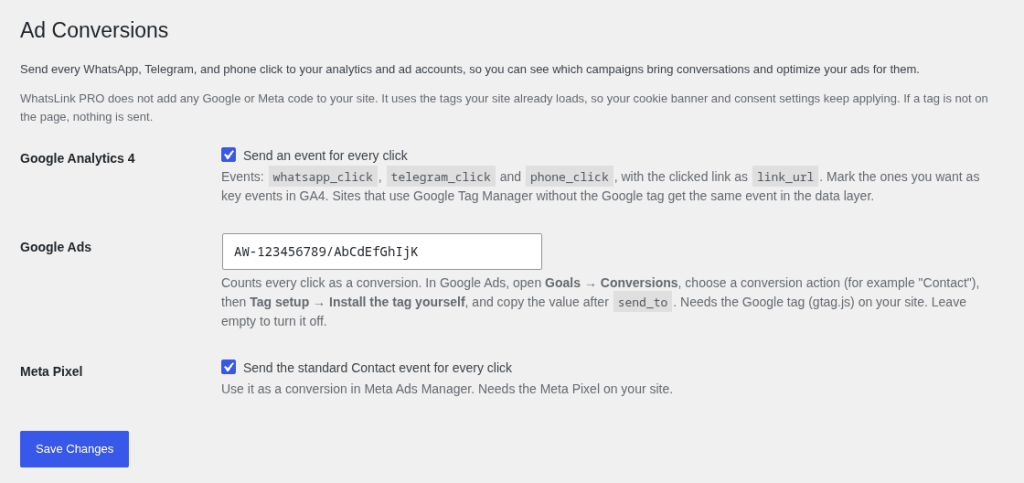
- Google Ads: paste the send_to value; every click counts as a conversion.
- Meta Pixel: tick it to send the standard Contact event.
- Google Analytics 4: tick it to send whatsapp_click, telegram_click, and phone_click events.
PRO adds no tracking code of its own: it uses the Google tag and Meta Pixel your site already loads, so your cookie banner and consent settings keep applying. If a tag is not on the page, nothing is sent to it.
Without a plugin
For a single hand-made link, you can send both conversions from the link itself (replace the send_to value with yours):
<a href="https://wa.me/391234567890"
   onclick="if (window.gtag) { gtag('event', 'conversion', { send_to: 'AW-123456789/AbCdEfGhIjK' }); }
            if (window.fbq) { fbq('track', 'Contact'); }">
  Chat on WhatsApp
</a>
This misses buttons generated by plugins and chat widgets. For those, use Tag Manager with an event that fires when WhatsApp is opened: see Track WhatsApp Button Clicks in Google Tag Manager.
Before you trust the numbers
- Consent. If your consent setup blocks the Google and Meta tags for visitors who decline cookies, their clicks never reach Google Ads or Meta, so your ad accounts report fewer conversions than really happened. With Google’s consent mode, Google Ads can model part of the missing conversions.
- Clicks are not messages. Some visitors open WhatsApp and never write. Compare conversions with the chats you actually receive for a couple of weeks.
- One setup only. Don’t send the same click from WhatsLink PRO and from Tag Manager, or each click counts twice.
- Give it time. Conversion data is not instant (Meta says new events can take 30 minutes or more to show), and Smart Bidding learns from the conversions it receives, so let a new conversion action collect data before you judge a campaign.
Read next
What WhatsLink PRO does for your ads
- Every WhatsApp, Telegram, and phone click as a Google Ads conversion
- The standard Contact event to your Meta Pixel
- whatsapp_click events in Google Analytics 4
- Chat widgets included: Click to Chat, Joinchat, WP Social Chat
- Uses the tags already on your site; adds no tracking code
FAQ
Can Google Ads see WhatsApp messages?
No. Google Ads only sees what your website reports. The click that opens WhatsApp can be reported as a conversion; the messages themselves stay inside WhatsApp.
How do I track conversions from Click-to-WhatsApp ads?
Ads that open WhatsApp directly from Facebook or Instagram never reach your website, so Meta measures them itself: Ads Manager reports Messaging conversations started for each ad. Website tags and plugins can't count them; they only count taps on the WhatsApp button on your own site.
Should I count every WhatsApp click or one per ad click?
For leads, Google suggests counting one conversion per ad click (Count: One), so a visitor who taps the button three times counts once. Use Every only if each click has value on its own.
Which Meta event should I use for WhatsApp clicks?
Contact, the standard event for contact between a customer and your business by phone, SMS, email, chat or other means. Meta defines standard events for logging conversions, optimizing for conversions and building audiences.
Is a GA4 import as good as a Google Ads conversion action?
Both work. A Google Ads conversion action reports directly to Google Ads. An imported GA4 key event needs no extra tag but goes through GA4 first, and GA4 and Google Ads attribute conversions differently, so totals can differ.
Official sources
- Set up your web conversions — Google Ads Help
- About conversion counting options — Google Ads Help
- Create Google Ads conversions based on Google Analytics key events — Google Ads Help
- Specifications for Meta Pixel standard events — Meta Business Help Center
- Messaging conversations started — Meta Business Help Center