
On this page
- Track WhatsApp Clicks Inside iframe: Limits and Fixes
- Getting an iframe WhatsApp click log in WordPress
- Can you track WhatsApp clicks inside iframe content?
- Who clicked the WhatsApp button inside your embedded content?
- Tag the pre-filled message with an iframe reference code
- How to check that your embedded WhatsApp link works
- FAQ
- Official sources
Track WhatsApp Clicks Inside iframe: Limits and Fixes
Before buying, request a compatibility test on your actual embed. Establish whether the solution instruments the frame, accesses a same-origin document or receives validated provider events. WordPress does not remove browser security boundaries.
Getting an iframe WhatsApp click log in WordPress
How to Track WhatsApp Clicks on WordPress covers the broader setup. Confirm one recorded click before evaluating reporting or advertising features.
You can track WhatsApp clicks inside iframe content only when tracking can access the embedded document or receive events from it. Installing a tracker on the surrounding website does not automatically cover embedded buttons: an iframe is a separate page, even when it looks like part of your layout.
Can you track WhatsApp clicks inside iframe content?
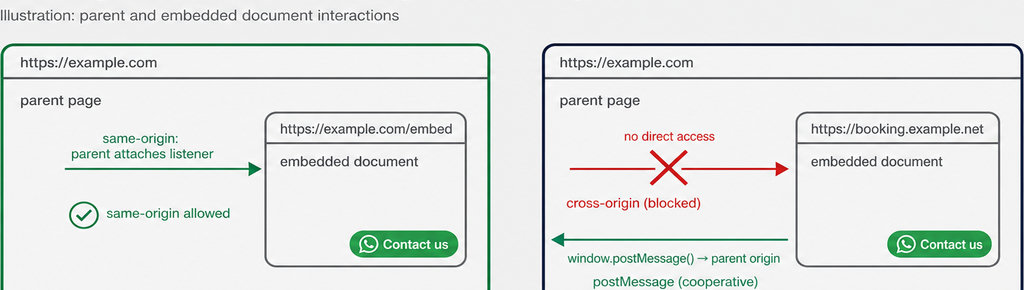
Start with one question: can you edit the embedded page? The parent page is the website surrounding the iframe. Clicks inside the embedded document do not bubble into that parent’s document, so its ordinary click listener will miss them.
Same-origin means matching scheme, hostname and port. https://example.com/contact and https://example.com/embed share an origin; https://booking.example.com does not. The relevant address is the document containing the button, not the button’s wa.me destination.
- Same-origin access: parent code can generally access the frame after it loads and explicitly attach a listener, unless sandbox restrictions prevent it.
- Cross-origin access: code inside the frame must record the click itself or deliberately notify the parent. Without provider cooperation, the parent cannot inspect its links.
For cooperative tracking, frame code can send a defined click event through window.postMessage(). Send it to an exact parent origin; the receiving code must validate event.origin, event.source and the message structure before recording anything. This is an integration, not a workaround for an inaccessible widget.
Explore the distinction between website clicks, analytics events and WhatsApp conversations.
Read more WhatsApp tracking guides
Who clicked the WhatsApp button inside your embedded content?
A click record measures an interaction, not a named WhatsApp user. It does not reveal the visitor’s phone number, prove that WhatsApp opened successfully, or confirm a sent message. WhatsApp Analytics: Chat Stats and Website Click Tracking explains those separate measurements.
Useful context includes the page URL, UTM parameters and referrer associated with the click. WhatsLink free records these details for clicks it captures, but iframe access must be established first. A plugin on the parent page cannot automatically collect inaccessible events from another provider’s document.
- Check the context. For embedded setups, establish which page each field describes. The frame’s URL and referrer can differ from the surrounding landing page and its original acquisition source; forwarding an event does not automatically preserve that context.
Once click capture is verified, use the free plugin to record the page, UTM parameters and referrer. Track WhatsApp clicks free with WhatsLink
Tag the pre-filled message with an iframe reference code
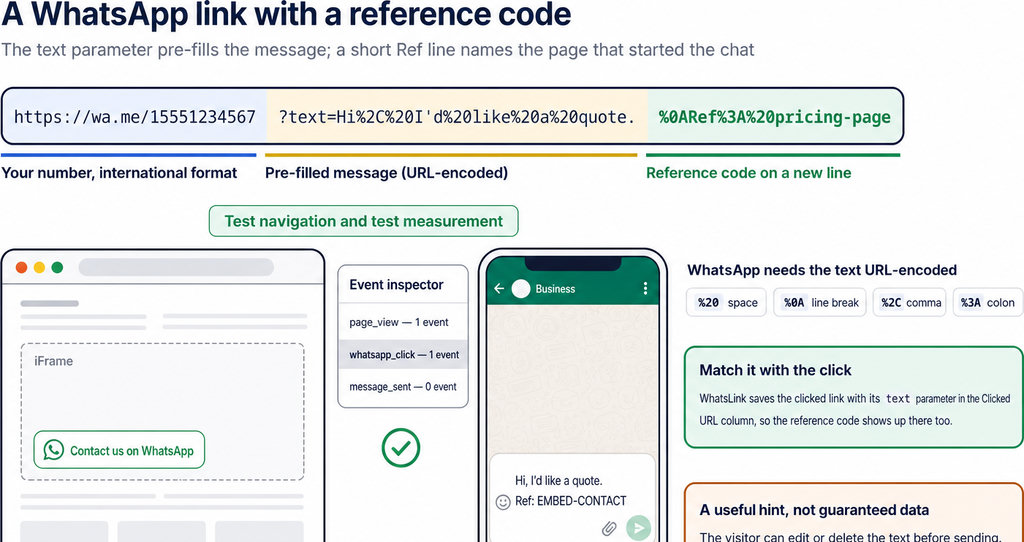
- Use a reference code. A reference code can help distinguish conversations started through embedded content. Set the WhatsApp link’s URL-encoded
textparameter to a message such as “Hello, I’m asking about your service. Ref: EMBED-CONTACT.” Use a non-personal label rather than an email address or customer identifier. - Understand the composer. WhatsApp places this text in the message composer; the visitor can change it or leave without sending. The code becomes useful only when a received message retains it. It cannot replace tracking or recover clicks from an inaccessible frame.
- Separate conversations from interactions. A reference in a received message is evidence about that conversation. An iframe click event is evidence about a website interaction. Neither establishes a one-to-one match unless your implementation provides a reliable, privacy-appropriate connection.
- Keep campaign codes readable and stable. A placement label such as
EMBED-CONTACTdistinguishes the embedded contact form from a header button without putting personal data into URLs or analytics events.
How to check that your embedded WhatsApp link works
Test navigation first: open the actual embedded page, click the button, and check the destination number and pre-filled text on mobile and desktop. Then test measurement separately. An opened chat is not proof that your tracker recorded a click.
Inspect the plugin’s log or, for a Google Analytics implementation, use Tag Assistant and GA4 DebugView. Trigger one click and check for one event; listeners in both documents can produce duplicates. Consent settings and privacy controls can also explain missing analytics events. Check sandbox restrictions if scripts, popups or navigation fail; do not remove protections indiscriminately. Google Tag Manager on the parent cannot bypass cross-origin restrictions, and GA4 cross-domain measurement changes attribution, not document access. Use How to Track WhatsApp Clicks in Google Analytics 4 for the analytics setup after capture works.
Your iframe tracking checklist
- Confirm access to the embedded document or provider events
- Check the destination number and pre-filled text
- Trigger one click and verify one recorded event
- Identify whether context describes the frame or parent
- Verify capture before evaluating paid reporting
FAQ
Does installing a plugin on the parent cover the iframe?
No. Parent-page installation alone does not instrument a separate document.
Can I track an uneditable third-party widget?
Only if its provider offers suitable events or an integration. Parent code cannot extract cross-origin link clicks.
Does GA4 enhanced measurement solve this?
Not by itself. Its outbound-link tracking applies within an instrumented document, not automatically inside embedded pages.
What should I ask before purchasing?
Ask for a demonstrated click from your actual iframe appearing once in the intended log. A successful WhatsApp launch alone is insufficient.