
On this page
- WhatsApp Business App vs API Analytics: Reports Compared
- WhatsApp Business App vs API Analytics: Message and Link Reports
- Who Clicked the WhatsApp Button on Your Website?
- Tag the Pre-filled Message With a Reference Code
- How to Check Your WhatsApp Link and Reports
- Getting a WhatsApp Click Log in WordPress
- FAQ
- Official sources
WhatsApp Business App vs API Analytics: Reports Compared
The WhatsApp Business app vs API analytics decision depends on what you need to measure: message delivery, customer replies, agent performance, or website-button clicks.
These are different reports, and moving to the API does not automatically connect a website click to a conversation or sale.
WhatsApp Business App vs API Analytics: Message and Link Reports
The app provides aggregate message statistics, including sent, delivered, and read messages. Business-broadcast insights can also cover replies where available, and businesses advertising through the app can access ad-performance metrics. These feature-specific reports do not apply to every ordinary chat.
The API, officially the WhatsApp Business Platform, supports message-status notifications such as sent, delivered, read, and failed. It connects messaging to other software rather than providing one universal reporting dashboard.
- Meta-provided reporting. Eligible template analytics can include sends, deliveries, reads, and button interactions. Analytics must be enabled where required; button-click reporting has eligibility and regional restrictions.
- Integration-dependent reporting. Response times, agent performance, CRM attribution, and sales reports depend on the connected inbox or reporting system and the data it collects.
A read receipt does not prove someone clicked an ordinary URL you sent. Eligible template-button metrics are a separate capability. WhatsApp channel analytics are separate again: they describe broadcast-channel engagement, such as reach, follower growth, reactions, and poll results—not customer-chat performance.
Who Clicked the WhatsApp Button on Your Website?
Website tracking answers which page generated a click, not which WhatsApp account belongs to the visitor. Report the page and destination number so you can distinguish interest in different services or branches.
GA4 enhanced measurement can record outbound clicks on ordinary links to another domain, including correctly implemented WhatsApp links. Custom widgets may need separate event configuration. Neither setup proves that the visitor sent a message.
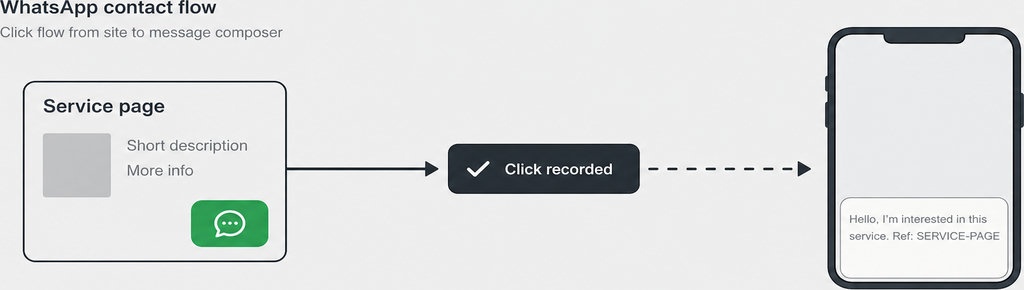
For a WordPress click log, free WhatsLink records the page, UTM parameters, and referrer of each click. Referrer information may be absent because of browser or privacy restrictions; none of these fields identifies the visitor’s WhatsApp account.
Use WhatsApp Button CTR to compare clicks against page traffic rather than treating raw click totals as conversion rates.
Tag the Pre-filled Message With a Reference Code
A reference code can connect an incoming enquiry to its likely source. For example, pre-fill the message with “Hello, I’m interested in this service. Ref: SERVICE-PAGE.” Use a different, non-personal code for each service page or campaign.
WhatsApp supports URL-encoded pre-filled text through click-to-chat links. The text opens in an editable field: the visitor must still send it and can remove the code first. A code is therefore attribution evidence when received, not guaranteed tracking.
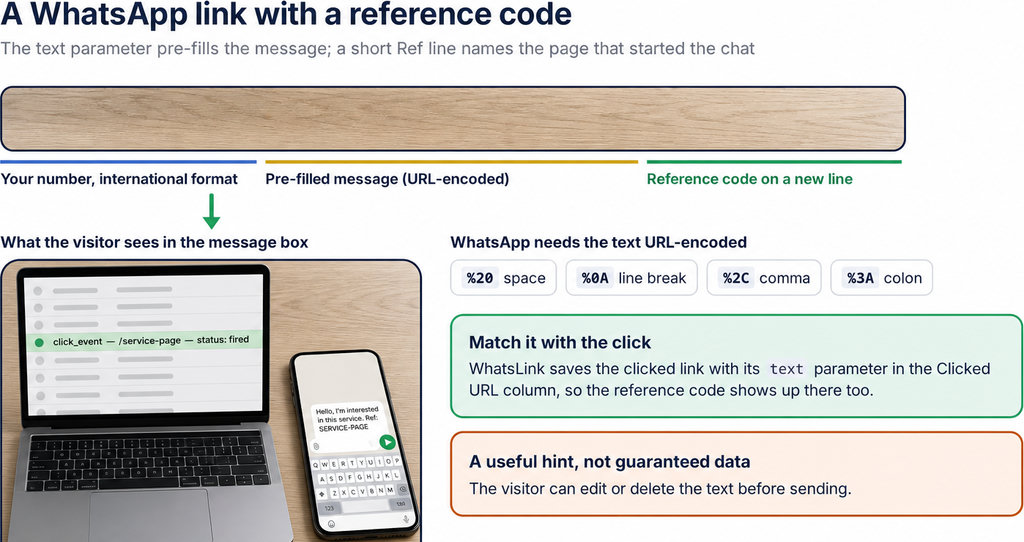
- Use source labels such as SERVICE-PAGE or SPRING-AD, not names, email addresses, or order details.
- Avoid putting personal information in URLs or analytics parameters.
- Keep website clicks and received enquiries as separate totals. One person might click twice and send one message; another might open WhatsApp without sending anything.
The distinction is explained further in WhatsApp Analytics: Chat Stats and Website Click Tracking.
How to Check Your WhatsApp Link and Reports
- Start with the destination number in full international format, without a plus sign, spaces, or punctuation.
- Check that the encoded message displays correctly, then test the link on mobile and through WhatsApp Web or the desktop app.
- Verify event collection separately with Google Tag Assistant or GA4 DebugView when using Google tracking. Successful navigation is not evidence that an analytics event fired. One intended interaction should produce the expected event, without duplicate tags counting it twice.
- Also check UTM preservation and the recorded source page in your click log. Test with consent accepted and declined where applicable, so you understand which records your privacy configuration permits.
Getting a WhatsApp Click Log in WordPress
You do not need an API migration merely to count website-button clicks. Free WhatsLink records click context; Google’s Site Kit can enable GA4 enhanced measurement, with the resulting reports available in Analytics. Site Kit should not be assumed to provide a visitor-by-visitor WhatsApp log inside WordPress.
For advertisers, WhatsLink PRO sends clicks to Google Ads, the Meta Pixel, and GA4 as conversions, exports clicks as CSV, and emails every click. Those conversions represent button clicks, not confirmed conversations or purchases. It does not connect directly to a CRM.
Running ads? Share click signals with your advertising tools and notify your team.
Send WhatsApp clicks to your ads and your team with WhatsLink PRO
When comparing WhatsApp Business app vs API analytics, choose the API for messaging workflows and integration requirements—not as a substitute for website attribution. Follow WhatsApp Conversion Tracking for Google Ads and Meta Ads to keep advertising click signals distinct from sales outcomes.
What WhatsLink records for each click
- The page and post type where the click happened
- The WhatsApp, Telegram or phone link clicked, with its pre-filled text
- UTM source, medium and campaign of that page
- The referrer and the date and time
- No IP address, location or device
FAQ
Can blue ticks prove a link was clicked?
No. They indicate message-read status, not engagement with a link inside the message.
Does the API include an analytics dashboard?
Not one universal dashboard covering every business outcome. Available reports depend on Meta's metrics and your connected software.
Can WhatsApp report template-button clicks?
Eligible template analytics can report button interactions. Availability and regional restrictions apply; ordinary pasted links are different.
Does a website WhatsApp click identify the customer?
No. It records a website interaction, not the visitor's WhatsApp identity or a confirmed enquiry.