
On this page
- Getting WhatsApp lead source into your CRM
- Then close the loop by hand or with your inbox
- Where the source gets lost
- A worked example, step by step
- Step 1: tag the ad’s landing page
- Step 2: log the click on your site
- Step 3: put a reference code in the pre-filled message
- Step 4: save the code on the CRM contact
- Step 5: keep a code sheet
- Reconcile clicks and leads every week
- When to leave the source empty
- What WhatsLink does in this chain
- FAQ
- Official sources
Getting WhatsApp lead source into your CRM
Tag the landing page, log the WhatsApp click with its campaign, and add a short reference code to the pre-filled message.
Then close the loop by hand or with your inbox
When the message arrives with the code, copy it to a fixed lead-source field on the contact. No plugin can do this step alone, because the website never learns who wrote.
To get the campaign source of a WhatsApp lead into your CRM, carry it through four hand-offs: a UTM-tagged link, a WhatsApp click logged on your WordPress site, a pre-filled message that contains a reference code, and a “lead source” field on the CRM contact, filled in when the message arrives. No WordPress plugin can do the last step on its own, because your website never learns who sent the message.
Below is the whole chain on a real-looking example, with the code you need, where the field lives in HubSpot, Pipedrive and Zoho CRM, and the cases where the honest answer is “source unknown”.
Where the source gets lost
Your website knows the campaign: it is in the landing page address when the visitor taps the WhatsApp button. WhatsApp knows the sender: a phone number and a name, in your chat list. Nothing connects the two. The click happens in the browser, the message is written in the app, and the visitor may send it minutes later or never.
The bridge is something that travels inside the message itself. A short reference code in the pre-filled text does exactly that: the visitor sends it along with their question, and whoever reads the chat can copy it to the contact.
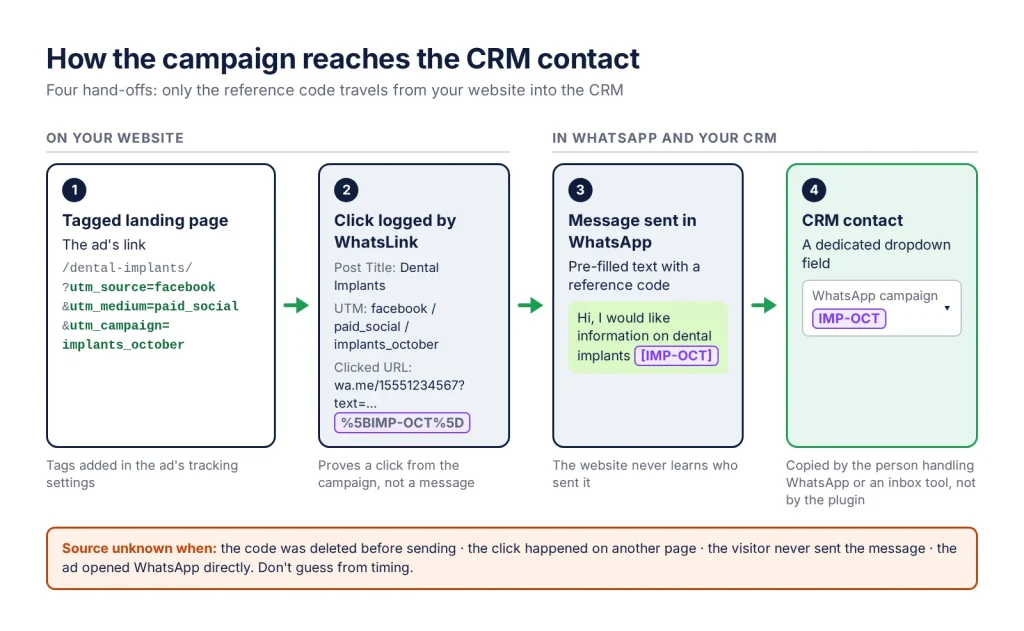
A worked example, step by step
A dental clinic runs a Meta ad for implants in October. It wants every WhatsApp lead from that ad to show “implants_october” as its source in the CRM.
Step 1: tag the ad’s landing page
The ad points to the implants page with UTM parameters added in the ad’s tracking settings:
https://example.com/dental-implants/?utm_source=facebook&utm_medium=paid_social&utm_campaign=implants_octoberNaming rules and the Google Ads case (where auto-tagging adds a click ID, not UTMs) are covered in WhatsApp UTM Tracking: Tag Links and Attribute Chats.
Step 2: log the click on your site
With WhatsLink Click Tracker active, the tap on the WhatsApp button becomes a row in WhatsLink Click Tracker in your WordPress admin, with no setup:
| Column | Value in the example |
|---|---|
| Post Title | Dental Implants |
| Permalink | https://example.com/dental-implants/?utm_source=facebook&utm_medium=paid_social&utm_campaign=implants_october |
| Clicked URL | https://wa.me/15551234567?text=Hi%2C%20I%20would%20like%20information%20on%20dental%20implants%20%5BIMP-OCT%5D |
| UTM Source / Medium / Campaign | facebook / paid_social / implants_october |
| Referrer | The page the browser reports the visitor came from, if any |
The row proves a click from that campaign, not a message. It’s the “top” of your funnel count for the campaign.
Step 3: put a reference code in the pre-filled message
WhatsApp’s click-to-chat links accept a pre-filled message: https://wa.me/<number>?text=<URL-encoded text>. The text appears in the chat’s input field, ready to send. Add a short code at the end of it. There are two ways to do that.
Option A, no code: one landing page per campaign. If each campaign has its own page, give that page’s button a fixed message:
https://wa.me/15551234567?text=Hi%2C%20I%20would%20like%20information%20on%20dental%20implants%20%5BIMP-OCT%5DThe visitor sees “Hi, I would like information on dental implants [IMP-OCT]” in WhatsApp and sends it.
Option B, a small script: copy the campaign into the message. If several campaigns share one page, this snippet adds the page’s utm_campaign to the text of every wa.me chat link on it (share links without a phone number are left alone). Add it with your theme or a code snippets plugin:
<script>
document.addEventListener('DOMContentLoaded', function () {
  var campaign = new URLSearchParams(window.location.search).get('utm_campaign');
  if (!campaign) return;
  document.querySelectorAll('a[href*="wa.me/"]').forEach(function (link) {
    var url = new URL(link.href);
    if (url.pathname === '/') return;
    var text = url.searchParams.get('text') || 'Hi';
    var tagged = text + ' [ref: ' + campaign.slice(0, 40) + ']';
    link.href = url.origin + url.pathname + '?text=' + encodeURIComponent(tagged);
  });
});
</script>
It changes plain wa.me links only. Chat widgets such as Joinchat or Click to Chat usually open WhatsApp from JavaScript rather than through a plain link, so use their own per-page message setting instead. Either way, WhatsLink stores the clicked link in full, so the code is also visible in the Clicked URL column of the log.
Step 4: save the code on the CRM contact
When the message arrives, the person handling WhatsApp (or an inbox tool you have connected to your CRM) copies the code to a dedicated field. Use a dropdown where you can, so nobody types “imp-oct” one day and “IMP OCT” the next:
- HubSpot: create a custom contact property, for example “WhatsApp campaign”, with the dropdown select field type and one option per code (Settings → Properties → Create property).
- Pipedrive: leads and deals have Source channel (a list your admin defines, so add “WhatsApp”) and Source channel ID (a custom value, for the code).
- Zoho CRM: leads have a standard Lead Source pick list for where the lead came from. For the campaign code, an administrator can add a custom pick list field in the Leads layout editor (Setup → Customization → Modules and Fields).
Step 5: keep a code sheet
One shared table turns a code back into the full campaign, so the CRM field can stay short:
| Code | utm_source / utm_medium | utm_campaign | Landing page |
|---|---|---|---|
| IMP-OCT | facebook / paid_social | implants_october | /dental-implants/ |
| WHT-NL | newsletter / email | whitening_november | /teeth-whitening/ |
Reconcile clicks and leads every week
Put three counts per campaign side by side: WhatsApp clicks from your log, CRM contacts with that code, and how many of those you qualified. The table below uses invented numbers to show the reading, not a benchmark:
| Campaign | WhatsApp clicks (log) | Contacts with the code (CRM) | Qualified leads |
|---|---|---|---|
| implants_october | 40 | 22 | 9 |
| whitening_november | 25 | 18 | 3 |
In this example the implants ad brings more clicks and more qualified leads; the newsletter turns clicks into messages more often but qualifies fewer. If clicks and contacts drift far apart, check whether the code survives (test it from your phone) before you blame the campaign.
To count clicks per code, sort the log by Clicked URL. With PRO, the Top Clicked URLs table shows the ten most-clicked links, pre-filled message included, for any date range, and the CSV export includes the clicked link, UTMs and referrer for a spreadsheet next to your CRM export.
When to leave the source empty
- The code was deleted. A pre-filled message is a draft: the visitor can edit it before sending.
- The click happened on another page. WhatsLink reads UTMs from the page of the click, and so does the script above. A visitor who lands on the implants page and then writes from your contact page arrives without code.
- The ad opened WhatsApp directly. Click-to-WhatsApp ads never reach your website, so no WordPress plugin sees them. Use the ad platform’s own reporting for those.
- The timing merely fits. Don’t assign a campaign because a message arrived a few minutes after a logged click. Without the code, the match is a guess.
Keep names, phone numbers and email addresses out of codes and UTM values: they end up in analytics tools and logs that aren’t meant to hold personal data.
What WhatsLink does in this chain
WhatsLink covers step 2 and the weekly count. It has no CRM integration, doesn’t see message content and doesn’t know who clicked.
- Free: logs every WhatsApp, Telegram and phone click, chat widgets included, with page, date, clicked link (code included), referrer and UTM source, medium and campaign. Setup and testing are in How to Track WhatsApp Button Clicks in WordPress (No Code).
- PRO: reports filtered by UTM values, Top Clicked URLs, CSV export, daily and weekly summary emails with the clicks attached as CSV, and a real-time email for each click (page, UTMs and referrer). Its Ad Conversions send each click to Google Ads, the Meta Pixel and GA4, so your ads get credit too: see How to Track WhatsApp Clicks as Conversions in Google Ads and Meta Ads.
- Developers: since version 1.6.0 every logged click fires a
whatslink:clickevent on the page with the clicked link, the channel and the page, which your own code can forward. It still carries no sender.
For what a single click row can and can’t tell you, see Who Clicked Your WhatsApp Link? See Page, UTM & Referrer Per Click.
What WhatsLink adds to this workflow
- Every WhatsApp click logged with UTM source, medium and campaign
- The clicked link stored in full, reference code included
- Page, date and referrer for each click
- Chat widgets included: Click to Chat, Joinchat, WP Social Chat
- No IP addresses or location stored
- PRO: CSV export and Top Clicked URLs to reconcile with your CRM
FAQ
Can a WhatsApp button send the campaign source to my CRM automatically?
Not on its own. The website knows the campaign when the button is tapped, but not who will send the message. Put a reference code in the pre-filled message, then copy it to a CRM field when the message arrives, by hand or with an inbox tool connected to your CRM.
Which CRM field should hold the WhatsApp lead source?
A dedicated one with fixed values: a custom dropdown contact property in HubSpot, Source channel plus Source channel ID on Pipedrive leads and deals, or the Lead Source pick list (or a custom pick list field) on Zoho CRM leads. Fixed values keep reports clean.
Does WhatsLink integrate with HubSpot, Pipedrive or Zoho?
No. WhatsLink logs WhatsApp clicks in WordPress with page, clicked link, referrer and UTM values. It has no CRM integration and doesn't know who clicked. PRO can export the clicks to CSV so you can compare them with your CRM.
How do I track leads from Click-to-WhatsApp ads?
Those ads open WhatsApp directly and never reach your website, so a WordPress click tracker can't see them. Use the ad platform's own reporting for them, and keep the website method for ads and emails that land on your pages.
What if the visitor deletes the reference code?
Then the source is unknown. Leave the CRM field empty rather than guessing from the time of the message: a pre-filled message is only a draft until the visitor sends it.