
On this page
- Which Meta Pixel Event to Use for WhatsApp Button Clicks?
- Can Meta Pixel track a WhatsApp button click?
- What does a WhatsApp button event tell you about the visitor?
- Tag the pre-filled WhatsApp message with a reference code
- How to check your WhatsApp link and Meta event
- Sending WhatsApp button clicks to Meta in WordPress
- Sources and references
Which Meta Pixel Event to Use for WhatsApp Button Clicks?
Use Contact as the standard Meta Pixel event for WhatsApp button clicks when your goal is to measure contact intent. If you want the event name to describe only the click, use a custom event such as WhatsAppClick.
Neither choice proves that someone sent a message, became a qualified lead, or bought anything.
Can Meta Pixel track a WhatsApp button click?
An event is a label sent when an action happens. For this setup, the action happens on your website: a visitor presses the WhatsApp button. The Pixel records that interaction, not what the visitor subsequently does inside WhatsApp.
Choose the event according to what you want to report:
- Use Contact for contact intent. It is a practical standard-event choice for a button intended to start contact, not a WhatsApp-specific requirement from Meta. In a manual implementation, attach
fbq('track', 'Contact')to the relevant button click—not to every page load. - Use a custom event for explicitly named click reporting. A developer could instead send
fbq('trackCustom', 'WhatsAppClick'). The distinction between standardtrackand customtrackCustomcalls is documented in this Meta Pixel implementation reference.WhatsAppClickis an illustrative custom name, not a predefined Meta event or a claim about a plugin setting.
WhatsApp’s click-to-chat documentation explains that the link opens a conversation and places any pre-filled text in the message field. The visitor must still press Send. That is the measurement boundary your reports should preserve.
What does a WhatsApp button event tell you about the visitor?
A click event tells you that someone attempted the handoff from your website to WhatsApp. It does not identify their WhatsApp account, disclose their phone number, or reveal their message.
Useful click records add context. A pricing-page click from a tagged campaign gives you a more useful clue than a site-wide total, even if you cannot connect that click to a particular conversation:
- Page: The page containing the button.
- Campaign: The URL’s UTM parameters, when present in the recorded context.
- Referrer: Where the visitor came from, when available.
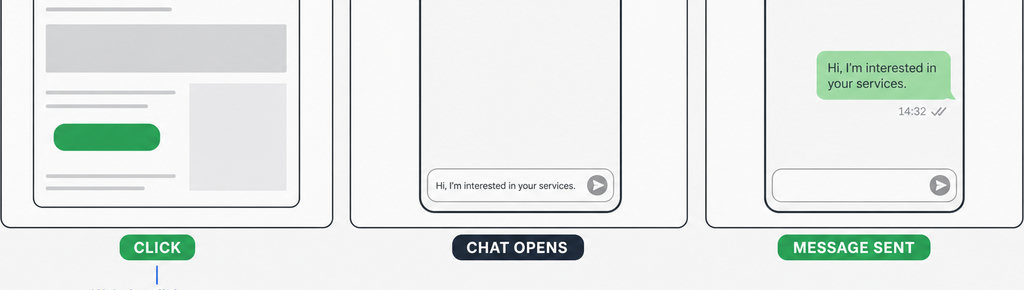
Keep these reporting limits in mind:
- Missing attribution is not proof of a direct visit. Referrer information can be unavailable. A click log also counts interactions, not necessarily unique people: one visitor may press the same button several times.
- Reserve Lead and Purchase for verified outcomes. Use
Leadfor a separately verified inquiry or qualification step that meets your business’s definition, andPurchasefor a confirmed purchase. Calling the button click a conversion is acceptable if the report clearly says WhatsApp button click, rather than “new customer.”
Explore WhatsApp click tracking in WordPress. Track WhatsApp clicks free with WhatsLink.
Tag the pre-filled WhatsApp message with a reference code
A reference code helps bridge the gap between a website placement and an incoming message. For example, a contact-page button could pre-fill “Hello, I have a question. Ref: CONTACT-PAGE.” The corresponding link could be:
https://wa.me/15551234567?text=Hello%2C%20I%20have%20a%20question.%20Ref%3A%20CONTACT-PAGEReplace the example number with your own international-format number, using digits only.
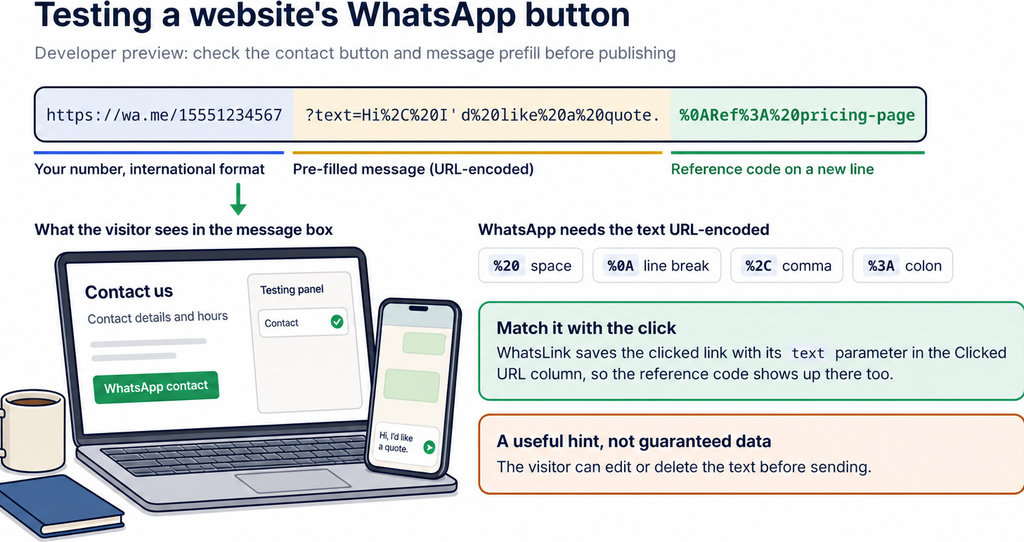
- Choose a non-sensitive placement label. Use
CONTACT-PAGEorPRODUCT-HELP, rather than a person’s email address or private account details. - Encode the message text. Make sure spaces and punctuation work correctly.
- Treat the reference as a manual attribution clue. The visitor can edit or remove the text, or leave without sending it. The reference does not turn the Pixel click into a verified lead. It adds evidence only when the incoming message retains it.
How to check your WhatsApp link and Meta event
- Start with one button and one tracking implementation. Open its page on a phone and a desktop browser, press the button, and confirm that the intended business number and pre-filled text appear. You should not need to send a message merely to test the handoff.
- Test the selected event. Use Meta’s event-testing tools. Loading the page should not send your WhatsApp click event; pressing the button should send one event per click. Test with the consent conditions required by your site, and without a browser blocker interfering.
- Match the trigger to the actual element. If you use Google Tag Manager, Google distinguishes “Just Links” from “All Elements” click triggers. A normal link and a script-driven button may need different conditions.
- Check for duplicate tracking. A plugin, a Tag Manager tag and manually inserted code may measure the same interaction. Also verify the event name:
ContactandWhatsAppClickare different signals, not interchangeable labels in reporting.
For a Tag Manager walkthrough, use Track WhatsApp Button Clicks in Google Tag Manager (GA4); its trigger setup helps you inspect the website interaction, although GA4 and Meta require separate event configurations.
Sending WhatsApp button clicks to Meta in WordPress
Keep local click records and advertising measurement conceptually separate. The former helps you inspect activity on your site; the latter sends a signal to an external platform. Neither records the content of a WhatsApp conversation.
If you run ads and need that external signal, consider WhatsLink Click Tracker PRO and confirm that it supports your intended platform and event. Check which options it offers for sharing click records with your team. The Contact and custom-event examples above describe measurement choices, not guaranteed PRO event-name settings or automatic Pixel installation. Verify the implementation’s actual event in testing before using it in reports. For campaign setup beyond event naming, continue with WhatsApp Conversion Tracking for Google Ads and Meta Ads. Keep click conversions separate from confirmed leads and sales so campaign reports describe what you actually measured.
Take the next step with WhatsLink PRO
- Use PRO when your next step is sending website click signals to advertising platforms and sharing click records with your team.