
On this page
- Why a working button can stay invisible
- Start with a test, not a fix
- Find where the click gets lost
- The button is not a link
- The trigger doesn’t match every WhatsApp address
- The click lands on an icon, not the link
- The event arrives but isn’t a key event
- Consent blocks the tags
- Caching or script optimisation gets in the way
- WhatsLink’s log stays empty
- FAQ
- Official sources
Why a working button can stay invisible
Opening WhatsApp and recording the click are two separate jobs. The button can do the first perfectly while your trigger, your GA4 setup, your cookie banner or your cache quietly stops the second.
Start with a test, not a fix
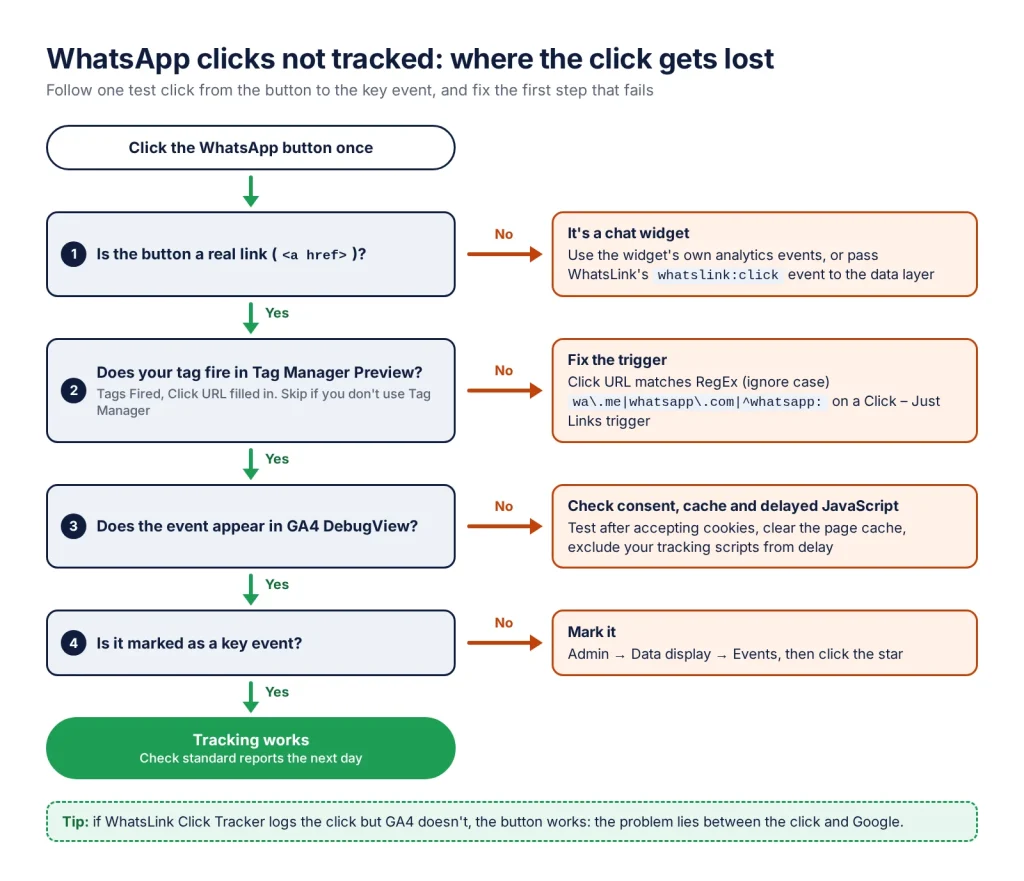
Tag Manager Preview, GA4 DebugView and a click log in WordPress tell you at which step the click disappears. Then you fix one cause instead of rebuilding everything.
When a WhatsApp button works but its clicks don’t show up in GA4 or Tag Manager, the cause is usually one of a few: the button isn’t a real link, the trigger doesn’t match every WhatsApp address, the event isn’t a key event, consent blocks the tag, or a cached page never loads the tracking. Find where the click gets lost first, then fix that one cause.
Find where the click gets lost
Test with these tools in order. Each one shows whether the click exists at a different stage.
- Tag Manager Preview, if you use Tag Manager. Open Preview, click the button and select the click in Tag Assistant’s event list. Is your WhatsApp tag under Tags Fired? On the Variables tab, is
Click URLfilled in? If it’s empty, a trigger condition on Click URL can’t match. - GA4 DebugView. With Preview or Tag Assistant running, open Admin → Data display → DebugView and click the button: the event should appear within seconds. The Realtime report works for ordinary visits too.
- A click log in WordPress. WhatsLink Click Tracker (free) records clicks on your own site, without Google tags. If a click is in its log but not in GA4, the button works and the problem lies between the click and Google: your trigger, your tag or your consent settings.
The button is not a link
Several chat widgets, such as Click to Chat, Joinchat and Social Chat, draw the button as a plain element and open WhatsApp from JavaScript. There is no link to click, so:
- a Click – Just Links trigger never fires, because it only tracks
<a>elements; - GA4’s automatic outbound click event doesn’t fire either, because it records clicks on links that lead to another domain.
Fixes, from least to most work:
- Use the widget’s own analytics events, if it has them. What each plugin sends is compared in WhatsApp Button Plugin Analytics: Click to Chat, Joinchat, Chaty.
- In Click to Chat, turn on the option (added in 4.42) that renders the click area as a link or button, so tools that only track links can see it.
- Install WhatsLink Click Tracker, which notices when a widget opens WhatsApp, pass its
whatslink:clickbrowser event to the data layer with a short listener, and fire your tag on it with a Custom Event trigger. The steps are in How to Track WhatsApp Button Clicks with Google Tag Manager.
The trigger doesn’t match every WhatsApp address
A trigger on Click URL contains wa.me misses the other addresses WhatsApp buttons use: api.whatsapp.com/send, web.whatsapp.com/send (WhatsApp Web, which some widgets open on desktop) and whatsapp://send app links. Match them all with Click URL matches RegEx (ignore case):
wa\.me|whatsapp\.com|^whatsapp:Then test one button on a phone and one on a computer, since the same widget can open a different address on each.
The click lands on an icon, not the link
An All Elements click trigger reports the element the click actually landed on. On a button made of a link with an icon or a label inside it, that can be the icon or the label rather than the link. Check what your trigger sees in Preview:
- Click the button and select the click in Tag Assistant’s event list.
- On the Variables tab, look at
Click ElementandClick URL. - If Click Element is an icon or a
spanand Click URL is blank, a condition on Click URL can’t match. Switch to a Click – Just Links trigger, which tracks link clicks, and check again.
Click the icon itself, not only the text next to it, since the two can give different results.
The event arrives but isn’t a key event
GA4 can receive whatsapp_click and still show no conversions, because only key events count as conversions. In Admin → Data display → Events, find your event and click the star. GA4 lists an event there only after receiving it, so make a test click first, or create the key event in advance with the exact event name.
Two more things that look like “not tracking”:
- You’re reading the wrong event. Enhanced measurement logs wa.me clicks as a generic
clickevent with the address inlink_url, not aswhatsapp_click. Ways to get a clean WhatsApp event are in How to Track WhatsApp Clicks in Google Analytics 4 (3 Ways). - You’re checking too early. Standard reports take time to process. Test in DebugView or Realtime, then check reports the next day.
Consent blocks the tags
If your cookie banner uses Google’s consent mode in its basic form, Google tags don’t fire at all for visitors who decline: nothing reaches GA4 or Google Ads, not even the consent choice. In advanced mode, tags send cookieless pings instead. Either way, a test after declining cookies looks like broken tracking, and your reports can show fewer clicks than really happened.
Test after accepting cookies. WhatsLink’s own log is kept in your WordPress database rather than sent to Google, and stores no IP address, location or device, so it doesn’t depend on your Google tags firing.
Caching or script optimisation gets in the way
- Page cache. After adding a tracking plugin or changing the Tag Manager snippet, clear the page cache. Cached pages keep serving the old HTML, without the new script.
- Delayed JavaScript. Options such as WP Rocket’s Delay JavaScript execution hold scripts back until the visitor interacts (a key press, mouse movement, touch or scroll). If clicks go missing only while it’s on, exclude your tracking scripts with the exclusion setting your optimisation plugin provides, and test again.
WhatsLink’s log stays empty
If WhatsLink itself shows no clicks after a test:
- Check that the plugin is active and up to date. Chat widget detection and WhatsApp Web links arrived in version 1.5.8.
- Make your test on a page that has a WhatsApp, Telegram or phone link or a chat widget, and wait for the page to finish loading before clicking.
- Check the address: WhatsLink recognises
wa.me,api.whatsapp.com,web.whatsapp.com,whatsapp://,t.meandtel:. - Check how the button opens WhatsApp. WhatsLink sees clicks on links and WhatsApp windows opened from JavaScript. A widget that opens WhatsApp some other way isn’t logged: write to support from the plugin page and name the plugin.
Once clicks appear, the same whatslink:click event can feed Tag Manager, and WhatsLink PRO can send each click to Google Ads, the Meta Pixel and GA4 from a settings page: How to Track WhatsApp Clicks as Conversions in Google Ads and Meta Ads. For a fresh setup from scratch, start with Track WhatsApp Button Clicks in WordPress (No Code).
How WhatsLink helps you debug
- Shows whether a click happened, independently of Google tags
- Detects chat widgets that open WhatsApp without a link
- Covers wa.me, api.whatsapp.com, WhatsApp Web and whatsapp:// links
- Announces each click with a whatslink:click event for Tag Manager
- Free on WordPress.org
FAQ
Why doesn't my WhatsApp button show up in Google Analytics?
Usually because the button isn't a real link (chat widgets open WhatsApp from JavaScript), because the event isn't marked as a key event, or because the visitor declined cookies and your consent setup blocked the tag. Test in DebugView to see whether the event arrives at all.
Why doesn't my GTM trigger fire on the WhatsApp chat widget?
A Click – Just Links trigger only sees links, and widgets such as Click to Chat and Joinchat open WhatsApp without one. Use the widget's own events, or an event that fires when WhatsApp is opened, such as WhatsLink's whatslink:click passed to the data layer.
Tracking works on mobile but not on desktop. Why?
Some widgets open wa.me on phones and web.whatsapp.com (WhatsApp Web) on computers. A trigger that only matches wa.me misses the desktop clicks. Match wa.me, whatsapp.com and whatsapp: in one regular expression.
Does GA4 track WhatsApp links automatically?
Clicks on real links to wa.me are recorded as a click event when enhanced measurement's outbound clicks option is on. Widgets without a link aren't, and the event is generic, so filter it by link_url or send a dedicated whatsapp_click event.
How do I test WhatsApp click tracking?
Use Tag Manager Preview to check the tag fires, GA4 DebugView to check the event arrives, and a click log in WordPress such as WhatsLink to check the click happened at all. Test once on a phone and once on a computer, after accepting cookies.