
On this page
- Why WhatsApp conversations are invisible to your ads
- The fix in one sentence
- What a WhatsApp conversion is
- Google Ads: two ways to count WhatsApp clicks
- Option 1: a Google Ads conversion action (recommended)
- Option 2: import a GA4 key event
- Meta Ads: the Contact event
- The fastest setup: WhatsLink PRO
- Without a plugin
- Before you trust the numbers
- Read next
- FAQ
- Official sources
Why WhatsApp conversations are invisible to your ads
Ad platforms count conversions that happen on your website: a purchase, a form, a call from the site. A WhatsApp conversation happens in another app, so neither Google Ads nor Meta can see it unless your site reports the click that opened WhatsApp.
The fix in one sentence
Report every click on a WhatsApp button as a conversion — a Google Ads conversion action and the Meta Contact event — and your campaigns get credit for the conversations they start.
What a WhatsApp conversion is
A website can see the click that opens WhatsApp. It can’t see whether the visitor then sends the message — that happens inside the app. So the conversion you can measure is the click on your WhatsApp button: a conversation started. Treat it like a lead, the same way Google Ads counts a click on a phone number.
Google Ads: two ways to count WhatsApp clicks
Option 1: a Google Ads conversion action (recommended)
- In Google Ads, open Goals → Conversions and create a new conversion action for Website. Enter your domain, then choose to add a conversion action manually.
- Set the category to Contact (or another lead category), give it a name such as “WhatsApp click”, and set Count to One: Google suggests counting one lead per ad click, so three taps after the same ad count as one conversion.
- Open Tag setup → Install the tag yourself. In the event snippet, copy the value after
send_to. It looks likeAW-123456789/AbCdEfGhIjK: your conversion ID and label. - Send that conversion on every WhatsApp click: paste the value in WhatsLink PRO (Ad Conversions → Google Ads), or use it in a Google Ads Conversion Tracking tag in Tag Manager (see the Tag Manager guide).
Your site needs the Google tag for your Google Ads account. Google Ads shows it in the same Tag setup screen; if your site already has a Google tag for GA4, you can connect Google Ads to it instead of adding a second one.
Option 2: import a GA4 key event
If you already send a whatsapp_click event to GA4 (three ways to do it), mark it as a key event, link GA4 to Google Ads, and create a Google Ads conversion based on it. It needs no extra tag, but the data goes through GA4 first, and GA4 and Google Ads attribute conversions differently, so totals don’t always match.
Meta Ads: the Contact event
Meta has a standard event for this: Contact, sent when someone contacts your business by phone, chat, or another channel. With the Meta Pixel on your site, send fbq('track', 'Contact') on every WhatsApp click — WhatsLink PRO does it when you tick Meta Pixel. In Ads Manager you can then choose Contact as the conversion event of a website campaign, and see conversations per ad.
Check that it arrives in Events Manager → Test events: open your site from there, click a WhatsApp button, and look for Contact.
The fastest setup: WhatsLink PRO
WhatsLink Click Tracker (free) detects every WhatsApp, Telegram, and phone click, including chat widgets such as Click to Chat and Joinchat. WhatsLink PRO adds an Ad Conversions page:
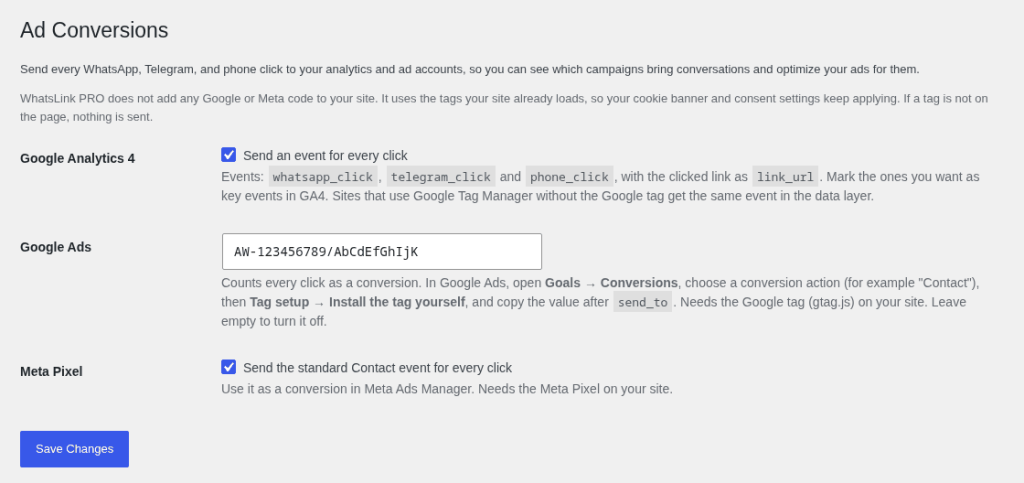
- Google Ads: paste the send_to value; every click counts as a conversion.
- Meta Pixel: tick it to send the standard Contact event.
- Google Analytics 4: tick it to send whatsapp_click, telegram_click, and phone_click events.
PRO adds no tracking code of its own: it uses the Google tag and Meta Pixel your site already loads, so your cookie banner and consent settings keep applying. If a tag is not on the page, nothing is sent to it.
Without a plugin
For a single hand-made link, you can send both conversions from the link itself (replace the send_to value with yours):
<a href="https://wa.me/391234567890"
   onclick="if (window.gtag) { gtag('event', 'conversion', { send_to: 'AW-123456789/AbCdEfGhIjK' }); }
            if (window.fbq) { fbq('track', 'Contact'); }">
  Chat on WhatsApp
</a>
This misses buttons generated by plugins and chat widgets. For those, use Tag Manager with an event that fires when WhatsApp is opened — see How to Track WhatsApp Button Clicks with Google Tag Manager.
Before you trust the numbers
- Consent. Visitors who decline marketing cookies are not sent to Google Ads or Meta when your consent setup blocks the tags. Your ad accounts see fewer conversions than really happened.
- Clicks are not messages. Some visitors open WhatsApp and never write. Compare conversions with the chats you actually receive for a couple of weeks.
- One setup only. Don’t send the same click from WhatsLink PRO and from Tag Manager, or each click counts twice.
- Give it time. Conversion columns can take hours to update, and automated bidding needs a steady flow of conversions before it changes much.
Read next
What WhatsLink PRO does for your ads
- Every WhatsApp, Telegram, and phone click as a Google Ads conversion
- The standard Contact event to your Meta Pixel
- whatsapp_click events in Google Analytics 4
- Chat widgets included: Click to Chat, Joinchat, WP Social Chat
- Uses the tags already on your site; adds no tracking code
FAQ
Can Google Ads see WhatsApp messages?
No. Google Ads only sees what your website reports. The click that opens WhatsApp can be reported as a conversion; the messages themselves stay inside WhatsApp.
Should I count every WhatsApp click or one per ad click?
For leads, Google suggests counting one conversion per ad click (Count: One), so a visitor who taps the button three times counts once. Use Every only if each click has value on its own.
Which Meta event should I use for WhatsApp clicks?
Contact, the standard event for a customer contacting your business by phone, chat, or another channel. Standard events can be used for optimization and reporting in Ads Manager without extra setup.
Do I need Google Tag Manager?
No. You can send the conversion with gtag from a hand-made link, or let WhatsLink PRO send it for every button and chat widget. Tag Manager is an option if you already use it.
Is a GA4 import as good as a Google Ads conversion action?
Both work. A Google Ads conversion action reports directly to Google Ads. An imported GA4 key event needs no extra tag but goes through GA4 first, and GA4 and Google Ads attribute conversions differently, so totals can differ.
Will this work if visitors decline cookies?
Only for visitors whose browser loads your Google tag and Meta Pixel. When your consent setup blocks the tags, those clicks are not sent, so your ad accounts undercount. WhatsLink's own click log in WordPress still records every click, without personal data.