
 Free plugin for WordPress
WhatsLink Click Tracker
Monitor every WhatsApp, Telegram, and phone click on your WordPress site — with zero setup.
WhatsLink Click Tracker FREE tracks clicks to WhatsApp (wa.me, api.whatsapp.com, WhatsApp Web, whatsapp://), Telegram (t.me), and phone (tel:) links across your posts, pages, and products, including chat widgets such as Click to Chat and Joinchat.
Start collecting insights today and unlock even more with the Pro version.
- Version
- 1.6.0
- Updated
- Apr 13, 2026
- Requires
- WordPress 6.0+
Screenshots

What WhatsLink Click Tracker PRO adds
Everything in WhatsLink Click Tracker, plus:
- Ad Conversions: every click sent to Google Ads, the Meta Pixel, and GA4
- Trend chart with visual click analytics over time
- Report filters (date range, UTM source, medium, campaign)
- UTM tracking (utm_source, utm_medium, utm_campaign)
- Referrer tracking
- KPI overview (total clicks, unique links clicked, pages with clicks, UTM coverage)
- Channel Breakdown (WhatsApp, Telegram, Phone clicks by channel)
- Export click logs to CSV
- Daily and weekly email reports
- Real-time email notifications for new clicks
- Built-in reporting dashboard inside WordPress
Overview
WhatsLink Click Tracker FREE is the easiest way to track WhatsApp, Telegram, and phone link clicks on your WordPress site — no setup required.
This lightweight plugin automatically detects clicks on WhatsApp links (wa.me, api.whatsapp.com, WhatsApp Web, and whatsapp://), Telegram links (t.me), and phone links (tel:) across your posts, pages, and WooCommerce products, including chat widgets such as Click to Chat, Joinchat, and WP Social Chat.
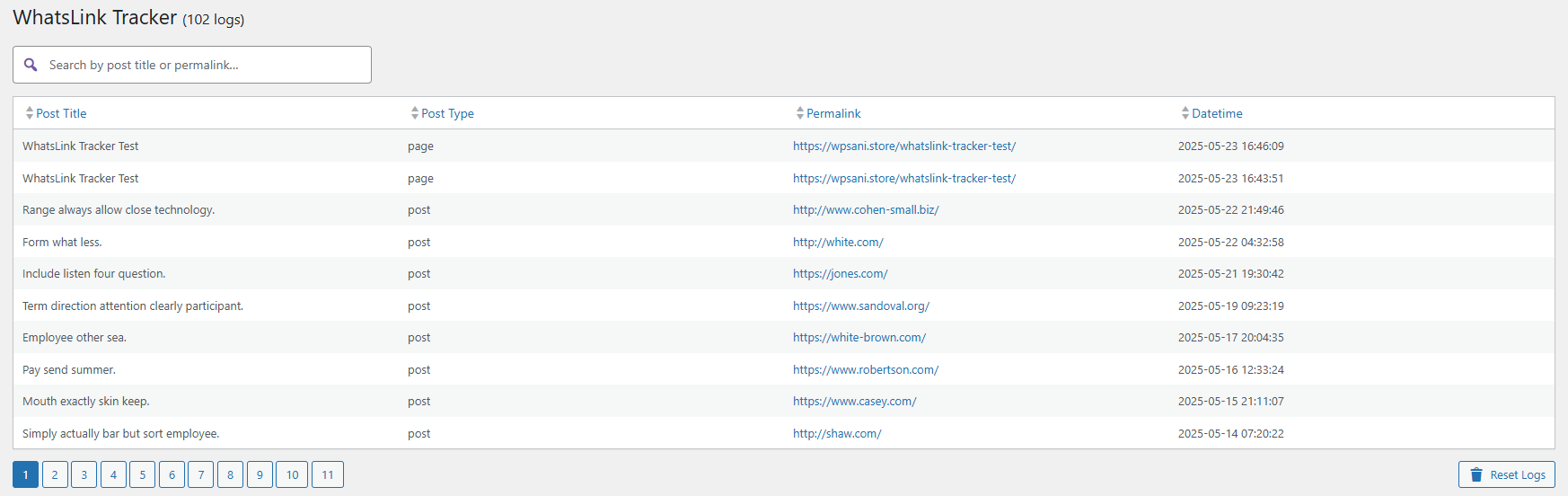
Each click is logged with key details: content name, post type, permalink, date/time, clicked URL, UTM source, UTM medium, UTM campaign, and referrer.
Running Google Ads or Meta ads? With WhatsLink PRO, every click also becomes a conversion in Google Ads, the Meta Pixel, and Google Analytics 4, using the tags your site already has. Developers can do the same with the free version: since 1.6.0, every logged click is announced on the page with a whatslink:click event.
Want to know where your leads come from and which campaigns perform best?
Start with the FREE version and scale with Pro version whenever you are ready.
Frequently asked questions
Does it work with Elementor, Divi, Beaver Builder, and other page builders?
Yes. WhatsLink detects clicks on WhatsApp links regardless of how they were added to the page — through any theme, page builder, or widget.
Which link formats does it support?
WhatsApp: https://wa.me/, https://api.whatsapp.com/send, https://web.whatsapp.com/send, and whatsapp://send are detected automatically.
Since version 1.5.5, WhatsLink also tracks Telegram links (https://t.me/) and phone links (tel:). No additional configuration needed.
Does it also track Telegram and phone links?
Yes, since version 1.5.5. Any link with a t.me/ URL or a tel: href is tracked alongside WhatsApp clicks. All three channels appear in the same click log and — if you use WhatsLink PRO — in the Channel Breakdown widget in the Reports dashboard.
How does the click tracking work? Does it modify my WhatsApp links?
No. WhatsLink uses a JavaScript event listener to detect clicks on messaging links, and also notices when a chat widget opens WhatsApp from JavaScript (as Click to Chat, Joinchat, and WP Social Chat do). Your links and widgets are never modified — they still open WhatsApp directly as usual. The click is just logged silently in the background.
What is the badge counter?
An optional feature that shows the total number of clicks next to each WhatsApp button — visible only when you are logged in as an admin. Useful for monitoring click activity directly on the page without opening the dashboard.
What's the difference between the free version and Pro?
The free version gives you the full click log with UTM and referrer data. Pro adds reports with date and UTM filters, visual charts, CSV export, and automated email reports. See the full comparison above.
Is it compatible with WooCommerce?
Yes. WhatsApp clicks on product pages are tracked and labeled by product title and type.
Is it GDPR compliant?
The Free version stores no IP addresses, no location data, and no personal user information — only anonymized click events tied to page URLs.
Will it slow down my site?
No. Click logging is asynchronous (uses the browser's sendBeacon API) and has no impact on page load time.
How many clicks can it store?
There is no hard limit. Clicks are stored in your WordPress database. You can reset the log at any time from the dashboard.
Can I export my click data?
CSV export is available in the Pro version.
Installation
- Install the plugin from the WordPress plugin directory or upload the zip manually.
- Activate it from the Plugins screen.
- Click WhatsLink Click Tracker in the WordPress admin sidebar to see your click log. No configuration required. Tracking starts immediately after activation.
Changelog
1.6.0
- New: Every logged click is announced on the page with a
whatslink:clickevent (clicked link, channel, and page), once per click and after the click is saved. Google Tag Manager or your own code can listen to it. See "For developers" in the description. - New: WhatsLink PRO 1.5.0 uses this event for Ad Conversions: clicks sent to Google Ads, the Meta Pixel, and Google Analytics 4. The Upgrade page now shows it first.
- Click tracking is unchanged: the same links, buttons, and chat widgets are logged exactly as before.
1.5.9
- New: The "Upgrade to PRO" page now shows what PRO adds with screenshots of the PRO screens (with example data), and how many clicks your site tracked in the last 30 days.
- Fix: The dashboard notices count all clicks (WhatsApp, Telegram, and phone), show the number formatted, and no longer appear on the Upgrade page itself. The upgrade notice now links to that page.
- Tweak: Removed unused demo images. Click tracking is unchanged in this version.
1.5.8
- Fix: Clicks on chat widgets that open WhatsApp from JavaScript instead of a link — Click to Chat, Joinchat, and WP Social Chat — are now tracked. Previously only plain links were.
- New: WhatsApp Web links (
web.whatsapp.com, used by Chaty, Joinchat, and others on desktop) and app links (whatsapp://) are now tracked. - Fix: Telegram links are now recognised by their address, so links such as
about.me/…are no longer counted as Telegram clicks. - Fix: One tap that triggers both a link and a widget is counted once.
- Fix: The "Top Page" stat and the "Top Pages" table were empty on MariaDB databases since 1.5.7.
- Fix: The plugin could not load on PHP versions older than 7.3. The minimum PHP version is now 7.4, the same as current WordPress.
- Fix: The deactivation feedback form now sends nothing unless you click "Send & Deactivate", says exactly what is sent, and can be closed without deactivating.
- Fix: After activation you are reliably taken to the WhatsLink dashboard, even if a background request runs first.
- Performance: The tracking script now loads deferred, and the badge stylesheet loads only for admins who see the badge.
Show 17 older releases
1.5.7
- Fix: Uninstalling the plugin now removes its database table, settings, and per-user dismissal flags. Previously, deleting the plugin left this data behind.
- Fix: The "Top Page" stat and the "Top Pages" table could come back empty on servers where MySQL's ONLY_FULL_GROUP_BY mode is enabled (the default on MySQL 8+ and many modern hosts) — this looked like "no data yet" but was a query error being silently swallowed.
- Performance: Added database indexes used by the badge counter lookup. Existing installs are upgraded automatically on the next visit to wp-admin — no action needed.
- Fix: Removed an inaccurate mention of "device" data from the empty-state screen; WhatsLink has never collected device data.
- Docs: Documented the optional deactivation feedback form (and the email it sends to the plugin author) in the FAQ.
- Docs: Updated "Tested up to" to WordPress 7.1 and trimmed tags to meet the WordPress.org 5-tag limit.
1.5.6
- Fix: Badge counter now displays click counts on Telegram (t.me) links, not only WhatsApp.
1.5.5
- New: Click tracking now covers Telegram links (t.me) and phone links (tel:) in addition to WhatsApp links.
1.5.4
- Fix: Corrected Pro upgrade link URL in readme — wrong URL was causing a redirect that stripped UTM parameters.
1.5.3
- Docs: Fixed installation instructions — plugin has a dedicated admin menu item, not under Tools.
1.5.2
- Compatibility: Confirmed compatibility with WordPress 7.0.
1.5.1
- Fix: Tracking reliability improvements for sites using dynamic WhatsApp button plugins.
- Fix: Admin scripts now load only on the plugin pages, not across the entire dashboard.
- Fix: Improved compatibility on sites with non-standard server configurations.
1.5.0
- Fix: Click tracking now works correctly with Joinchat, Chaty, WP Social Chat, and any plugin that injects its WhatsApp button via JavaScript. Previously those buttons could go untracked.
- Fix: Lighter frontend script — jQuery dependency removed.
- Fix: Badge counter correctly documented as visible to admins only.
1.4.0
- New: After tracking 25 clicks, a notice in the dashboard invites you to leave a review on WordPress.org.
- New: Plugin page updated with a compatibility list for popular WhatsApp button plugins.
1.3.0
- New: Deactivation feedback form — a short optional survey when you deactivate helps us improve the plugin.
- New: Once you have tracked 10+ clicks, a notice links to WhatsLink PRO for charts and CSV export.
1.2.2
- New: First-install screen — if no clicks have been logged yet, the dashboard confirms tracking is active instead of showing an empty table.
1.2.0
- New: Stats bar — total clicks, last 30 days, and top page shown at the top of the dashboard.
- New: Date range filter — view clicks from the last 7 days, 30 days, or all time.
- New: Top Pages — the 5 pages that have received the most WhatsApp clicks.
- Fix: Click tracking was not recording clicks from regular (non-admin) visitors. Critical fix — update immediately if you are on 1.1.x.
- Fix: Plugin was silently failing on sites with a non-standard database table prefix.
- Fix: Column sorting was not working correctly in all cases.
1.1.2
- Fix: Prevented a startup error on some server configurations during plugin activation.
1.1.1
- New: UTM tracking (source, medium, campaign) and referrer now included in the free version.
1.1.0
- New: Badge counter — shows total click counts next to each WhatsApp button (visible to admins only).
- New: Clicked URL column added to the click log.
- Fix: Click logging is now more reliable on mobile browsers.
- Fix: Security improvements.
1.0.1
- Fix: Security and stability improvements.
1.0.0
- Initial release. ---
Reviews
No reviews yet. If you use this plugin, tell others how it works for you.
Write a review
-
How to Track WhatsApp Clicks as Conversions in Google Ads and Meta Ads
Your ads bring WhatsApp conversations that Google Ads and Meta never see. Here is how to count each WhatsApp click as a…
-
How to Track WhatsApp Button Clicks with Google Tag Manager
Two Google Tag Manager setups for WhatsApp clicks: a link-click trigger for plain wa.me links, and a custom event that also catches…
-
How to Track Phone Link Clicks in WordPress (tel: Links)
WordPress doesn't track tel: link clicks by default. Learn how to log every phone number click — page, referrer, clicked link —…
-
How to Track Telegram Link Clicks in WordPress
WordPress doesn't track t.me link clicks by default. Learn how to capture every Telegram click — page, referrer, clicked link — without…
-
WhatsApp Button Not Tracking in WordPress: How to Fix It
Your WhatsApp button gets clicks but nothing shows in analytics. Here are the three reasons tracking breaks — and the fix that…
Questions or problems?
Write to us and a person who builds the plugin will reply, usually within 24 hours.