
On this page
- WordPress WhatsApp Prefilled Messages by Page Language
- Can a WhatsApp link show a different message for each language?
- Which page language should your WhatsApp button use?
- Tag each localized message with a reference code
- How to check every language-specific WhatsApp link
- Managing localized messages and click logs in WordPress
- Official sources
WordPress WhatsApp Prefilled Messages by Page Language
To give a WordPress WhatsApp link a different prefilled message for each page language, change the text value in each translated page’s button URL. Translating the button label alone does not change the message already typed when WhatsApp opens.
Can a WhatsApp link show a different message for each language?
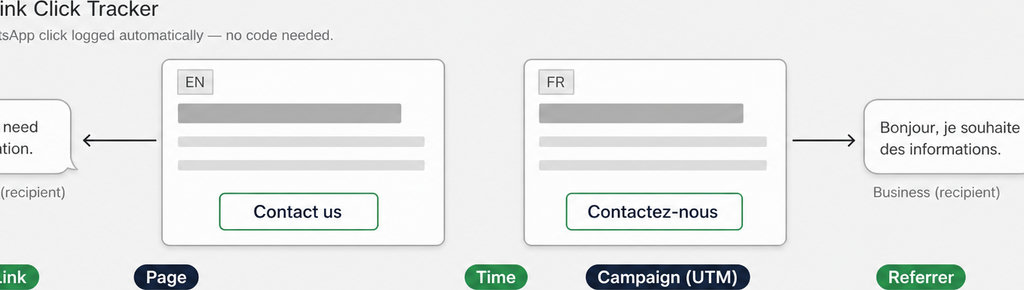
Yes. Each language version can point to the same WhatsApp number while supplying a different message. WhatsApp uses the text included in the link; it does not choose a translation based on the page.
The documented click-to-chat format is https://wa.me/NUMBER?text=ENCODED_MESSAGE. Replace NUMBER with your international phone number, including the country code but no plus sign, spaces, brackets, or dashes. Both examples below contain a placeholder number: replace it before publishing.
- English version:
https://wa.me/NUMBER?text=Hello%2C%20I%20need%20information. - French equivalent:
https://wa.me/NUMBER?text=Bonjour%2C%20je%20souhaite%20des%20informations.
Apply URL encoding to the message, not the entire link. This protects spaces, accented characters, and punctuation from being interpreted as URL syntax. Developers can generate the text value with JavaScript’s encodeURIComponent(message); editors can request the finished encoded URLs from whoever maintains the site. Opening the link creates a chat draft, not a sent inquiry. The visitor can edit the text, delete it, or leave without sending.
Which page language should your WhatsApp button use?
Match the currently displayed page, rather than guessing from the visitor’s location or browser language. Someone reading your French service page should receive the French draft, even if they arrived from an English-language search.
To add the WhatsApp link in WordPress:
- Edit the translated page. Select the individual button inside its Buttons block.
- Open the Link control. Paste the complete localized URL and save. WordPress documents this control separately from the button’s editable text. Repeat for each translation.
- Polylang: With pages edited separately, update the button on each translated page.
- TranslatePress: Use its external-link translation workflow.
- WPML or a page builder: Check the destination itself: translating surrounding text does not prove that an external WhatsApp URL changed.
A shared floating button needs different handling:
- Check its settings. If they contain only one global URL, editing a page-level button will not change it. Check whether the widget supports language-specific destinations or translated settings; do not assume it does.
- Define a fallback message for any language without a configured translation.
Explore the difference between opening a WhatsApp chat, recording a click, and identifying a lead. Read more WhatsApp tracking guides
Tag each localized message with a reference code
An optional reference code makes incoming messages easier to place. For example, use Hello, I need information [EN-CONTACT] on the English contact page and Bonjour, je souhaite des informations [FR-CONTACT] on its French counterpart.
Encode the complete message, including the marker. Keep the code short and understandable: it is visible to the visitor, not hidden tracking data. Avoid putting customer details or other sensitive information into a link.
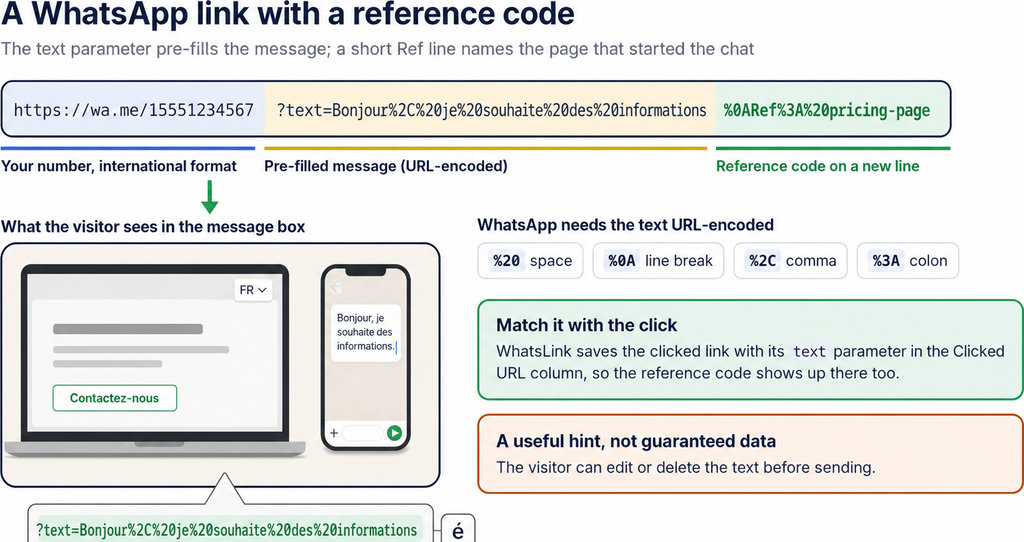
- The marker describes the intended page source, not the visitor’s identity or guaranteed preferred language. A visitor can remove it, and a forwarded link can carry it somewhere else.
- Record the click separately. A WordPress click log can preserve the clicked page, available UTM parameters, and referrer even when the visitor never sends the draft.
- Allow for missing information. Referrer and campaign information may be absent, so missing values should not be treated as proof of a direct visit.
Measure clicks separately from the editable message. Track WhatsApp clicks free with WhatsLink
How to check every language-specific WhatsApp link
- Test the published pages, not just the editor preview. Open the English page, click its button, and inspect the recipient and complete draft. Repeat from the French page and every other supported language.
- Check accented characters and punctuation, especially apostrophes, ampersands, and line breaks. A message cut off at an ampersand usually warrants inspecting the encoded
textvalue. If literal encoding fragments appear in the draft, check whether the message was encoded twice. - Test on a phone and on desktop with WhatsApp Web available. Then switch languages using the website’s language selector and click again. This catches shared buttons that retain the previous destination.
- Inspect the saved destination URL first if the button label changes but the draft does not. If the saved URL is correct but the live page differs, clear relevant page caches and inspect the rendered link before changing translations again.
Managing localized messages and click logs in WordPress
Keep message configuration and click measurement separate. Your translated pages or button widget control what WhatsApp opens. A tracker records the interaction; it does not translate the draft or confirm that someone sent it. For an owner comparing multilingual contact pages, my recommendation is to keep the language in the page URL, such as /en/contact/ and /fr/contact/, and review the logged page alongside available campaign data. This gives you a useful comparison without treating the editable message as your only evidence.
A click is not a named lead. For that distinction, read Who Clicked My WhatsApp Link? What You Can Track. If your team needs to carry source information into its lead process, use Track WhatsApp Lead Source in Your CRM from WordPress for the next step. Running ads to multilingual pages? Check WhatsLink PRO’s documented features to see whether it meets your click-tracking needs. These remain click conversions, not proof of sent messages. Send WhatsApp clicks to your ads and your team with WhatsLink PRO
What WhatsLink records for each click
- The page and post type where the click happened
- The WhatsApp, Telegram or phone link clicked, with its pre-filled text
- UTM source, medium and campaign of that page
- The referrer and the date and time
- No IP address, location or device