
On this page
To stop local WordPress sending real emails during plugin tests, block outgoing mail when delivery is irrelevant, or capture messages locally when you need to inspect them.
Do this before testing registrations, password resets, contact forms, or purchase notifications on a copy containing customer addresses.
Stop Local WordPress Sending Real Emails During Plugin Tests
For a no-code blocker, Disable Emails stops messages using WordPress’s standard wp_mail() function. That includes password-reset emails, so keep a working administrator login before enabling it. A mail catcher, such as Mailpit, instead gives you a local inbox where you can examine generated messages without delivering them to customers.
Neither option automatically covers every sending route:
- Remove production SMTP credentials and email-provider API keys from the copy before running tests. An integration that calls an external API directly can bypass WordPress’s mail function; external SMTP can bypass your local catcher.
- Local is not an email firewall. Confirm which transport each plugin uses, and ensure any catcher has external relay and forwarding disabled.
Read more WhatsApp tracking guides
If your plugin tests also involve WhatsApp buttons, these guides explain the separate click-tracking workflow.
Read more WhatsApp tracking guides
Which plugin or action triggered the test email?
Trigger one action at a time: submit one form, change one order, or request one password reset. Compare the resulting recipient, subject, body, and timestamp before moving to the next action. Running several tests together makes attribution harder, especially when background jobs send messages later.
WP Mail Logging can help inspect messages, attachments, and errors, but a log is not a blocker. Do not assume it identifies the responsible plugin automatically.
- Narrow the search: a recognizable subject or template can help.
- Confirm the source: repeat the action with unrelated plugins disabled.
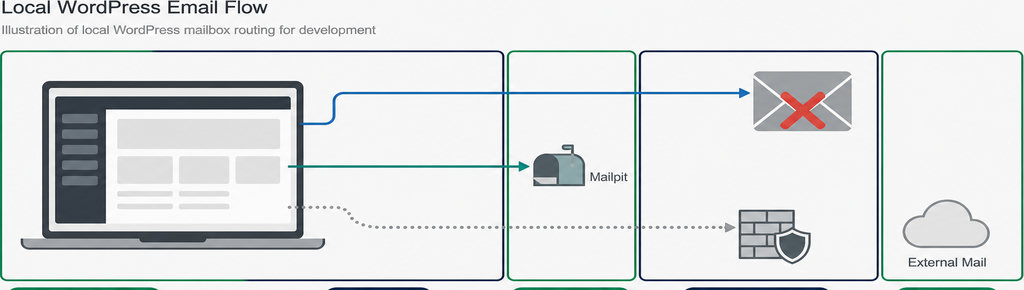
Keep generated, captured, and delivered separate in your notes.
- Reported success is not delivery. A plugin reporting success does not establish inbox delivery, and a local capture does not prove every other sending route is contained.
- Keep contact-button records separate. WhatsApp click records provide context for click testing, not proof that an email was sent.
Track WhatsApp clicks free with WhatsLink
Use the free click record alongside your mail test notes when checking which pages and campaigns lead to WhatsApp interactions.
Track WhatsApp clicks free with WhatsLink
Tag each test email with a reference code
Add a unique test marker to a subject or message field you control, for example:
Change it between runs so you can distinguish a fresh result from an older message still sitting in the catcher.
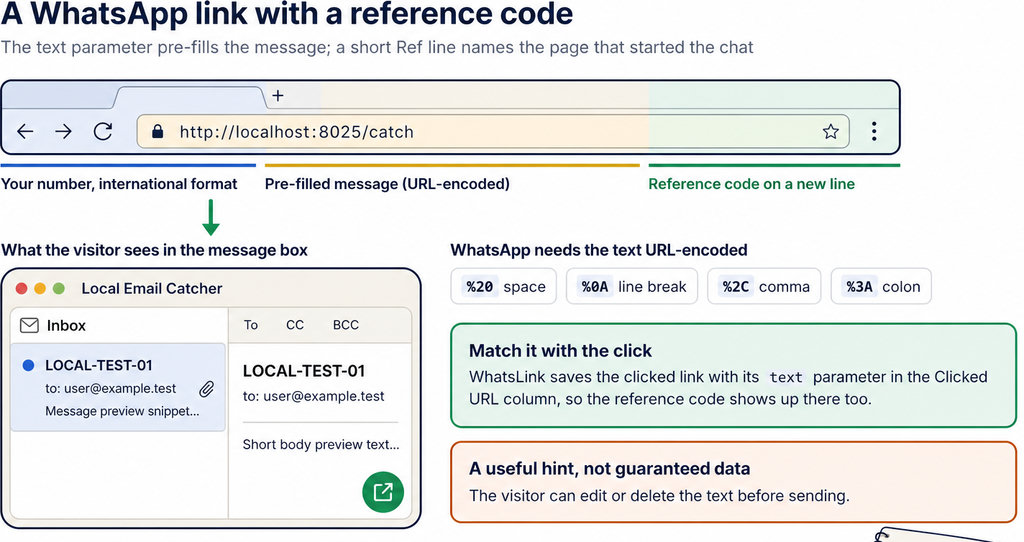
- Record the action and expected recipient alongside that marker. For example, “order status changed, test customer address” makes an unexpected administrator notification easier to spot. Use synthetic customer details rather than copying private message contents into shared notes.
- A reference code is identification, not protection. It cannot stop delivery, replace SMTP isolation, or make a real customer address safe. Likewise, changing only the main recipient leaves possible CC and BCC recipients untouched.
- Prefer test-controlled fields. Avoid modifying the plugin’s source just to label messages unless that modification is itself under test, keeping the behavior you want to evaluate intact.
How to check that your email safeguard works
- Start with a test account you control, not a customer account. In Local, open Tools → Mailpit → Open Mailpit, then request a password reset. Local documents this capture test for messages sent through PHP’s
mail()function. - If you chose blocking instead, expect no newly captured message from the blocked standard mail call. That absence alone is not proof of safety: verify the blocker is active and inspect any separate SMTP or API configuration.
- Repeat the actual plugin action. Check the intended recipient, CC, BCC, message content, and attachments in the catcher. A password-reset capture establishes a baseline; it does not validate a plugin using another transport.
- Test delayed notifications too. An immediate action can enqueue mail that runs later through WordPress cron.
If background tasks behave differently on protected staging, follow the guide to testing WordPress plugin cron on password-protected staging before treating a quiet inbox as a successful test.
Blocking and logging test emails in WordPress
For a developer-controlled guard on WordPress 5.7 or later, set define( 'WP_ENVIRONMENT_TYPE', 'local' ); in the local wp-config.php before WordPress loads. The environment setting alone does not block mail.
Create wp-content/mu-plugins/ if necessary, then save a PHP file directly inside it containing <?php if ( 'local' === wp_get_environment_type() ) { add_filter( 'pre_wp_mail', '__return_true' ); }. Must-use plugins load automatically.
The pre_wp_mail filter stops standard sending when it returns a non-null value. Here, returning true simulates success without sending; returning false would report failure. An unset or invalid environment defaults to production, so this local-only guard would not activate.
Use either this guard or the no-code blocker deliberately. Verify logger compatibility rather than expecting every logger to record short-circuited messages. Keep local configuration out of production. On multisite, check scope using the guide to testing a plugin on one multisite subsite.
For advertising tests, isolate analytics destinations too: mail blocking does not prevent test conversions reaching production accounts. Before testing any per-click email feature, verify its sending route against your safeguard.
Send WhatsApp clicks to your ads and your team with WhatsLink PRO
Send WhatsApp clicks to your ads and your team with WhatsLink PRO.
Explore WhatsLink PRO
What WhatsLink records for each click
- The page and post type where the click happened
- The WhatsApp, Telegram or phone link clicked, with its pre-filled text
- UTM source, medium and campaign of that page
- The referrer and the date and time
- No IP address, location or device