
On this page
Can a WordPress WhatsApp Button Send Automatically?
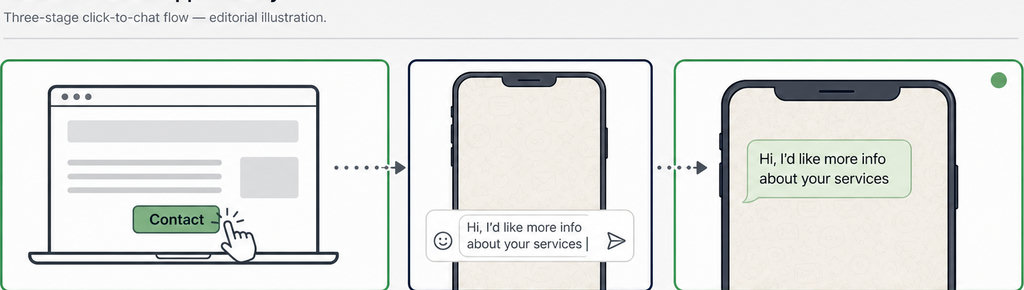
No: a standard WordPress WhatsApp button cannot send a message automatically from the visitor’s account. It opens WhatsApp, optionally with a pre-filled draft, but the visitor must press Send before that message can reach your business.
There are three separate actions: clicking your website button, opening the chat, and sending the message. A successful first step does not prove the other two happened. That matters when your website reports clicks but your WhatsApp inbox has no corresponding inquiries.
- According to WhatsApp’s click-to-chat documentation, a link containing message text puts that text into the chat’s message field. A pre-filled message saves typing; it is not a command to submit the draft. Adding a WordPress plugin around that link does not change this behavior.
- Business messaging automation is a different mechanism. A WhatsApp Business Platform integration can send messages from the business under applicable messaging rules, as explained in Twilio’s WhatsApp concepts documentation. It does not silently press Send on an unsent draft in the visitor’s account. If a tool advertises automatic messages, check whose account sends them and what triggers them.
Read more WhatsApp tracking guides
- Explore what you can measure before and after a visitor leaves your website.
What Does a WhatsApp Button Click Tell You About the Visitor?
A recorded click shows contact intent, not a confirmed conversation. The visitor might open the chat and leave, edit the draft, or encounter a problem opening WhatsApp. They might also click repeatedly while comparing products.
Google Analytics documents outbound-click measurement as tracking links that take visitors to another website. That event concerns the website interaction, not the later action inside WhatsApp. An outbound click therefore cannot, by itself, confirm message delivery.
- Nor does a normal click log reveal the visitor’s WhatsApp name or phone number. For that distinction, see Who Clicked My WhatsApp Link? What You Can Track. A report about where someone clicked is different from identifying the person who contacted you.
- For a useful website-side record, capture the page, UTM parameters and referrer associated with each click. These help distinguish a product-page button from a contact-page button and identify campaign information when available. UTMs and referrers can be missing, so an empty field is not necessarily a tracking failure.
- If that is the record you need, check whether WhatsLink Click Tracker’s free version provides it. Treat its entries as click records, not an inbox of received messages.
Track WhatsApp clicks free with WhatsLink
Explore WhatsApp click tracking without treating a click as proof of a sent message.
Track WhatsApp clicks free with WhatsLink
Tag the Pre-filled Message with a Reference Code
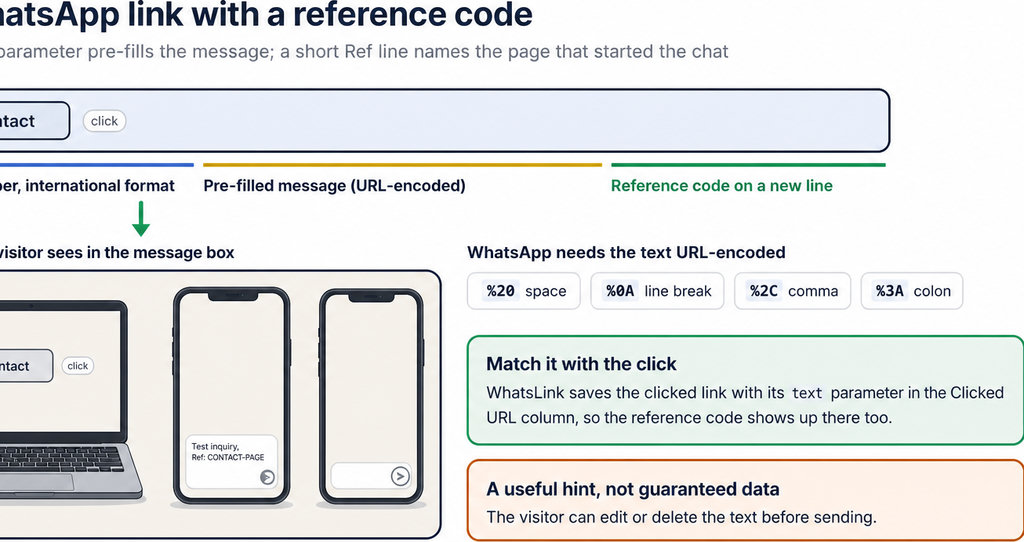
- A reference code in the draft can help connect a received inquiry with the button that opened it. For example, your contact-page button could prepare: “Hello, I’m interested in this service. Ref: CONTACT-PAGE.”
- Use a different code for a genuinely different placement, such as
PRODUCT-INSTALLATIONfor an installation service page. A readable code is easier for your team to interpret than an unexplained number. Avoid inserting private customer information into a URL. - The useful evidence is the received message containing the code, not merely the link containing it. Visitors can edit or delete the text, write a different message, or decide not to send anything. A copied or shared link can also carry the original code into a different context.
- This gives you source context, not guaranteed attribution. If a code appears in a received message, it is a clue about the link used. If it does not appear, the website’s click log still cannot fill that gap by proving which message followed the click.
How to Check That Your WhatsApp Button Works and Get a Click Log in WordPress
Test the full journey rather than stopping when WhatsApp opens. First inspect the link: a standard click-to-chat address uses https://wa.me/ followed by the international-format number, without a plus sign, brackets or dashes. Encode the draft text in the text parameter so spaces and punctuation survive the URL.
If you need to construct the link yourself, follow Add a WhatsApp Button to WordPress Without a Plugin. The same destination and draft checks apply whether the button comes from your theme, a page builder or a plugin.
Click the published button on mobile and desktop, using the app or WhatsApp Web as appropriate. Check the destination account and draft. Then send a test message and confirm it arrives in the business inbox.
Finally, compare the inbox with the website log. A recorded click followed by an unsent draft demonstrates the measurement boundary. A received test message verifies the sending step too; neither test guarantees that future visitors will complete it.
A WhatsApp link does not create a WordPress report on its own. You need click tracking configured for the relevant button or link, and you should verify that it records a test click before relying on the data.
Keep clicks and inquiries separate in reporting. Label a click-based conversion “WhatsApp button click,” rather than “WhatsApp message received.” If you count actual inquiries manually, remember that repeat clicks and returning customers prevent a simple one-click-to-one-contact comparison.
For advertising, a conversion event can still represent a useful action without representing a completed conversation. The important point is to tell your team what it measures before using it to judge campaign results.
Send WhatsApp clicks to your ads and your team with WhatsLink PRO
Review WhatsLink PRO’s documented features and integrations before choosing it. These remain click signals—not confirmation of a received WhatsApp message.
Explore WhatsLink PRO
What WhatsLink records for each click
- The page and post type where the click happened
- The WhatsApp, Telegram or phone link clicked, with its pre-filled text
- UTM source, medium and campaign of that page
- The referrer and the date and time
- No IP address, location or device