
On this page
- Start from the symptom
- Change one thing at a time
- Submenu missing: check the menu structure
- Classic themes
- Block themes
- Submenu opens behind the content: fix the stacking order
- Submenu is cut off: look for overflow on a parent
- Submenu closes before you reach it
- Dropdown doesn’t open on mobile or with the keyboard
- Form dropdown empty, or the choice never arrives
- WooCommerce variation dropdown missing or “unavailable”
- Still broken? Isolate the theme or plugin
- FAQ
- Official sources
Start from the symptom
A missing submenu is a menu setting. A submenu behind the content, cut off or closing too early is theme CSS. One that won't open on a phone is a hover-only menu or a script error.
Change one thing at a time
Check the live page in a private window after each change, so a cache or a second menu doesn't hide the result. Test CSS on a staging copy or after a backup.
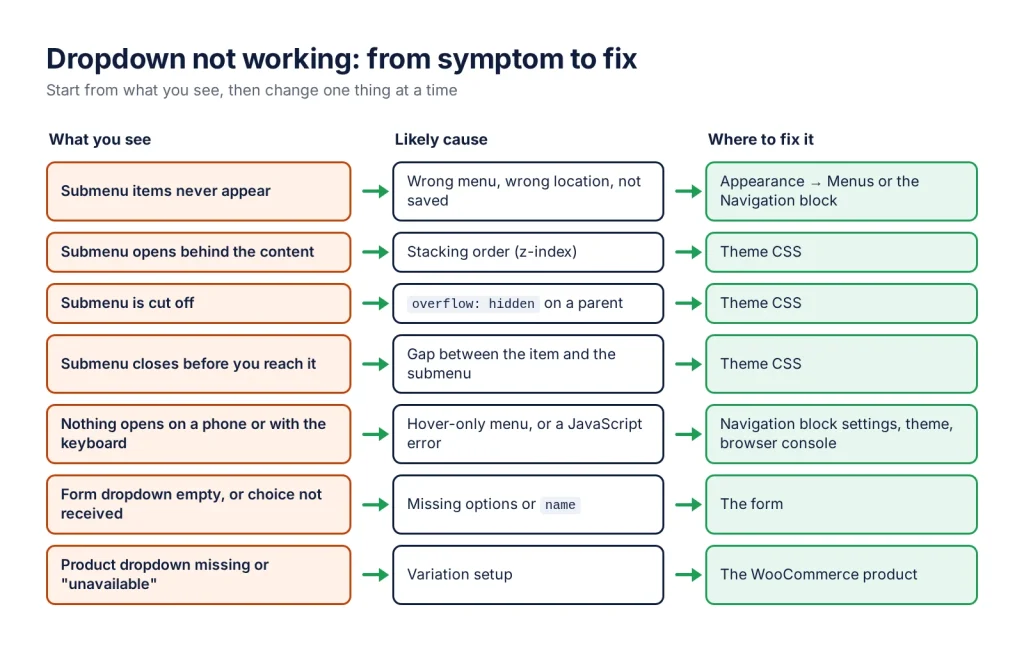
A WordPress dropdown menu that doesn’t work usually has one of five causes: the submenu is not in the menu the header shows, the theme’s CSS hides or clips it, it only opens on hover, a script failed to load, or (for forms and shops) the options themselves are missing. Start from what you see, find the matching section below, and change one thing at a time.
| What you see | Likely cause | Where to fix it |
|---|---|---|
| Submenu items never appear | Wrong menu, wrong location, not saved | Appearance → Menus or the Navigation block |
| Submenu opens behind the content | Stacking order (z-index) | Theme CSS |
| Submenu is cut off | overflow: hidden on a parent | Theme CSS |
| Submenu closes before you reach it | Gap between the item and the submenu | Theme CSS |
| Nothing opens on a phone or with the keyboard | Hover-only menu, or a JavaScript error | Navigation block settings, theme, browser console |
| Form dropdown empty, or choice not received | Missing options or name | The form |
| Product dropdown missing or “unavailable” | Variation setup | The WooCommerce product |
Submenu missing: check the menu structure
Before touching CSS, confirm the submenu really exists in the menu your header displays.
Classic themes
- In Appearance → Menus, check that the child items are indented under their parent. If they are level with it, drag them slightly to the right.
- Under Menu Settings, check that this menu is assigned to the header’s Menu location. A site can have several menus, and the header may show a different one.
- Click Save Menu, then clear your page cache and check the live site in a private window.
Block themes
Open Appearance → Editor, edit the Header and select the Navigation block. In its List View, check that the child links sit inside a Submenu item, and that the block shows the menu you edited: one Navigation block displays one menu at a time, so you may have edited another one. Save the template part, not only the menu.
If you still need to build the submenu, WordPress Dropdown Menu & List: 3 Ways, No Plugin Needed has the steps for both kinds of theme.
Submenu opens behind the content: fix the stacking order
If you can see the submenu start to open and then disappear under a slider, a hero image or the page content, it is a stacking problem. Right-click the submenu and choose Inspect to see which element covers it.
Raising the submenu’s z-index alone often fails. An element creates its own stacking context when, for example, it has position: relative with a z-index, a transform, a filter or an opacity below 1. Everything inside it is then stacked only within that context. So raise the header, the ancestor that competes with the content:
/* Replace .site-header with your theme's header selector (see Inspect). */
.site-header {
    position: relative; /* z-index needs a positioned element */
    z-index: 100;       /* higher than the slider or hero below it */
}

/* If the element covering the menu has a transform or its own z-index,
   give it a lower one instead: */
.hero-slider {
    position: relative;
    z-index: 1;
}
Add CSS in Appearance → Customize → Additional CSS (classic themes). In block themes, open Appearance → Editor → Styles and choose Additional CSS from its menu.
Submenu is cut off: look for overflow on a parent
If the submenu stops at the bottom edge of the header bar, as if sliced, an ancestor has overflow: hidden (or auto), which clips anything that extends beyond it. In the Inspect panel, select each parent of the submenu in turn and look for overflow in its styles:
/* The header row that clips the dropdown */
.site-header .header-inner {
    overflow: visible;
}
Themes sometimes set overflow: hidden on purpose, to contain floats or a sliding mobile menu. Test the mobile menu after the change.
Submenu closes before you reach it
A hover menu stays open only while the pointer is over the parent item or the submenu. If there is a gap between the two, for example a margin-top on the submenu, the pointer leaves both while crossing it and the submenu closes. Remove the gap, or replace the margin with padding inside the submenu:
/* Replace the selector with your theme's submenu (see Inspect). */
.main-navigation .sub-menu {
    margin-top: 0;
    padding-top: 10px; /* the space stays, but now it belongs to the submenu */
}
Dropdown doesn’t open on mobile or with the keyboard
Touch screens have no hover, and keyboard users can’t hover either. A menu that only opens on hover needs another way in.
- Block themes: select the Navigation block, open the Settings tab, and in Display set Submenu Visibility to Click or keep Show arrow on. In the Overlay section, Overlay visibility controls whether phones get the collapsed menu.
- Tap the arrow, not the label. With hover menus, tapping the parent’s text can follow its link. If the parent should only open the submenu, use a parent without a page of its own.
- Classic themes: the mobile toggle is the theme’s JavaScript. Open the browser console (F12 → Console) on the live page: a red error means a script stopped before the menu code ran.
Script errors often appear after an optimisation plugin combines, defers or delays JavaScript. Exclude the theme’s navigation script from those settings, or turn the option off and test again. To see which scripts a page loads and whether one is missing a dependency, Query Monitor helps; it is part of WordPress Plugins for Developers: Debug & Staging Tools.
Form dropdown empty, or the choice never arrives
Menu settings and menu CSS don’t affect a form’s select field. If the list is empty, the field has no choices: open it in your form plugin and add them, one per line. If the form sends but the chosen value is missing:
- in hand-written HTML, check that the
<select>has anameattribute: fields without one are left out of the submission; - in a form plugin, check that the field is included in the notification email or entry;
- if the page shows an old version of the form, clear the page cache.
WooCommerce variation dropdown missing or “unavailable”
- No dropdown at all: the product must be a Variable product, and in the Attributes tab the attribute must have Used for variations ticked.
- Options missing: in the Variations tab, check that each combination exists and has a price. WooCommerce does not show variations without a price.
- Out-of-stock options hidden: if Hide out of stock items from the catalog is on in WooCommerce’s inventory settings, out-of-stock variations can disappear from the dropdown, unless they allow backorders.
- “Sorry, no products matched your selection. Please choose a different combination.”: no variation exists for that combination. Create it in the Variations tab, or remove the attribute value that nobody can buy.
- “Sorry, this product is unavailable. Please choose a different combination.”: the variation exists but can’t be bought, for example because it has no price. Give it a price, then test the combination again.
Both messages are more common on products with more than 30 variations. Up to that number, WooCommerce loads every variation with the page and removes or disables the options that lead to no variation; above it, it checks each combination only after the customer has chosen it.
Still broken? Isolate the theme or plugin
Work on a staging copy, or take a backup first. Then:
- Switch to a default theme such as Twenty Twenty-Five. If the submenu works there, the cause is your theme or its settings.
- With your theme active, deactivate caching, optimisation and menu plugins one at a time, testing after each.
- Check
debug.logfor PHP errors raised while the header loads. WordPress debug.log: Location, Size, and How to Clear It shows where to find it.
When one step fixes it, you have the cause: report it to the theme or plugin developer with what you changed.
Free plugins from WPSani
- Quick debug.log Viewer: read and clear debug.log in the dashboard
- WhatsLink Click Tracker: log WhatsApp, Telegram and phone link clicks
- GPL licensed, no account needed to use them
- Small plugins that each solve one problem
FAQ
Why does my WordPress submenu not show up?
Usually the child items are not indented under their parent, the menu you edited is not the one assigned to the header's Menu location, or a page cache still serves the old header. In a block theme, check that the Navigation block in the Header shows the menu you edited.
Why is my dropdown menu hidden behind the page content?
It is a stacking problem. Raising the submenu's z-index often fails because an ancestor creates its own stacking context. Give the header position: relative and a higher z-index than the element that covers it.
Why does my dropdown menu work on desktop but not on mobile?
Phones have no hover. In a block theme, set Submenu Visibility to Click or keep Show arrow on in the Navigation block settings. In a classic theme, check the browser console for JavaScript errors and any optimisation plugin that delays scripts.
Why does WooCommerce say this product is unavailable for some choices?
The variation for that combination exists but cannot be bought, usually because it has no price. If no variation exists at all, WooCommerce says that no products matched your selection instead. On products with more than 30 variations WooCommerce no longer removes impossible combinations from the dropdowns in advance, so customers meet both messages more often.