
On this page
- The short answer
- Dropdown lists in forms and shops
- Which WordPress dropdown do you need?
- Dropdown menu in a classic theme (Appearance → Menus)
- Dropdown menu in a block theme (Site Editor)
- Open the submenu on click instead of hover
- Dropdown list in a form (select field)
- Category and archive dropdowns
- WooCommerce dropdowns (product variations)
- When the dropdown doesn’t work
- Do you need a dropdown menu plugin?
- FAQ
- Official sources
The short answer
A dropdown menu is a submenu: drag an item under its parent in Appearance > Menus, or click Add submenu in the Navigation block of a block theme.
Dropdown lists in forms and shops
A dropdown list in a form is a select field from your form plugin. Product dropdowns come from WooCommerce variations, which need attributes, variations and prices.
You can create a dropdown in WordPress without a plugin: a dropdown menu is a submenu you build in Appearance → Menus (classic themes) or in the Navigation block (block themes), and a dropdown list in a form is a <select> field. On a WooCommerce store, product variations create their own dropdowns.
Pick the kind you need below and follow its steps.
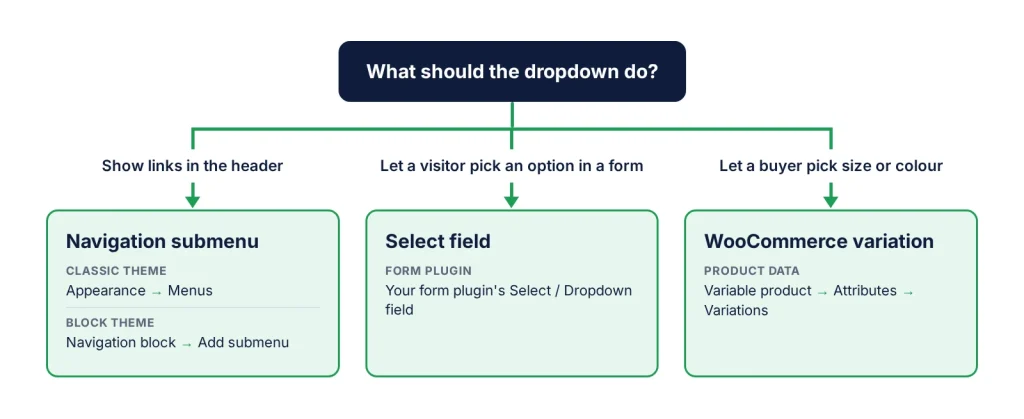
Which WordPress dropdown do you need?
- A dropdown menu in your header: links that open under a parent item, such as Services → Web design, SEO. You build it as a submenu.
- A dropdown list in a form: the visitor picks one option, which is sent with the form. That is a select field.
- A product option: size or colour on a WooCommerce product. WooCommerce shows those dropdowns for variable products.
Dropdown menu in a classic theme (Appearance → Menus)
If your dashboard has Appearance → Menus, your theme uses classic menus:
- Go to Appearance → Menus and select your menu, or create one.
- Add the pages, posts or custom links you need from the left column.
- Drag an item slightly to the right, under the item that should be its parent. It is now a sub-item, shown indented.
- Under Menu Settings, tick the Menu location your theme uses for the header (the names depend on the theme, for example Primary).
- Click Save Menu and check the live site.
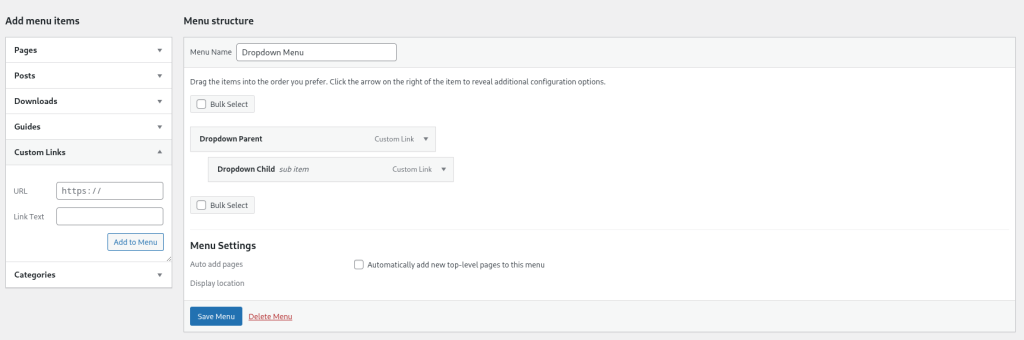
Each sub-item can have its own sub-items, but how many levels show, and whether they open on hover or click, depends on your theme. A parent that should only open the submenu, without a page of its own, can be a Custom Link with # as its URL.
Dropdown menu in a block theme (Site Editor)
Block themes such as Twenty Twenty-Five usually have no Menus screen. The menu lives in the Navigation block, usually in the Header template part:
- Go to Appearance → Editor and open the Header (or choose Navigation to edit the menu directly).
- Select the link that should become the parent and click Add submenu in its toolbar.
- Add the child links inside the new Submenu block.
- Click Save and check the live site.
Open the submenu on click instead of hover
In a block theme this is a setting, not code. Select the Navigation block (not one of its links), open the Settings tab in the sidebar and go to the Display section, under Submenus:
- Submenu Visibility: choose Click instead of Hover. Older WordPress versions show this as an Open on click toggle.
- Show arrow: keeps a small arrow next to each parent, so keyboard users can open a submenu on its own.
If you choose Hover and turn off Show arrow, WordPress warns that these options “offer reduced accessibility”. Keep at least one of Click or Show arrow on. In a classic theme, click-to-open is up to the theme: look for the option in Appearance → Customize or the theme’s settings.
Dropdown list in a form (select field)
Most form plugins have a field called Select or Dropdown: add it, type one choice per line, save. In Contact Form 7 it is a form-tag; the asterisk makes it required:
[select* service "Web design" "SEO" "Maintenance"]In hand-written HTML, for example in a Custom HTML block, the field looks like this. The name attribute matters: without it, the choice is not sent with the form.
<label for="service">Choose a service</label>
<select id="service" name="service" required>
  <option value="">Select one</option>
  <option value="web-design">Web design</option>
  <option value="seo">SEO</option>
  <option value="maintenance">Maintenance</option>
</select>
A select on its own does nothing: it must be inside a form that sends its data somewhere, which is why a form plugin is usually simpler.
Category and archive dropdowns
For a list of your categories or monthly archives, you don’t need a form at all. The Categories List block and the Archives block both have a Display as dropdown option in their settings.
WooCommerce dropdowns (product variations)
WooCommerce shows a dropdown for each attribute of a variable product:
- Edit the product and choose Variable product in the Product data box.
- In the Attributes tab, add an attribute such as Size with its values, tick Used for variations, and click Save attributes.
- In the Variations tab, click Generate variations.
- Give every variation a price, then update the product.
Step 4 is the one people miss: WooCommerce does not show variations without a price in your store.
When the dropdown doesn’t work
A submenu that is saved but hidden behind the page, cut off, or impossible to open on a phone has a cause you can find: menu location, theme CSS, a script that did not load, or a setting. Dropdown menu not working? See the fixes, sorted by symptom.
Do you need a dropdown menu plugin?
Not for the three dropdowns above. A plugin is worth it when you want something WordPress and your theme don’t offer:
- a mega menu, with columns, images or widgets inside the dropdown;
- form dropdowns that show or hide other fields (conditional logic);
- product options that are not variations, such as a gift message;
- filters that narrow a list of posts or products.
Before you install one, test it on a staging copy: a plugin that changes your header usually loads its files on every page of the site.
Free plugins from WPSani
- Quick debug.log Viewer: read and clear debug.log in the dashboard
- WhatsLink Click Tracker: log WhatsApp, Telegram and phone link clicks
- GPL licensed, no account needed to use them
- Small plugins that each solve one problem
FAQ
How do I create a dropdown menu in WordPress without a plugin?
In a classic theme, go to Appearance > Menus, drag an item slightly to the right under its parent, and save. In a block theme, open Appearance > Editor, select a link in the Navigation block, click Add submenu and add the child links.
How do I make a WordPress dropdown menu open on click?
In a block theme, select the Navigation block and, under Submenus in its settings, set Submenu Visibility to Click (older versions call it Open on click). In a classic theme it depends on the theme's own options.
How do I add a dropdown list to a WordPress form?
Add the Select or Dropdown field of your form plugin and enter one choice per line. In Contact Form 7, use a select form-tag. In hand-written HTML, use a select element with a name attribute inside the form.
Why is my WooCommerce variation dropdown empty?
Usually because the attribute is not marked Used for variations, the variations were never generated, or they have no price. WooCommerce does not show variations without a price.