
On this page
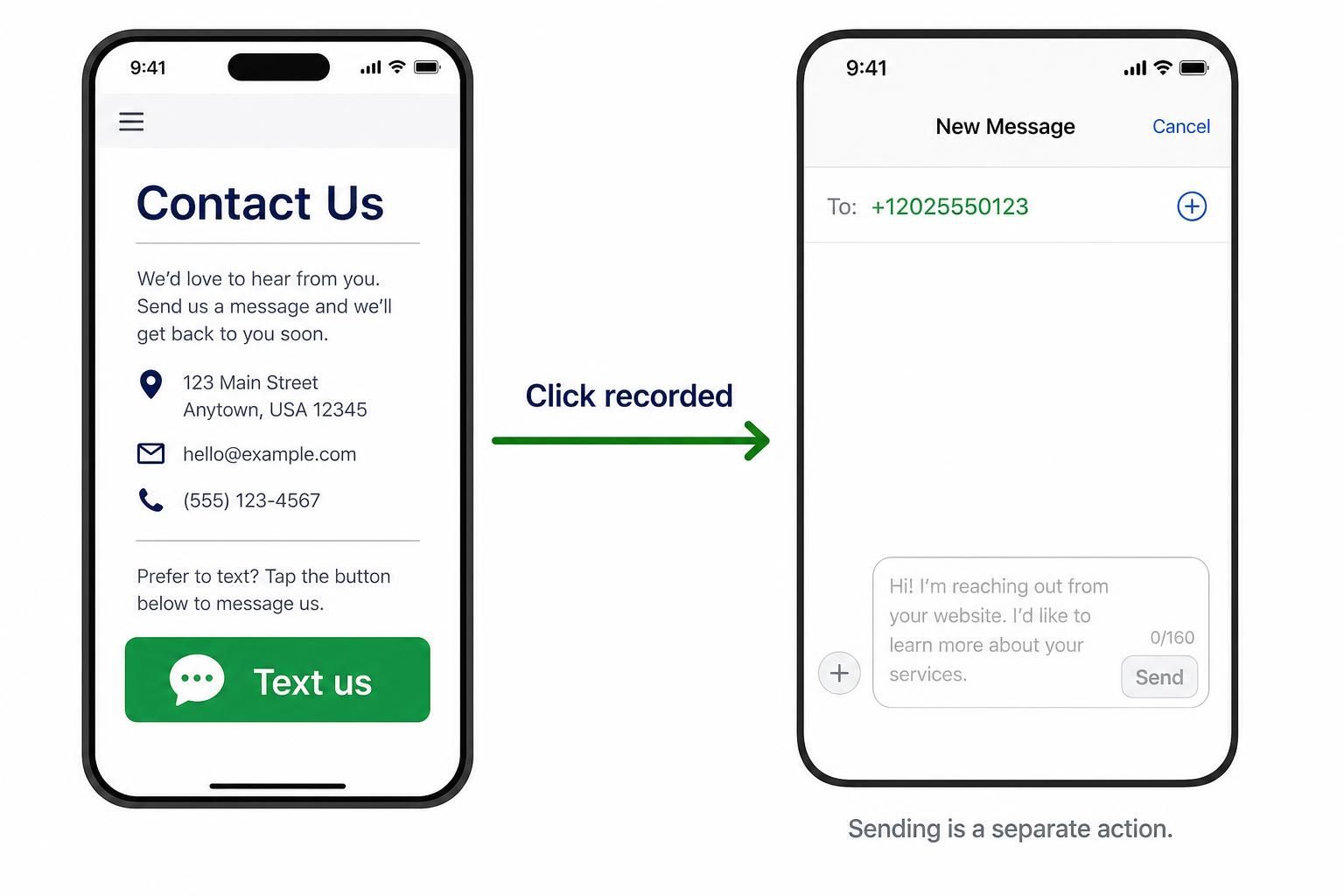
To track SMS link clicks in WordPress, configure a click event for links beginning with sms:. This records someone pressing your Text us button, not a message being sent. Google Tag Manager and GA4 can measure that action without changing how visitors open their messaging app.
Can you see if someone clicked an SMS link?
You can record clicks on an SMS link on your website. A basic link looks like <a href="sms:+12025550123">Text us</a>; replace the example number with your business number, including its country code.
That differs from tracking a website link inside a text message. If you send customers an HTTPS link by SMS, campaign parameters and website analytics measure their visits. The method here measures visitors leaving your WordPress page to compose a text.
A recorded click proves link activation, not that the visitor sent anything. The SMS URI standard requires user confirmation before sending. Your website cannot infer delivery, reading, or a completed enquiry from that click.
Who clicked the SMS button on your website?
Analytics can show where the click happened, but it does not reveal the sender’s identity. A useful event answers which page and button generated interest, rather than promising to identify the person behind it.
With Google Tag Manager already installed on WordPress and your Google tag configured, open Variables and enable the built-in Click URL and Click ID variables. Create a Click – Just Links trigger, choose Some Link Clicks, and set the condition to Click URL starts with sms:. Google documents these controls in its link-click trigger instructions.
Create a Google Analytics: GA4 Event tag using your existing Google tag configuration. Set its event name to sms_click and attach that trigger. This is a custom event name you choose, not a built-in SMS report.
For placement context, give the link a stable HTML ID, such as header_sms, and send Click ID as an event parameter named sms_placement. Register that parameter as an event-scoped custom dimension if you want it available in GA4 reporting. GA4 normally collects page location with events; check it during testing.
Do not rely on automatic outbound-click measurement to cover application links. Also avoid sending the complete SMS URL or message body: Google prohibits sending personally identifiable information to Analytics.
For the WhatsApp equivalent, follow How to Track WhatsApp Clicks on WordPress rather than applying the SMS trigger unchanged.
Read more WhatsApp tracking guides
Explore the companion guides if your contact page also offers WhatsApp.
Tag the pre-filled message with a reference code
A reference code can connect an incoming text to a website placement. For example, sms:+12025550123?body=Website%20enquiry%20REF-HOME uses the SMS standard’s optional body parameter to request a pre-filled message.
The %20 sequences represent spaces. Keep the code neutral and readable, such as REF-HOME, so staff can recognise it in a received message without needing an analytics report.
Treat this as supporting evidence, not guaranteed attribution. Visitors can change or delete the text, and someone can reuse a code later. A placement code identifies the intended source, not a unique visitor.
Body-prefill support is device-dependent. Apple’s archived SMS-link documentation specifies a number-only format, so do not assume the example will populate text everywhere. If prefilling fails on your audience’s devices, retain a working number-only link and use the click event for website measurement.
How to check that your SMS link works
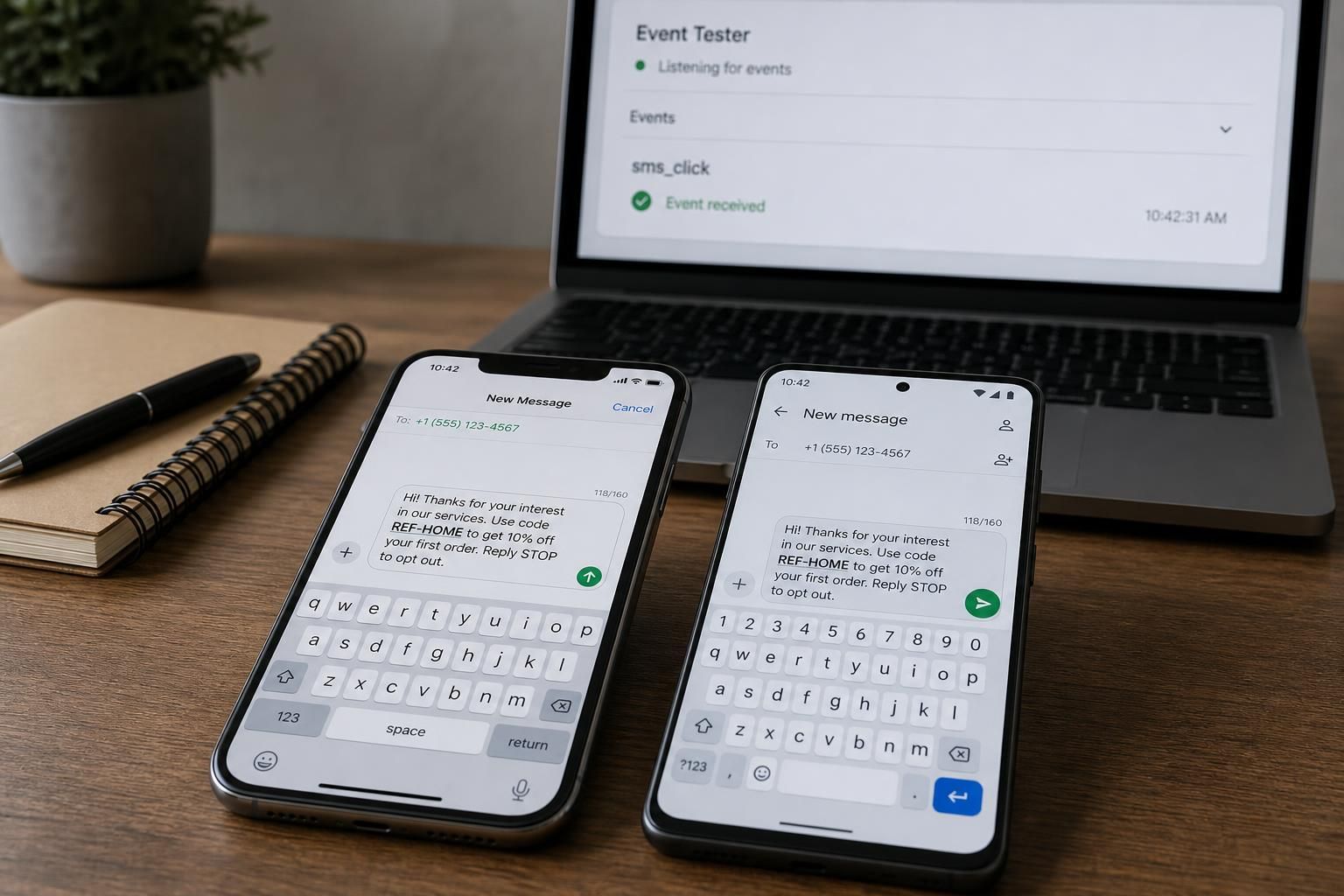
Test the link and the measurement separately. Open the published WordPress page on an actual iPhone and Android phone where available. Tap the button and confirm that a compatible messaging app opens with the correct recipient. Check the optional body independently; desktop behaviour is not sufficient evidence of mobile compatibility.
Connect Tag Assistant Preview to the page, activate the SMS link, and confirm that the intended trigger fires the GA4 event tag. Check that the placement value identifies the button you used.
Look for sms_click in GA4 DebugView or Realtime. Return to the browser after the messaging app opens if necessary. Check that one activation does not fire duplicate tags, and repeat the test for footer, header, and other SMS links.
Run a cancellation test: open the composer, then leave without sending. The click can still appear in analytics. That is expected, and demonstrates why the event should be labelled “SMS button click,” not “SMS sent.” Publish the container after validation, then check the live page.
Getting this log in WordPress
The setup above produces a GA4 event report, not a click log inside WordPress. A local log requires an implementation that explicitly recognises sms: links. Support for tel: call tracking does not establish SMS support.
For SMS-specific logging, ask a developer to capture the link activation and save only the context you need, with suitable permissions and retention controls. If you are comparing local logging with analytics, Track Link Clicks in WordPress Without Google Analytics explains that distinction.
For a separate WhatsApp button, our free WhatsLink Click Tracker provides WhatsApp click tracking. That makes it useful alongside SMS measurement; SMS support is not established by its documented features.
Track WhatsApp clicks free with WhatsLink
Use the free WordPress log for the WhatsApp side of your contact page.
If you run ads, keep contact intent separate from confirmed enquiries. WhatsLink PRO lets you send WhatsApp clicks to your ads and your team. Those remain click records, not proof of a conversation.
Send WhatsApp clicks to your ads and your team with WhatsLink PRO
Send WhatsApp clicks to your ads and your team with WhatsLink PRO.