
On this page
- Get Google Analytics Tracking ID for WordPress
- Get Google Analytics Tracking ID for Your WordPress Plugin
- Which Google Analytics ID does your plugin need?
- Get Google Analytics tracking ID from your Web stream
- How to check that your Analytics tracking works
- Using the Measurement ID in WordPress
- FAQ
- Official sources
Get Google Analytics Tracking ID for WordPress
Get Google Analytics Tracking ID for Your WordPress Plugin
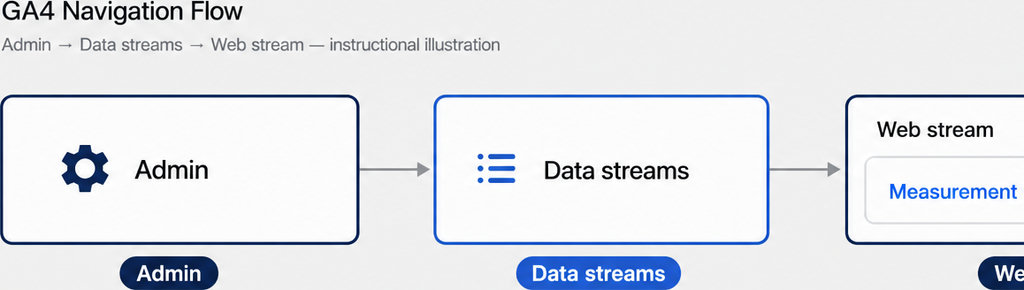
To get Google Analytics tracking ID for a GA4-compatible WordPress plugin, open Google Analytics, select your property, then go to Admin → Data streams. Open your website’s Web stream and copy the Measurement ID beginning with G-. Paste the complete identifier into the plugin’s designated field and save.
“Tracking ID” is older terminology that still appears in plugin settings and tutorials. Current website tracking uses Google Analytics 4, or GA4. Its Measurement ID identifies a website data stream; copying it does not automatically install tracking or configure WhatsApp click events.
Which Google Analytics ID does your plugin need?
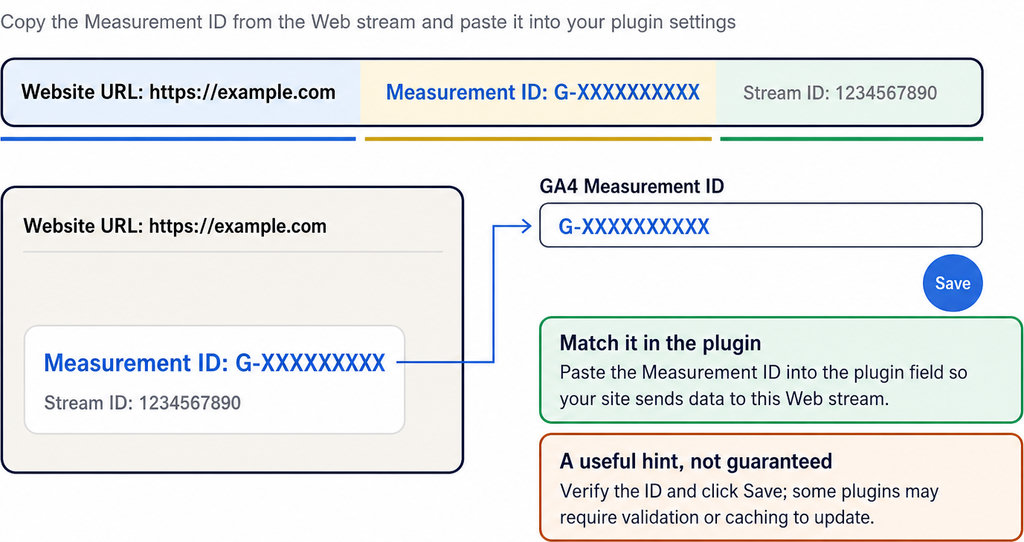
A plugin asking for a GA4 Measurement ID normally expects a value such as G-XXXXXXXXXX. Do not substitute the numeric Stream ID, Analytics property number, or a Google Ads identifier. Match the stream’s website URL to the WordPress site you are configuring, especially when your account contains several properties.
An old UA- tracking ID belongs to Universal Analytics, which no longer processes new data. Google’s current setup does not use the old “Tracking Info → Tracking Code” route. If a plugin only accepts UA-, check its documentation for GA4 support rather than trying to convert your identifier.
Some plugins connect through Google-account authorization instead of asking you to paste an ID. Follow the plugin’s documented setup method; there is no universal WordPress Analytics settings screen.
For the distinction between website clicks and activity inside WhatsApp, read WhatsApp Analytics: Chat Stats and Website Click Tracking.
Get Google Analytics tracking ID from your Web stream
Sign in to Google Analytics with the account that manages your website. Select the correct property, open Admin, then select Data streams under Data collection and modification. Open the Web stream for your domain and copy the full Measurement ID, including G-. Google’s ID-finding instructions specify Editor access or higher.
If no stream exists and Analytics displays “Choose a platform,” select Web, enter your website URL and stream name, and create the stream. New users must first create an Analytics account and property. If an existing stream seems missing, check your selected Google account, property, and permissions before creating another one.
How to check that your Analytics tracking works
- Check Realtime. After completing the plugin’s setup, visit the live website and open Realtime in the same Analytics property. Activity typically appears within minutes; standard reports can take 24–48 hours to process.
- Test a WhatsApp button separately. A recorded page visit does not prove that a click event is configured.
- Investigate missing activity. Check the saved ID, clear relevant page caches, and inspect consent settings and browser blockers. Use Tag Assistant to investigate tag loading, or DebugView for events from a debug-enabled session.
- Verify the intended property. Analytics verification checks whether your website sends data to the intended property. Test with any required consent granted.
Follow Track WhatsApp Button Clicks in Google Tag Manager (GA4) when implementing that specific event through GTM. A WhatsApp click log records the website interaction. It does not establish that the visitor sent a message or became a customer. For page-level investigation, WhatsLink’s free version records each click’s page, UTM parameters and referrer. Use Click to Chat Analytics: See WhatsApp Clicks by Page to understand that view.
Using the Measurement ID in WordPress
Paste the identifier into your plugin’s documented GA4 field, save, and check whether the plugin installs the Google tag or relies on an existing installation. Tools such as Site Kit can connect through your Google account instead. Do not assume a WhatsApp plugin installs Analytics merely because it offers event tracking.
Check your theme, tag manager and existing plugins before enabling another tag implementation. Duplicate tracking can inflate measurements. For advertising workflows, WhatsLink PRO sends clicks to Google Ads, the Meta Pixel and GA4 as conversions, supports CSV exports, and emails every click. It does not connect directly to a CRM. For paid campaigns, send WhatsApp click conversions to your advertising tools and keep your team informed by email. Send WhatsApp clicks to your ads and your team with WhatsLink PRO
Browse related explanations of WhatsApp click measurement before choosing your setup
- The page and post type where the click happened
- The WhatsApp, Telegram or phone link clicked, with its pre-filled text
- UTM source, medium and campaign of that page
- The referrer and the date and time
- No IP address, location or device
FAQ
Is the Measurement ID a secret?
The Measurement ID appears in client-side tracking code and is not a password. Never confuse it with private credentials such as a Measurement Protocol API secret.
Does creating a Web stream install tracking?
No. Your website still needs a working tag implementation, whether provided by a plugin, your theme or Google Tag Manager.
Can I use the same ID throughout my website?
Use the website’s intended Measurement ID beginning with G- consistently across its pages. Do not copy an ID from another property simply because you can access it.
Does GA4 prove someone messaged me on WhatsApp?
No. A website click event measures the click, not a sent message. Qualifying outbound clicks may be captured by enhanced measurement, but completed conversations require separate evidence.