
On this page
- Google Ads WhatsApp Clicks: Compare Campaign Results
- Separate button clicks from verified chats
- What Google Ads WhatsApp clicks actually measure
- Website buttons and message assets need different reporting
- Ad → website → WhatsApp
- Ad → messaging route
- Connect paid visits to an existing WhatsApp event
- Find WhatsApp clicks by campaign in GA4 and Google Ads
- Choose the right conversion column
- Understand “One” versus “Every”
- Record page, UTM parameters, and referrer for click context
- Compare campaign cost without confusing clicks with leads
- Use the pattern to choose the next action
- Troubleshoot missing conversions and mismatched totals
- Move from click tracking to verified lead outcomes
- Frequently Asked Questions
- Can Google Ads track WhatsApp clicks?
- How do I see which Google Ads campaign generated a WhatsApp click?
- Why do I have WhatsApp conversions but no messages?
- How do I track a WhatsApp button click with Google Tag Manager?
- Which Google Ads campaign type brings the best WhatsApp leads?
- FAQ
Google Ads WhatsApp Clicks: Compare Campaign Results
Connect the paid visit to a tracked WhatsApp-button action, then compare that conversion with campaign spend. Use separately verified messages, qualified inquiries, and sales to judge whether inexpensive clicks become worthwhile conversations.
Separate button clicks from verified chats
Need to send website clicks to your advertising reports? WhatsLink PRO sends WhatsApp-click conversions to Google Ads, the Meta Pixel, and GA4.
To compare Google Ads WhatsApp clicks by campaign, you need to connect the advertising visit to a recorded WhatsApp-button interaction, then report that specific action alongside campaign spend. That tells you which campaigns generate contact attempts—not necessarily which ones produce received messages, qualified inquiries, or sales.
The useful question is therefore two-part: which campaigns make people click WhatsApp, and which of those clicks become worthwhile conversations? The first answer comes from click tracking and advertising reports. The second requires evidence beyond the website button.
What Google Ads WhatsApp clicks actually measure
A Google Ads click and a WhatsApp click are different events. The first records an interaction with your advertisement. In the website journey, the second happens later, when someone clicks a link or button intended to open WhatsApp.
A conversion is an action you choose to measure in Google Ads. Naming that action “WhatsApp conversation” does not make it a verified conversation: if its trigger is a website button click, its evidence stops at that click.
| Funnel stage | What it establishes | What it does not establish |
|---|---|---|
| Ad click | Someone interacted with the advertisement | The website loaded successfully |
| Website visit | A visit reached the site and was measured | The visitor wanted to contact you |
| WhatsApp click | Someone clicked a tracked WhatsApp link or button | A message was sent |
| Received message | An inquiry reached your WhatsApp inbox | The inquiry fits your business |
| Qualified inquiry | The contact meets your qualification criteria | A purchase occurred |
| Sale | A transaction was confirmed | Every earlier stage was correctly attributed |
This distinction matters when allocating budget. A campaign can generate inexpensive button taps while attracting people outside your service area, people seeking something you do not sell, or visitors who open WhatsApp and leave without sending anything.
Use “WhatsApp click” for a website-button conversion. Use “received conversation,” “qualified inquiry,” or “sale” only when you have separately verified that outcome. Clear labels prevent a click report from becoming an inflated lead report.
Website buttons and message assets need different reporting
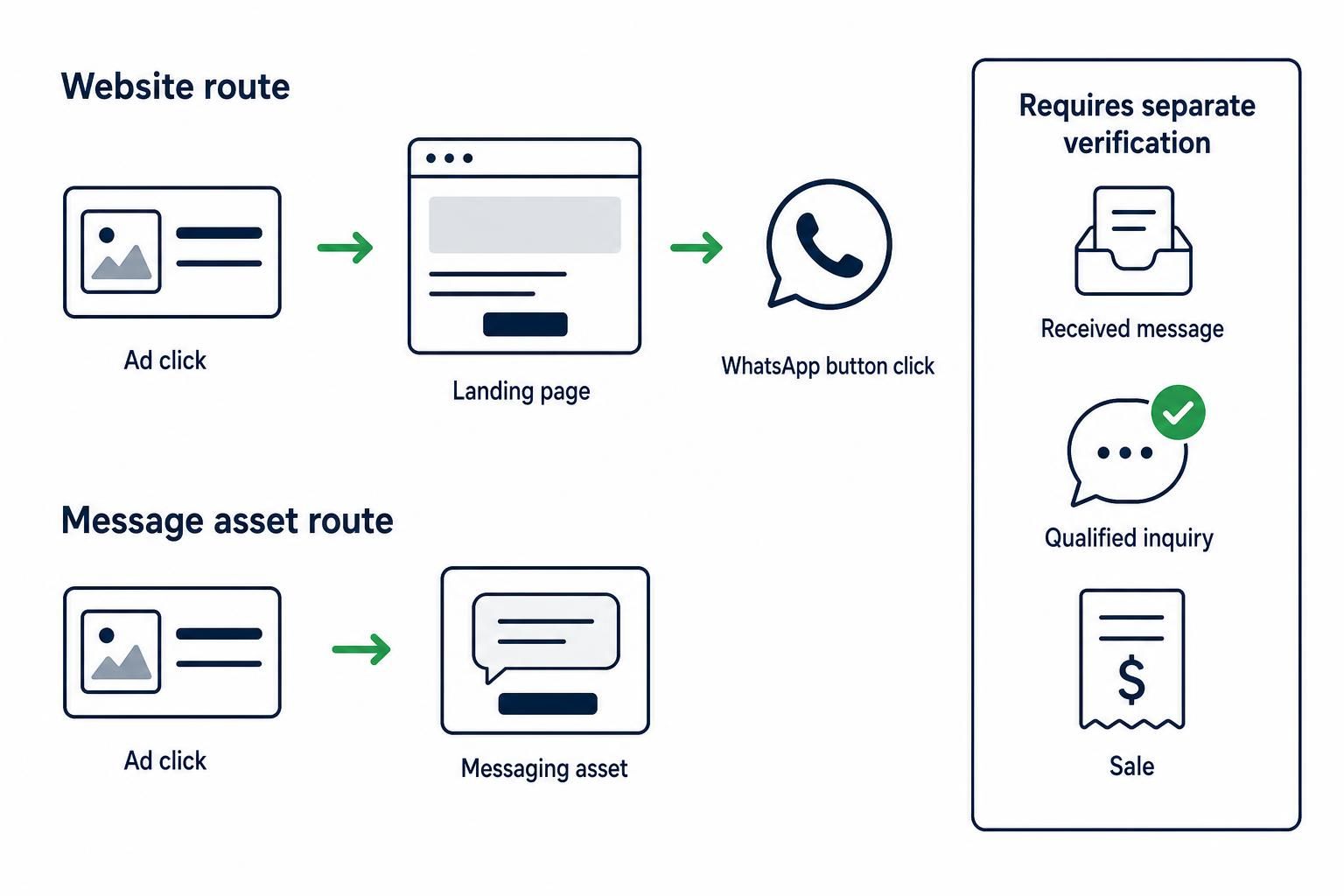
Before checking tags or conversion settings, ask: does the person visit your website before opening WhatsApp? A website event can measure a button on that website. It cannot measure an interaction that bypasses the site entirely.
Google documents message assets for eligible Search and Performance Max campaigns. With these assets, a headline click can lead to the website while the messaging button takes a different route. Access and serving depend on eligibility, verification, policy, country, and device conditions; do not assume that every account can use them.
Ad → website → WhatsApp
The visitor lands on your site and then clicks your WhatsApp button.
Measure the website interaction, connect it to the advertising visit, and compare the resulting conversion across campaigns.
Ad → messaging route
The visitor uses an eligible message asset rather than your website button.
Review the asset’s configuration and reporting in Google Ads. A website-only WhatsApp event does not cover this skipped website interaction.
Check Google’s message-asset documentation for current availability before planning a direct-to-WhatsApp campaign. Google also provides separate guidance for message-asset reporting; do not assume those metrics have the same definition as your website conversion.
If you use both routes, keep them distinguishable in your reporting. Combining website-button conversions and messaging-asset results under a single unlabeled “chats” total hides where each measurement came from.
Connect paid visits to an existing WhatsApp event
For the website route, the measurement chain has three jobs: identify the paid visit, record the WhatsApp interaction, and make that action available in campaign reporting. Google Analytics 4, or GA4, can connect these pieces when its Google Ads integration and event setup are working.
If you have not recorded the button interaction yet, use How to Track WhatsApp Clicks in Google Analytics 4 (3 Ways). That guide covers the implementation choices, including Google Tag Manager; the campaign analysis here starts after a test click produces the intended event.
- Check Google Ads auto-tagging. Auto-tagging adds a Google Click ID, or GCLID, to eligible ad-click URLs.
- Confirm that the landing journey preserves attribution information. Redirects and URL handling should not strip the identifiers your measurement relies on.
- Verify the Google Ads–GA4 account link. Make sure you are examining the linked property and advertising account.
- Test the WhatsApp event on the actual landing pages. Include relevant mobile buttons, floating buttons, and widgets.
- Identify the reporting action. Know which GA4 key event or Google Ads conversion action represents the WhatsApp click.
UTM parameters provide readable campaign labels, such as utm_source=google, utm_medium=cpc, and utm_campaign=service_search. They are useful for manually labeled reporting, but they are not a replacement for the complete Google Ads integration. When auto-tagging and manual tagging are both present, GA4 prioritizes auto-tagging for Google Ads traffic attribution.
A GCLID identifies an advertising click; it does not identify a WhatsApp conversation. Passing a visitor from your website to WhatsApp does not automatically attach the later message to that identifier in your reports.
Read more WhatsApp tracking guides
Explore the other guides to understand click detection, attribution, and the limits of website-based measurement.
Find WhatsApp clicks by campaign in GA4 and Google Ads
Use different reports for different questions. A session acquisition report describes the visits a campaign brought to your website. An attributed key-event report assigns credit for measured outcomes according to its reporting scope and attribution rules.
In GA4, the Google Ads acquisition report provides session-scoped advertising dimensions. The Google Ads campaigns performance report in Advertising connects advertising metrics such as clicks and cost with selected key events. Select the WhatsApp key event explicitly rather than treating a total containing purchases, forms, and other actions as WhatsApp results.
| Reporting view | Main question it answers | What to check |
|---|---|---|
| GA4 Google Ads acquisition report | Which campaigns brought the sessions being analyzed? | Session campaign and available ad-group, network, keyword, or query dimensions |
| GA4 Google Ads campaigns performance report | Which campaigns receive credit for the selected key event? | WhatsApp key-event selection, advertising cost, and attribution scope |
| Google Ads campaign report | Which campaigns generated the configured conversion action? | Conversion action, campaign goals, counting settings, and reporting columns |
| WhatsApp inbox or lead records | Which messages arrived and became useful inquiries? | A separate, reliable process for connecting leads to their source |
A practical review starts with one date range, the intended campaigns, and a WhatsApp-only outcome. In Google Ads, segment results by conversion action where needed so that form submissions or purchases do not get mistaken for WhatsApp clicks.
Do not expect the acquisition view and attributed performance view to give identical campaign totals. They answer different questions. A campaign associated with the visit is not always the same campaign receiving conversion credit under the selected attribution approach.
Choose the right conversion column
A GA4 key event does not automatically become a bidding target in Google Ads. You must create or import the relevant conversion action and review its optimization setting and campaign goals.
Analytics-based conversion actions created through Analytics are secondary by default. Check the resulting setting in Google Ads instead of assuming that an action appearing in Analytics is already driving campaign optimization.
- Primary actions appear in the “Conversions” column and are used for bidding when the relevant standard goal is selected by the campaign.
- Secondary actions normally appear in “All conversions” and are used for observation rather than bidding.
- Custom goals are an exception: a secondary action included in a custom goal can be used for bidding.
For implementation details, follow How to Track WhatsApp Button Clicks with Google Tag Manager. Keep this reporting review focused on what the configured action represents and whether it should influence spending.
Understand “One” versus “Every”
For a lead-style action, the “One” counting setting can be appropriate when repeated conversions after the same ad interaction should not all count as additional leads. “Every” counts each eligible conversion under that action’s counting rules.
Neither option identifies unique WhatsApp contacts. In particular, “One” does not mean one verified person, one phone number, or one received conversation.
Record page, UTM parameters, and referrer for click context
Campaign reports explain advertising performance, but click-level context helps investigate what visitors actually did on the site. The page where someone clicked can reveal whether contact attempts came from a service page, a pricing page, or a broad introductory landing page.
The free WhatsLink Click Tracker records the page, UTM parameters, and referrer of each click. Those records help you inspect the context around a WhatsApp-button interaction. They do not, by themselves, verify that a message arrived or provide a complete Google Ads attribution model.
| Recorded detail | Useful question | Limitation |
|---|---|---|
| Page | Which page was the visitor on when they clicked? | The page alone does not identify the acquisition campaign |
| UTM parameters | Which manual campaign labels accompanied the visit? | Missing or inconsistent labels weaken interpretation |
| Referrer | What referring information was available? | Referrers can be absent or limited |
| Click record | Was a WhatsApp interaction recorded? | It does not prove that the person sent a message |
For example, if a campaign’s tagged visits generate clicks mainly on an unrelated service page, review the landing-page journey and message match. That is a useful diagnostic finding even before you can connect individual messages to campaigns.
Keep campaign labels non-sensitive. Do not put customer names, personal phone numbers, or private message content into campaign URLs or ordinary Analytics event parameters. Google’s guidance on avoiding personally identifiable information applies to what you send into Analytics.
Track WhatsApp clicks free with WhatsLink
Record the page, UTM parameters, and referrer of each click to inspect the context behind website contact attempts.
Compare campaign cost without confusing clicks with leads
For Google Ads WhatsApp clicks, the first useful cost metric is straightforward: campaign spend divided by the corresponding attributed WhatsApp-click conversions. Label it “cost per tracked WhatsApp click,” not “cost per conversation.”
Use the same date range, conversion definition, and reporting basis for each campaign. If one row uses raw website events and another uses attributed Google Ads conversions, their costs are not directly comparable.
| Campaign | Spend | Attributed WhatsApp clicks | Cost per tracked click | Verified received conversations | Verified qualified inquiries |
|---|---|---|---|---|---|
| Campaign name | Enter spend | Enter selected conversion total | Spend ÷ tracked clicks | Enter only if verified | Enter only if verified |
| Campaign name | Enter spend | Enter selected conversion total | Spend ÷ tracked clicks | Enter only if verified | Enter only if verified |
| Campaign name | Enter spend | Enter selected conversion total | Spend ÷ tracked clicks | Enter only if verified | Enter only if verified |
Leave unavailable downstream outcomes blank or mark them “not measured.” A zero means you measured the outcome and found none; it should not stand in for missing tracking. If there are no tracked clicks, cost per tracked click is undefined rather than zero.
No campaign type is automatically the winner. Search, Performance Max, and other campaigns reaching your website can differ in audience, intent, placement, and landing-page experience. Your selected outcome—not the campaign label—must determine the comparison.
Use the pattern to choose the next action
- Spend but few WhatsApp clicks: inspect traffic relevance, landing-page clarity, and button visibility before assuming that the tracking tool is the problem.
- Many clicks but few received messages: test the handoff to WhatsApp, check the destination number, and examine whether the invitation sets accurate expectations.
- Received messages but poor qualification: review targeting, search terms where available, service-area wording, and offer clarity.
- Qualified inquiries but few sales: investigate pricing, availability, follow-up, and the sales process.
A low click cost is useful only within the stage it measures. It can justify further investigation, but it cannot establish that the campaign brings better customers.
For a deeper review of page-level patterns and lead interpretation, use WhatsApp Chat Link Analysis: Track Click-to-Chat Leads From Your Website. Use those findings alongside advertising costs rather than replacing the campaign comparison with a sitewide click total.
Troubleshoot missing conversions and mismatched totals
Google Ads clicks, GA4 sessions, WhatsApp events, attributed conversions, and received messages count different things. Differences between those totals are not automatically evidence of broken tracking.
Investigate the first point where the expected measurement disappears. If the website event is missing, inspect detection. If the event appears in GA4 but not in the Google Ads column you are viewing, inspect the conversion setup and reporting settings before installing another tag.
| Symptom | Check first |
|---|---|
| Test clicks do not produce the website event | Button or widget coverage, trigger conditions, consent behavior, and tag execution |
| GA4 records clicks but Google Ads shows none | Account linking, conversion creation, processing time, and the selected date range |
| “All conversions” has results but “Conversions” does not | Primary versus secondary status and campaign goal selection |
| Events appear without expected campaign information | Auto-tagging, redirects, account linking, consent effects, and dimension availability |
| One button click produces multiple events | Overlapping plugin, GTM, or direct-tag implementations |
| Reported conversions exceed received messages | Repeated clicks, abandonment before sending, duplicate measurement, and the click-versus-message distinction |
Date handling can also explain discrepancies. Standard Google Ads conversion reporting generally associates a conversion with the ad interaction date, while other views may report by conversion time. Attribution models, conversion windows, counting settings, and processing can further affect comparisons.
Avoid fixing uncertainty by adding a second copy of the same conversion. If a direct Google Ads tag and an imported GA4 action both measure the same button interaction, counting both as primary can make one contact attempt look like two outcomes.
Choose one clearly defined bidding signal for a given WhatsApp-button interaction. If you retain another measurement route for validation, keep its purpose and optimization settings separate, and review any custom goals that could still use it for bidding.
Move from click tracking to verified lead outcomes
To identify which campaigns actually bring worthwhile chats, you need a way to connect received inquiries to their advertising source. A browser event alone does not supply that connection. Recording a GCLID on the website does not automatically match a later WhatsApp message to it.
Google supports importing later lead outcomes when the required identifiers, conversion details, and matching process are available. Keep later stages in separate conversion actions—for example, a qualified inquiry and a sale—rather than renaming the original button click as a completed lead.
- Define what qualifies an inquiry: service fit, location, purchase intent, or another explicit criterion.
- Establish a reliable, privacy-appropriate process for matching the received inquiry to its source.
- Record qualification or sales outcomes in your lead records.
- Import supported outcomes only when the necessary matching data and configuration are in place.
- Decide which verified action should guide bidding once measurement is dependable.
A WhatsApp click tracking tool should therefore be evaluated by capability, not by a promise of “complete attribution.” Click detection, campaign-context recording, conversion delivery, and received-conversation matching are different functions.
WhatsLink PRO sends WhatsApp clicks to Google Ads, the Meta Pixel, and GA4 as conversions, exports click records as CSV, and emails every click. Those features help distribute and review website interaction data. They do not verify that a message was sent, automatically match a conversation to a GCLID, or connect directly to a CRM.
Send WhatsApp clicks to your ads and your team with WhatsLink PRO
Send click conversions to Google Ads, the Meta Pixel, and GA4, export records as CSV, and receive an email for every click. Keep verified conversations and qualified leads as separate outcomes.
Frequently Asked Questions
Can Google Ads track WhatsApp clicks?
Yes. For a website journey, a recorded WhatsApp-button interaction can be measured as a Google Ads conversion through an appropriate conversion setup. Eligible message assets provide a separate messaging route with their own reporting. Neither route should be assumed to verify a qualified conversation merely because a click occurred.
How do I see which Google Ads campaign generated a WhatsApp click?
Record the website interaction, maintain the advertising attribution setup, and select the WhatsApp-specific key event or conversion action in campaign reporting. In GA4, distinguish session acquisition from attributed key-event performance. In Google Ads, check the conversion-action breakdown and whether the action appears under “Conversions” or “All conversions.”
Why do I have WhatsApp conversions but no messages?
A website conversion can fire when someone clicks the WhatsApp button and then leaves without sending a message. An incorrect destination, a confusing handoff, repeated taps, or duplicate tracking can also contribute. Test the complete journey on the devices your visitors use before interpreting the count as received inquiries.
How do I track a WhatsApp button click with Google Tag Manager?
Use a suitable link-click trigger or a supported widget event, depending on how the button is implemented, and verify that it fires once for the intended interaction. The linked GA4 setup guide covers the implementation methods. GTM measures the website interaction; it does not observe whether a person subsequently sends a message inside WhatsApp.
Which Google Ads campaign type brings the best WhatsApp leads?
There is no universal winner. Compare consistently measured WhatsApp-click costs first, then use separately verified qualified inquiries and sales to judge lead quality. A campaign with cheaper button clicks may still produce fewer useful conversations.
Review WhatsApp clicks with WhatsLink PRO
- The page where the WhatsApp button was clicked
- UTM campaign parameters, when present
- Available referrer information
- Click conversions sent to Google Ads, the Meta Pixel, and GA4 (PRO)
- CSV export and an email for every click (PRO)
- Received messages and qualified leads require separate verification
FAQ
Can Google Ads track WhatsApp clicks?
Yes. A website WhatsApp-button interaction can be measured through an appropriate Google Ads conversion setup. Eligible message assets use a separate messaging route and reporting.
How do I see which Google Ads campaign generated a WhatsApp click?
Record the website interaction, maintain advertising attribution, and select the WhatsApp-specific key event or conversion action in campaign reports. Check conversion-action breakdowns and the relevant conversion column.
Why do I have WhatsApp conversions but no messages?
A button click can be recorded even if the visitor never sends a message. Incorrect destinations, confusing handoffs, repeated taps, and duplicate tracking can also contribute.
How do I track a WhatsApp button click with Google Tag Manager?
Use a suitable link-click trigger or supported widget event and verify that it fires once per intended interaction. GTM measures the website click, not whether a message is later sent inside WhatsApp.