
On this page
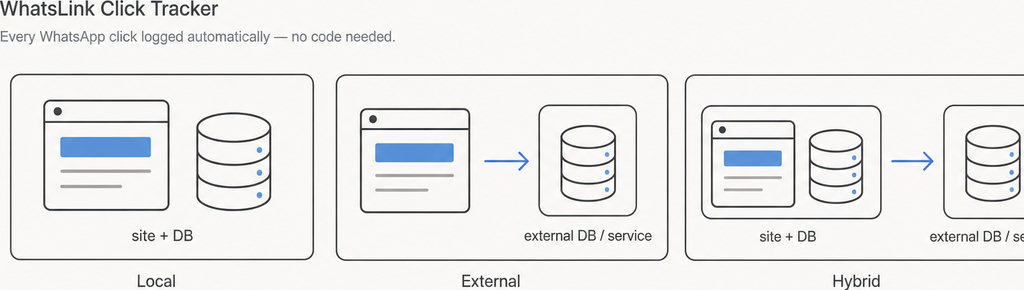
The practical difference in WordPress plugin local data storage vs cloud is where your records live and what you need to access them. Local records belong to your website’s hosting environment; external records live in a separate service.
A plugin can also combine both, so “installed in WordPress” does not mean “everything stays on your website.”
WordPress Plugin Data Storage: Local vs Cloud
Local storage usually means the WordPress database, although plugins can also write files.
WordPress plugins can use different storage arrangements:
- Local records: Settings may use WordPress options, while growing collections of submissions or activity records may use metadata or custom tables. WordPress documents these approaches in its plugin database guidance. Local does not mean your laptop, and your hosting itself may run on cloud infrastructure.
- External and hybrid records: An external service receives or holds data outside that website environment, typically through an account or API. A hybrid plugin might save a record locally and send an event to an analytics platform.
Compare the complete journey of the data, not just the location of the first saved copy.
Who Can Access Your WordPress Plugin Data?
With local records, dashboard permissions determine who can use the plugin’s screens. Do not assume that everyone who can edit a page can view submissions, or that hiding a menu prevents all access. Ask which WordPress roles can view, export and delete records.
There is also hosting access. People with database credentials, server access or backup access may be able to read data without opening the plugin. An agency managing client websites should establish who keeps those credentials and what happens when the maintenance agreement ends.
- Service accounts: External storage adds a separate set of accounts and permissions.
- Individual access: Check whether staff need individual accounts and whether access can be revoked.
- Connection dependency: Check whether losing the connection prevents collection, reporting or both.
Neither model automatically guarantees privacy.
- Storage and transmission are separate questions: Email notifications, analytics scripts and off-site backups can create additional copies.
- Review every destination: WordPress’s plugin privacy guidance explicitly asks developers to consider these destinations alongside database storage.
For practical examples of what a website click can reveal—and what it cannot—continue with the WhatsApp tracking guides. Read more WhatsApp tracking guides
Use a Reference Code to Trace a Test Record
Create one harmless test record with a unique reference, such as:
Put it in a supported form field or another documented input that the plugin records. This is a testing technique, not a feature every plugin provides.
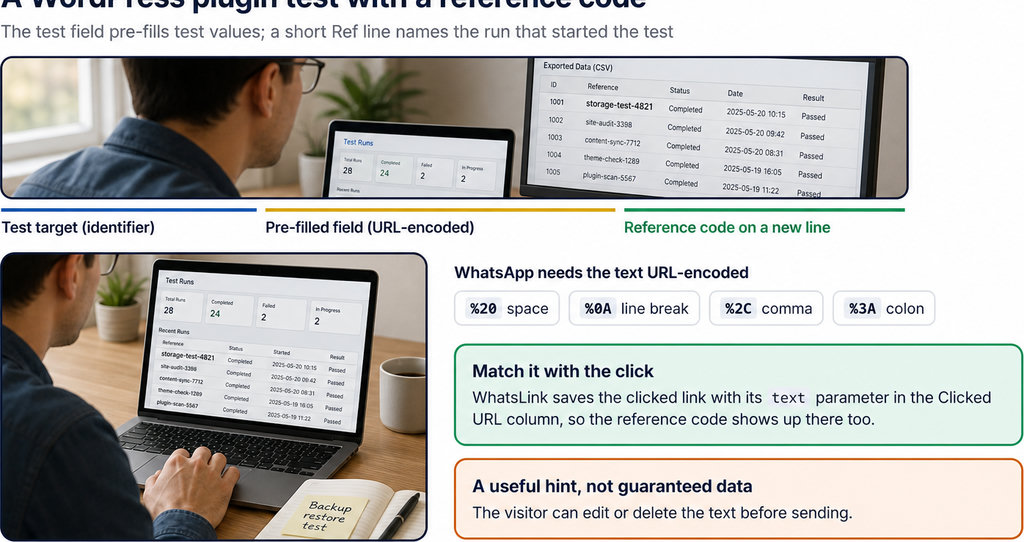
- Use dummy data, not a real customer’s phone number or message. Look for the reference in the plugin’s dashboard, its export and any connected service. If database inspection is necessary, ask your developer to identify the relevant tables rather than editing unfamiliar records yourself.
- Distinguish event context from a conversation. For click tracking, a record of the page, UTM parameters and referrer helps explain where a click came from; it does not establish that someone sent a WhatsApp message. Referrer information may also be unavailable, so a missing value is not necessarily a storage failure.
- Record the context of each click. For this specific job, free WhatsLink tracks WhatsApp clicks. Check which context is available during your test. Track WhatsApp clicks free with WhatsLink
Finding the reference proves that a destination received that record. It does not prove that no other copies exist.
How to Check Where Your Plugin Stores Data
- Begin with the documentation. Review the plugin documentation, privacy information and integration settings. Look for named external services, what they receive and when transfers happen. If the description only says “secure storage,” ask whether that means your WordPress database, the vendor’s infrastructure or both.
- Follow your test record through collection, display, export and deletion. Check the export format: can you open it independently, and does it include the fields you would need to move elsewhere? An export is useful for portability, but it is not necessarily a restorable backup.
- Test recovery on a staging site. WordPress files and database records require appropriate backup coverage; copying the plugin folder alone will not preserve its database entries. The official WordPress backup guidance explains why both database and file backups matter. Verify that your backup includes the relevant tables and uploaded files.
- Ask about failure behaviour before relying on the plugin. If an external service is unavailable, does collection stop, queue locally or continue without reporting? For local storage, ask how records are limited or cleared as they accumulate. Do not simulate outages on a live customer-facing site.
Choosing Data Storage for Your WordPress Plugin
Choose local storage when keeping records within your hosting and managing recovery yourself fits your workflow. Account for database growth, backups and maintenance rather than treating local storage as free or automatically faster. Choose an external service when its capabilities justify the additional dependency. Check usage limits, account permissions, export availability and what remains accessible after cancellation. A hybrid arrangement needs both sets of checks.
Compare total operating cost, not just the plugin price. A renewal may pay for updates and support rather than storage; a service subscription may include usage-based charges. Neither pricing model tells you where records live. Finally, confirm exit terms. Deactivation and uninstalling are different events, and a plugin may retain or remove records when deleted. Ask separately how external copies, backups and emailed records are handled. Your purchase decision should include how you leave, not only how you start.
Running ads as well as recording clicks?
- WhatsLink PRO sends WhatsApp clicks to your ads and your team.
- Those destinations also belong in your data-access and retention review.