
On this page
To log WordPress errors without displaying them on your website, enable WP_DEBUG and WP_DEBUG_LOG, then set WP_DEBUG_DISPLAY to false. WordPress can then write diagnostic messages to a server-side text file instead of printing them on customer-facing pages.
Logging and display are separate controls: enabling a log does not automatically hide errors. These settings also do not repair broken code. A failed checkout can still fail even when its technical message is hidden. Use staging first whenever you can reproduce the problem there. For an issue that happens only on your public site, keep debugging temporary, back up the configuration, and protect the resulting file. Hidden messages do not mean a private log: its URL may still be accessible unless your server blocks access.
What Can Your WordPress Error Log Tell You?
A WordPress error log can record PHP warnings, notices, deprecated-code messages, and fatal errors. Entries often contain a timestamp, a file path, and a line number, helping you identify which code was running when something went wrong.
Start with the action that failed. Note the time, reproduce it once, and inspect entries around that moment. A warning mentioning a plugin is evidence to investigate, not proof that the plugin caused the customer’s problem. Old warnings may be unrelated.
- The log is not a visitor activity report. It will not automatically tell you which marketing campaign generated a contact or who clicked a WhatsApp button. Those questions need click tracking rather than PHP error logging.
- Keep two kinds of evidence separate if your investigation concerns a WhatsApp contact button: the error log helps diagnose execution problems; click records help establish whether the button was used.
Investigating a WhatsApp contact button? For the click-tracking side of the investigation, use the separate guides rather than treating debug.log as an analytics report. Read more WhatsApp tracking guides
Configure WordPress to Log Errors Without Displaying Them
Download a backup of wp-config.php before editing it through your hosting file manager or SFTP. This file is normally in the main WordPress directory. If file editing is unfamiliar, ask your host to apply the settings.
Find existing definitions of these constants and update them rather than adding duplicates. Put the following four lines before the comment that says to stop editing, with each statement on its own line:
define( 'WP_DEBUG', true );define( 'WP_DEBUG_LOG', true );define( 'WP_DEBUG_DISPLAY', false );@ini_set( 'display_errors', 0 );
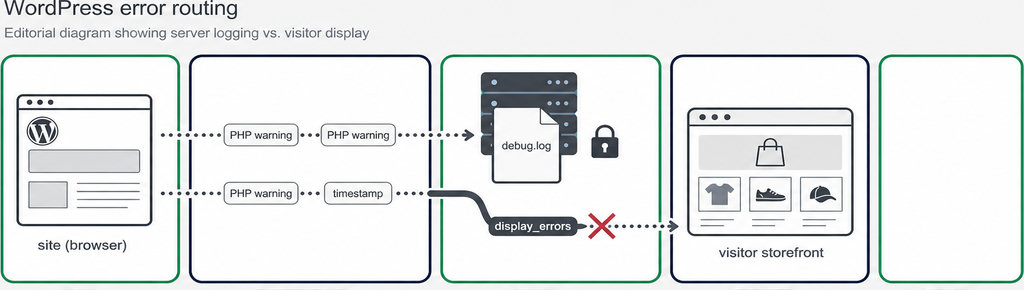
WP_DEBUG enables WordPress debugging. WP_DEBUG_LOG sends messages to the log, while WP_DEBUG_DISPLAY disables their display. The final line also requests that PHP turn off displayed errors at runtime. The WordPress debugging documentation explains these settings and their dependencies.
- Use unquoted Boolean values:
false, not'false'. A quoted value is a string and can produce the opposite behavior from what you intended. SettingWP_DEBUGtofalsealso disables WordPress’s debug logging mechanism, even ifWP_DEBUG_LOGremains enabled. - The default destination is
wp-content/debug.log, although installations with a relocated content directory differ. WordPress also accepts an absolute file path as the value ofWP_DEBUG_LOG. Ask your host about a writable location outside the public web directory, or server rules that deny web access to the default file.
How to Check That Error Logging Works Without Public Messages
Reproduce the original problem, then inspect the log for fresh entries. Also visit the affected page while logged out, preferably in a private browser window. Check the actual failing action, not just the homepage.
A missing or empty debug.log does not necessarily mean the setup failed. The file may appear only after a PHP message is generated. If nothing is recorded, check the configured path and whether PHP has permission to write there; avoid solving permissions problems by granting everyone write access.
- If technical messages still appear, ask your host to check PHP-level settings, including
display_errorsanddisplay_startup_errors. Failures before WordPress loads may bypass its configuration. - For ongoing production monitoring, the host can configure
log_errorsanderror_logindependently of WordPress debugging, following PHP’s error configuration controls. - Do not deliberately crash a live site to test logging. If the symptom is a missing WhatsApp contact, a recorded click is separate evidence: it helps establish whether the button was used, not whether PHP encountered an error.
Need click evidence alongside your troubleshooting? WhatsLink provides WhatsApp click tracking. Click records complement error logs; they do not replace them. Track WhatsApp clicks free with WhatsLink
Read the Log in WordPress with Quick debug.log Viewer
- Quick debug.log Viewer is a practical option once logging works if you want to inspect the file without repeatedly opening your hosting account. Install and activate it, then open Tools → Quick debug.log Viewer. Check compatibility information and test it on staging before adding it to a client site.
- Inspect recorded messages. The plugin’s directory listing documents searching, severity filters, downloading, clearing, and chunked loading. These help you inspect recorded messages; the viewer does not fix errors or replace logging configuration. It can read an existing accessible log even when debugging is off.
For dashboard access details, follow How to View WordPress debug.log Without FTP. If the file keeps growing, WordPress debug.log: Location, Size, and How to Clear It explains the next maintenance task.
After diagnosis, disable temporary debugging, retain only necessary evidence, and remove or protect the remaining log. Downloads can contain sensitive paths or request data, so share only relevant, redacted excerpts.
Running ads that send visitors to WhatsApp? For campaign measurement—not PHP diagnosis—WhatsLink PRO sends WhatsApp clicks to your ads and your team. Send WhatsApp clicks to your ads and your team with WhatsLink PRO
What WhatsLink records for each click
- The page and post type where the click happened
- The WhatsApp, Telegram or phone link clicked, with its pre-filled text
- UTM source, medium and campaign of that page
- The referrer and the date and time
- No IP address, location or device