
On this page
Test Whether WooCommerce Checkout Blocks Save Custom Fields
If you also measure WhatsApp enquiries, apply the same distinction: a recorded click proves an interaction, not a completed conversation or an order containing your custom field.
To test whether a checkout field plugin saves custom fields in WooCommerce Checkout Block orders, place a test order with a recognizable value, then reopen that exact order and retrieve it. A visible field is not proof of saving. Neither is a value that reappears when you refresh checkout: it could come from temporary browser state or the customer’s profile.
Treat display, submission and permanent storage as separate checkpoints. Your delivery instruction or gift message must reach the server, remain attached to the right order and be accessible to whoever needs it. An email or export introduces another checkpoint: displaying the saved information outside the order screen.
Which Order Received Your Custom Checkout Field?
Record the order number shown after checkout and open that order in WooCommerce administration. Compare its field value with what you entered, rather than checking the newest order and assuming it belongs to your test.
Check the order record and keep evidence tied to that transaction:
- A customer profile is not a substitute for the order record. A returning customer may have saved details from an earlier purchase; finding your value there does not establish that this purchase retained it. Native additional fields also distinguish billing and shipping values, so inspect the correct address when your field belongs to an address section.
- Keep your evidence tied to one transaction: the submitted value, checkout screenshot and resulting order number. For a separate WhatsApp attribution test, recording the page, UTM parameters and referrer helps identify where a click originated, but those records cannot verify checkout-field storage.
Record WhatsApp click context separately
Keep WhatsApp click tracking separate from evidence that an order field was saved.
Track WhatsApp clicks free with WhatsLink
Enter a Unique Reference Value in the Field
Use a harmless unique marker, such as BLOCK-TEST-A17, instead of a common value like “test.” A distinctive marker makes stale defaults and values from earlier orders easier to spot. Respect the field’s validation: an email field needs a valid test email address, not an arbitrary reference.
Record the field’s state and the information support will need:
- Dropdown: Record the selected option.
- Checkbox: Record the checked or unchecked state and test both separately. An unchecked checkbox may legitimately be represented differently from a text field, so ask the plugin developer what result to expect.
- Field identifier: Note it alongside the marker, if available, and record the field’s label. Labels can change or be duplicated; the internal identifier gives support a more precise reference.
- Versions: Record the plugin version and WooCommerce version.
- Expected result: Record where staff should find the value and whether it must appear in emails or exports.
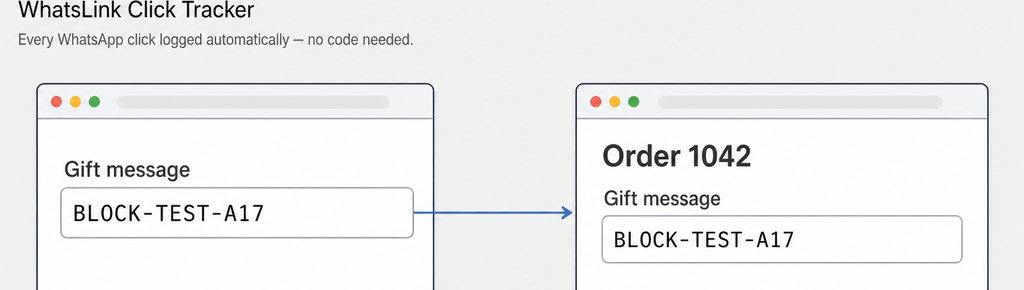
How to Test the Complete Checkout-to-Order Journey
First confirm that the actual checkout page uses the Checkout block, not the classic checkout shortcode. Open the page editor and inspect List View; WooCommerce documents the Checkout block’s structure and settings. Testing a classic checkout does not demonstrate block compatibility.
Use staging and sandbox payments. Check connected fulfillment services, emails and analytics before submitting anything: WooCommerce’s testing guidance warns that test orders can still trigger normal integrations. A payment sandbox alone does not isolate those systems.
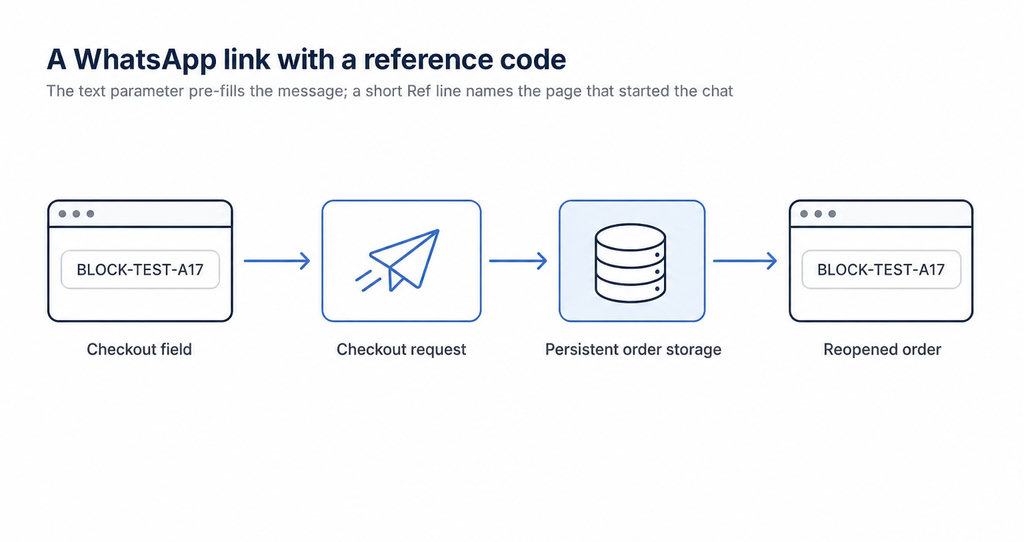
- Retrieve the saved value. Enter your marker, complete checkout and open the resulting order. Then navigate away and reopen the order in a fresh administrative request. Compare the retrieved value with your original entry. A field still visible in the checkout browser is weaker evidence than a value retrieved from the saved order.
- Repeat with different checkout conditions. Test guest and signed-in customers where your store supports both. Test different billing and shipping addresses if relevant. Trigger a required-field error, correct it and finish checkout to check that validation does not discard the value. Give each resulting order a different marker.
- Inspect transmission if needed. If the value disappears, a developer can inspect the checkout request. Native additional fields may travel in
additional_fields; custom integrations can use extension data. Request data proves transmission, not successful saving. Avoid sharing full request captures publicly because they can contain customer information.
Getting Reliable Field Records in WordPress
- Verify storage before display. If the value is missing from the order screen, ask support to verify storage first. A plugin may save information without showing it in that particular panel. For native additional fields, WooCommerce provides retrieval helpers and field-location rules. Other extensions should document their storage key and supported retrieval method.
- Check HPOS compatibility separately. Do not treat an empty
wp_postmetasearch as conclusive. HPOS compatibility concerns order storage, while Checkout block compatibility concerns checkout integration; neither guarantees the other. Request evidence for both under your configuration. - Check emails and exports separately after confirming storage. Before buying or replacing an extension, give its developer your field type, placement, validation requirements and reproduction steps.
- Define an acceptance test. A convincing acceptance test retrieves the right value from the right order after reopening it, then verifies every destination your staff actually use.
Advertising attribution remains a separate task: sending a WhatsApp click to an advertising platform does not prove purchase completion or custom-field persistence.
For stores running WhatsApp campaigns
Keep WhatsApp advertising attribution separate from checkout-field verification.
Send WhatsApp clicks to your ads and your team with WhatsLink PRO
What WhatsLink records for each click
- The page and post type where the click happened
- The WhatsApp, Telegram or phone link clicked, with its pre-filled text
- UTM source, medium and campaign of that page
- The referrer and the date and time
- No IP address, location or device