
What a WordPress throughput check really tells you
If you’ve ever wondered how many internal REST API requests per second your WordPress installation can handle, this guide explains it clearly. Throughput Check runs a controlled internal benchmark so you can estimate PHP execution capacity without using external stress tools.
Why internal throughput matters
Before traffic spikes, product launches, or marketing campaigns, you need to understand your server’s baseline. Internal throughput gives you a clean snapshot of WordPress execution speed without noise from network latency or CDN behavior.
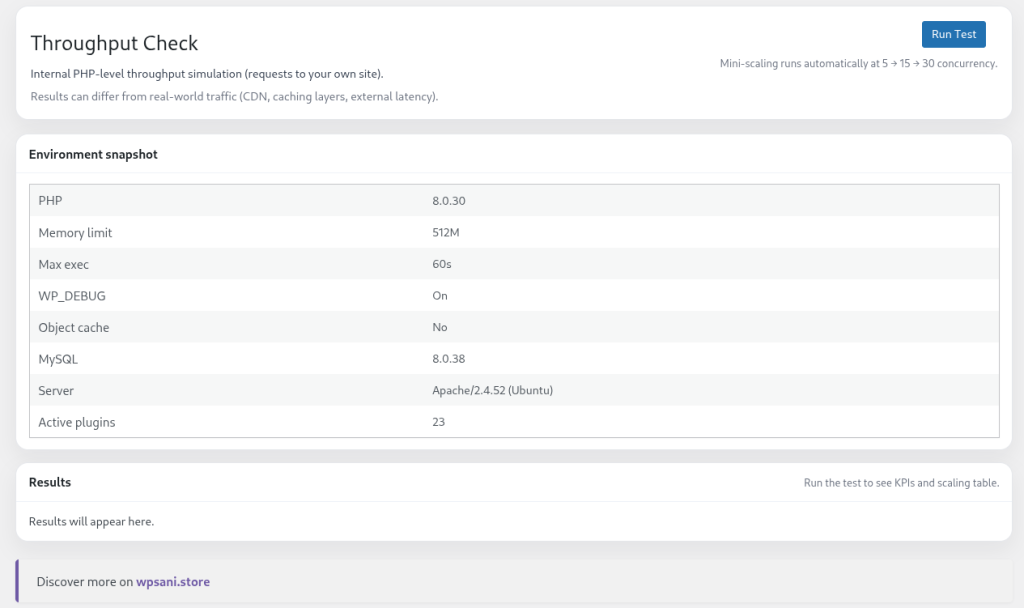
What is a WordPress Throughput Check?
A WordPress throughput check measures how many internal REST API requests per second your site can handle. Instead of simulating traffic from the outside, it benchmarks the internal PHP execution layer of your WordPress installation.
Throughput Check is a lightweight WordPress plugin designed specifically for this purpose. It runs controlled internal REST requests against your own environment and calculates performance metrics such as requests per second (req/s), p50 and p95 latency, and overall stability.
Why Internal Throughput Matters
Before a campaign launch, traffic spike, or infrastructure change, developers need a baseline. External stress testing tools often introduce network latency, CDN variables, and configuration overhead. That makes it harder to understand what your WordPress server can actually process at the PHP level.
An internal throughput test isolates WordPress execution itself. It answers a practical question: how many concurrent REST requests can this installation process safely?
- Measures internal REST API execution speed
- Estimates requests per second (req/s)
- Analyzes server response times (p50 / p95)
- Detects errors during concurrency scaling
- Provides a simple performance grade (A–D)
How Throughput Check Works
The plugin creates an internal REST endpoint and sends concurrent requests to it. Each request performs a small but realistic WordPress workload:
- Multiple
get_option()calls - A lightweight
WP_Query(5 published posts) - A cache set/get operation
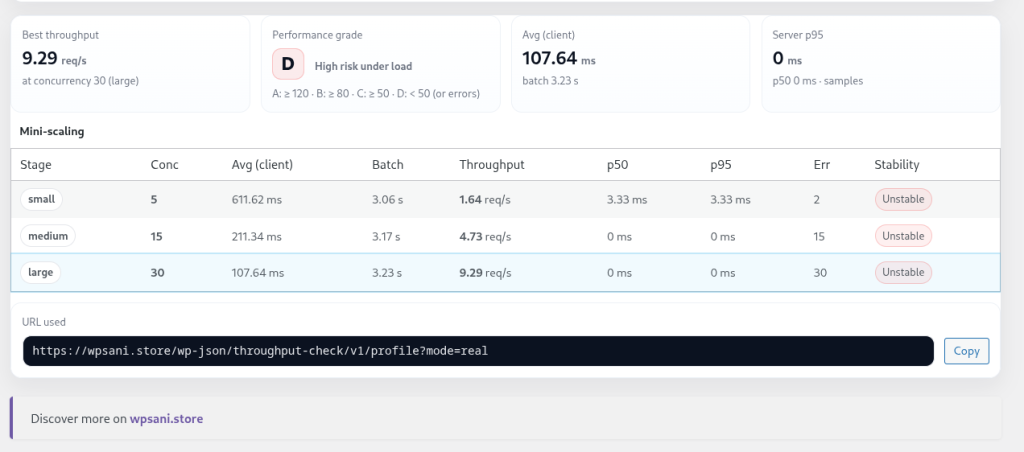
It then runs automatic mini-scaling at 5, 15, and 30 concurrent requests. For each stage, it calculates:
- Average client response time
- Batch duration
- Estimated requests per second
- Server p50 latency
- Server p95 latency
- Stability and error detection
This gives you a clean internal performance snapshot in seconds — without generating external traffic.
What This WordPress Plugin Is Not
Throughput Check is not a CDN benchmark, browser performance tool, or full external load testing suite. It does not simulate real-world internet traffic.
Instead, it focuses strictly on internal WordPress processing capacity. Results may differ from real-world scenarios affected by caching layers, reverse proxies, or network conditions.
Understanding the Performance Grade
The plugin assigns a simple performance grade based on estimated requests per second:
- A: ≥ 120 req/s
- B: ≥ 80 req/s
- C: ≥ 50 req/s
- D: < 50 req/s or errors detected
This grading system helps developers quickly interpret whether a hosting environment is suitable for heavier workloads or needs optimization.
Who Should Use a Throughput Check Plugin?
- WordPress developers benchmarking environments
- Agencies validating hosting performance
- Plugin authors comparing PHP execution capacity
- Site owners preparing for traffic spikes
- Technical teams analyzing REST API performance
If you want a fast, controlled, and safe way to measure internal WordPress throughput without external services, this plugin provides exactly that.
- Internal REST API throughput simulation
- Automatic mini-scaling (5 → 15 → 30 concurrent requests)
- Estimated requests per second (req/s)
- p50 and p95 response time metrics
- Stability check and error detection
- Environment snapshot (PHP, MySQL, memory, plugins)
- Clear A–D performance grading
FAQ
Does this generate real external traffic?
No. All requests are internal REST calls to your own WordPress installation. No external stress traffic is created.
Is this a full load test?
No. This is an internal throughput benchmark. It measures PHP and WordPress execution capacity, not CDN, browser or network performance.
Is it safe to run on a production site?
Yes. The mini-scaling is intentionally lightweight and limited to 5, 15 and 30 concurrent internal requests.
What does the performance grade mean?
Grades are calculated from estimated requests per second: A ≥ 120 req/s, B ≥ 80 req/s, C ≥ 50 req/s, D below 50 req/s or when errors are detected.
Does the plugin send any data externally?
No. All calculations and measurements are executed entirely inside your WordPress environment.