
When a simple dropdown is not enough
Basic dropdown menus are easy. The complexity starts when you need styling control, dynamic behavior, conditional logic, or performance optimization.
Advanced customization topics
If you're dealing with CSS conflicts, hover vs click behavior, or fully custom markup, you’ll want to go deeper. Below you’ll find dedicated guides that break those topics down step-by-step.
If you’re searching for WordPress dropdown list or WordPress dropdown menu, you’re probably trying to build one of three things: a submenu in your navigation, a select field inside a form, or a product variation dropdown in WooCommerce.
The problem is that most tutorials mix everything together. In this guide, we’ll show you exactly how dropdowns work in WordPress, when you need a plugin, when you don’t, and how to fix the most common CSS issues developers run into.
What is a dropdown in WordPress?
A dropdown is simply an element that reveals additional options when triggered (hover or click). In WordPress, dropdowns usually appear in:
- Navigation menus (parent → child pages)
- Forms (HTML
<select>fields) - WooCommerce product variations (size, color)
- Dynamic filters (categories, taxonomies)
The implementation depends entirely on which one you need. Let’s break them down properly.
1. How to create a dropdown menu in WordPress navigation
If you want a classic dropdown menu in your header, you don’t need a plugin. WordPress already supports submenus natively.
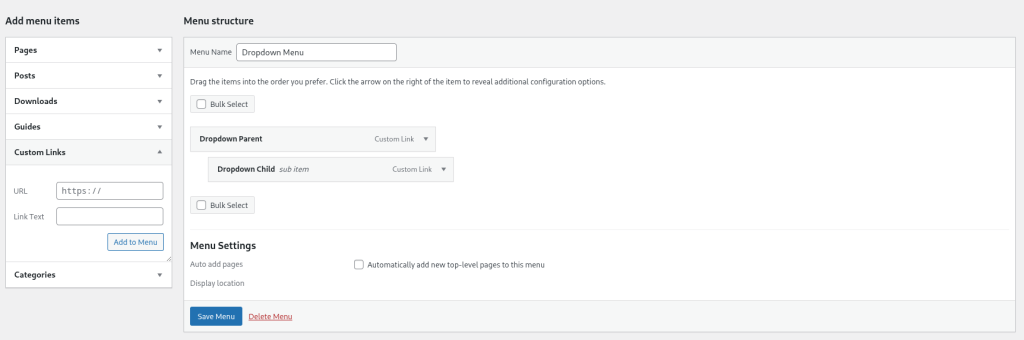
Classic themes (Appearance → Menus)
- Go to Appearance → Menus
- Create or select your menu
- Add menu items
- Drag one item slightly to the right under another item
- Save
That indentation creates a submenu (dropdown).
Block themes (Site Editor)
- Go to Appearance → Editor
- Edit your Header template
- Select the Navigation block
- Nest items inside a parent item
- Save
Developer tip: Many dropdown “not working” issues are theme-related, not WordPress-related. Always inspect with DevTools before blaming WordPress core.
2. How to create a dropdown list inside a form
If you’re trying to create a dropdown list in WordPress forms, you’re looking for a <select> field.
Using HTML (no plugin required)
<label for="service">Choose a service</label>
<select id="service" name="service" required>
  <option value="">Select one</option>
  <option value="web-design">Web Design</option>
  <option value="seo">SEO</option>
  <option value="maintenance">Maintenance</option>
</select>
This works in any theme and doesn’t require extra plugins.
Using a form plugin
Most form plugins include a Select field by default. For example in Contact Form 7:
[select* service "Web Design" "SEO" "Maintenance"]If you need conditional logic (show fields based on selection), then you’ll need a more advanced form plugin.
3. WooCommerce dropdown (product variations)
WooCommerce automatically generates dropdowns for variable products.
- Edit product
- Select Variable product
- Add attributes (Size, Color)
- Enable “Used for variations”
- Generate variations
If your WooCommerce dropdown is empty, 90% of the time it’s because variations weren’t properly created.
4. WordPress dropdown menu CSS (common fixes)
Dropdown menus often break because of CSS stacking or positioning issues. Here are typical fixes developers use.
Fix hidden dropdown (z-index issue)
.main-navigation ul ul {
  position: absolute;
  z-index: 9999;
}
Make dropdown open on click instead of hover
This requires JavaScript and depends on your theme structure. Most themes default to hover for desktop and click for mobile.
If you’re modifying this behavior, always check accessibility. Hover-only dropdowns are problematic for keyboard users.
Do you need a WordPress dropdown menu plugin?
In most cases, no.
You only need a dropdown plugin if:
- You need mega menus
- You need advanced animations
- You need dynamic data-driven dropdowns
- Your theme lacks submenu support
For basic dropdown lists and menus, WordPress core already handles everything efficiently.
FAQ
How do I create a dropdown list in WordPress without a plugin?
Use WordPress Navigation for menus or a simple HTML <select> for forms.
Why is my WordPress dropdown menu not working?
Check CSS conflicts, z-index, JavaScript errors, or caching/minification plugins first.
How do I create a submenu in WordPress?
Drag a menu item slightly to the right under a parent item in Appearance → Menus, then save.
- WordPress already supports submenus natively
- Most dropdown issues are CSS-related, not functional
- Many plugins slow down navigation rendering
- Accessibility is often broken by animation-heavy menus